34
4 - Problems, diagnostics and instructions about the station,
the keyboard and the dosing of the DA model.
4.1 – When turning the machine on, the leds on the
keyboard stay on/off, without performing the turning
on/off sequence.
Possible reasons:
a – Electric cable faulty.
b – Keyboard faulty.
c – Electronic station faulty.
Operations:
When the fault described at 4.1 occurs, replace and then check each component to
see if the problem has been solved.
Proceed as follows:
a – Replace the faulty electric cable.
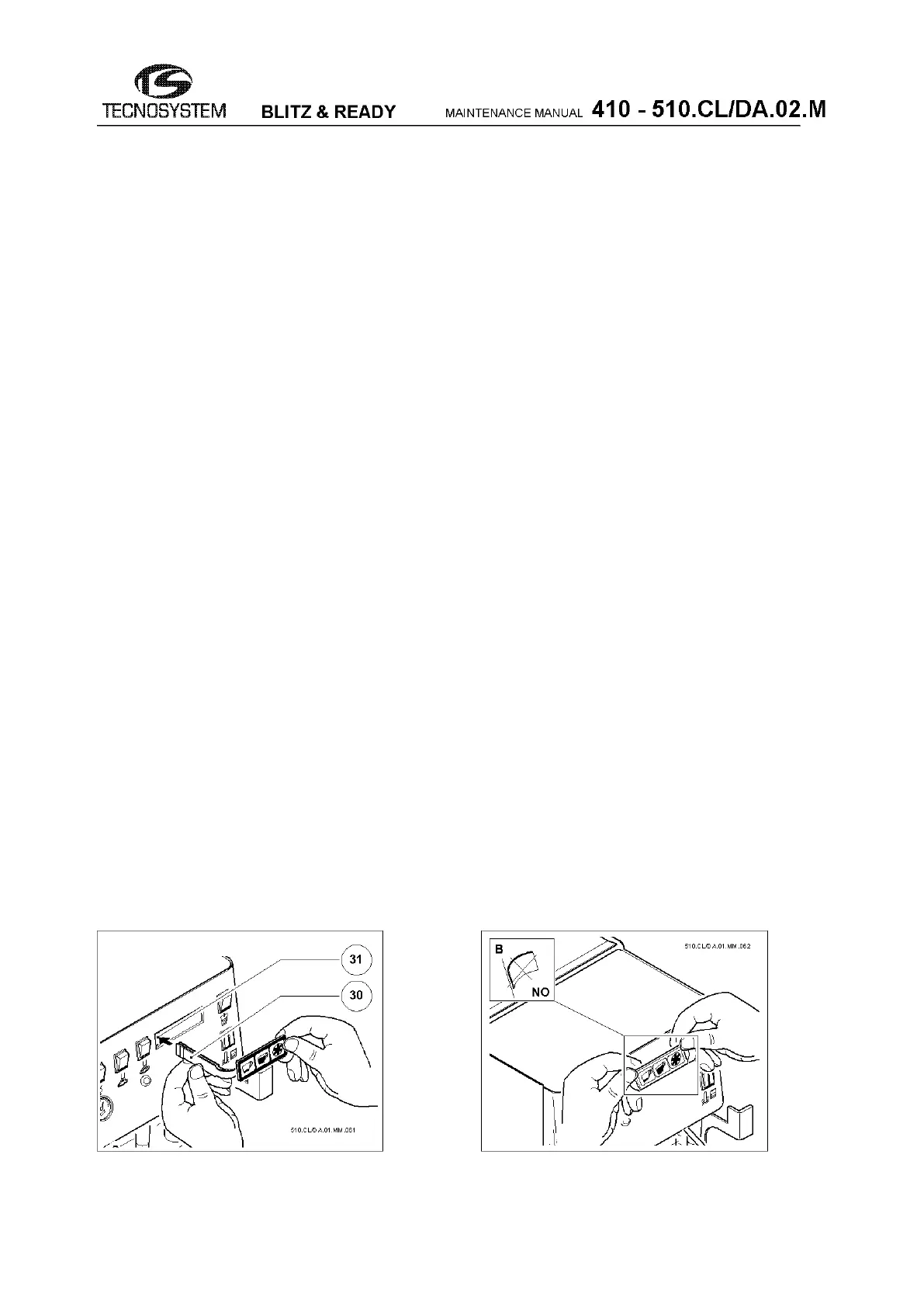
b – Replace the faulty keyboard (see fig.51-52 and note)
c – Replace the faulty electronic station.
b – Replace the faulty keyboard
In the DA version, the keyboard must be mounted as follows:
- Fit the two plugs on the flexible support (30) into their slot
(31) - see fig.51.
- Remove the protective paper film covering the adhesive
side.
- Apply the keyboard on the adhesive side, starting from the
top edge, and then go down from the top.
- Do not bend the keyboard for any reason, as in the
example b of fig.52, otherwise the keys will break or
come unglued.
fig.51 fig.52



 To Next Page