______________________________________________________________________________ STARGAS
OPERATING INSTRUCTIONS 29
1.0 - DESCRIPTION OF STARGAS
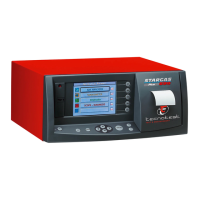
1.1 - Tool front view
1. Lens: Infrared rays conveying filter for the remote control receiver.
2. Memory card slot: To update and install new programs for the direct use of the
Autodiagnosis and for future functions.
3. STAND-BY key:
Slightly press the key to turn off the LCD display back-light
(sleep mode).
Press again to go back to the previously displayed function.
Hold down the key for more than 2 seconds to put the tool in the stand-by
mode.
Press the key again to reset and to take the tool back to the stand-by position
ready for the use. The function is indicated by the red colour of the key.
4. ESC key: To quit the various pages of the test measurement, enabling and
setting.
5. MENU key: To enable or disable the FUNCTIONS BAR display, or to scroll the
display of many FUNCTIONS BAR in a decreasing way (from the last to the first).
6. Cursor shift keys: Allow to shift selection to the four directions (low, up, right
and left).
7. ENTER key: To confirm key.
8. Contrast key: To decrease the contrast the LCD.
9. Contrast key: To increase the contrast the LCD.
10. FEED key: To feed the printer paper.
11. Printer: It prints the test results on a ticket.
12. F1, F2, F3, F4 and F5 keys: Press the keys when prompted on the display or to
enable the FUNCTIONS BAR icons.
13. Display LCD: Enables the operator to follow the test phases and to read
immediately the results.


 To Next Page