7
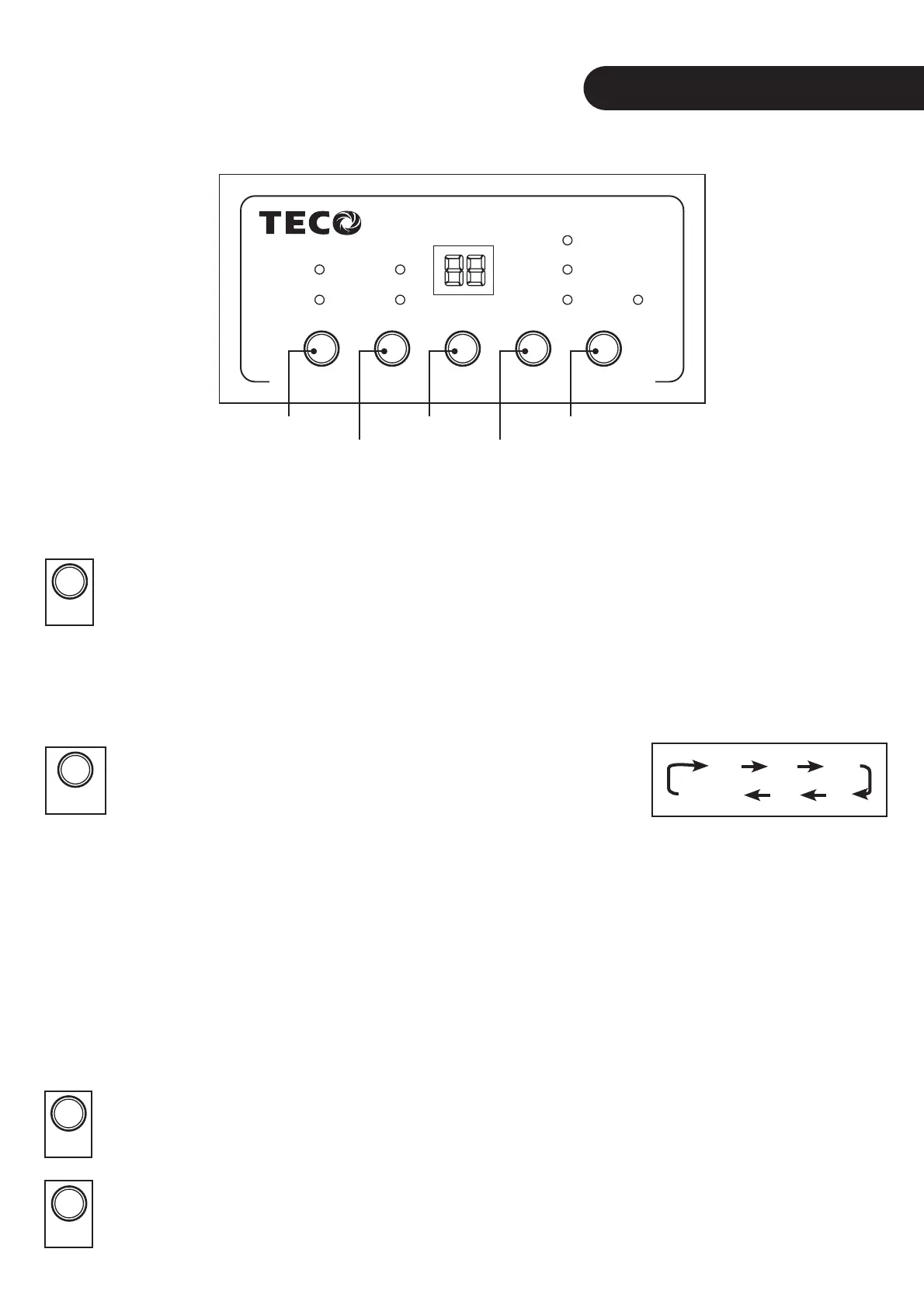
CONTROL PANEL
POWER HUMIDITY TIMER FAN SWING
FULL
DEFROST
TIMER
HUMIDITY
HI
LO
FAN ONLY
SWING
POWER HUMIDITY TIMER FAN SWING
FULL
DEFROST
TIMER
HUMIDITY
HI
LO
FAN ONLY
SWING
Fig. 5
Power (1)
Humidity (2)
Timer (3)
Fan (4)
Swing (5)
Control Panel Button Description
The POWER Button
Plug in the power cable and switch on the main power source.
The buzzer will sound and the current room relative humidity will be displayed.
Press the POWER (1) button and the dehumidi er will begin operating in the above mentioned default state.
When the dehumidi er is rst turned on, it defaults to continuous dehumidi ng, high fan speed and swing
louvre.
The HUMIDITY Button
Press the HUMIDITY (2) button to select a humidity level. Choose
from 80%, 70%, 60%, 50%, 40% or continuous.
The dehumidi er will operate until the room’s ambient relative humidity is below
the selected humidity level.
Once the dehumidi er reaches the selected humidity level, the compressor will stop and the fan will
continue circulating air. If the room’s humidity rises above the selected humidity level, the compressor will
automatically start to maintain the selected humidity level.
To set the dehumidi er into continuous mode, press the HUMIDITY (2) button until 40% is displayed.
Press the HUMIDITY (2) button again will activate the continuous mode. The dehumidi er will continuosly
dehumidify regardless of the humdity of the room.
The Power O TIMER Button
Press the TIMER (3) button to select a duration for operation. You can select between 1 to 12 hours.
The dehumidi er will automatically stop once the selected time has been reached.
The FAN Button
Press the FAN (4) button to select a fan speed. When in FAN ONLY mode, the dehumidi er will only
lter the air. It will not dehumidify.
80% 70% 60%
50%40%Continuous
POWERPOWER
HUMIDITYHUMIDITY
TIMERTIMER
FANFAN


 To Next Page