Installation
The unit should be mounted via its screw holes on the brack-
et. Always ensure that the unit is rmly xed to avoid vibra-
tion and slipping while operating. Always ensure that the
structure to which you are attaching the unit is secure and is
able to support a weight of 10 times of the unit’s weight. Also
always use a safety cable that can hold 12 times of the weight
of the unit when installing the xture.
The equipment must be xed by professionals. And it must
be xed at a place where is out of the touch of people and has
no one pass by or under it.
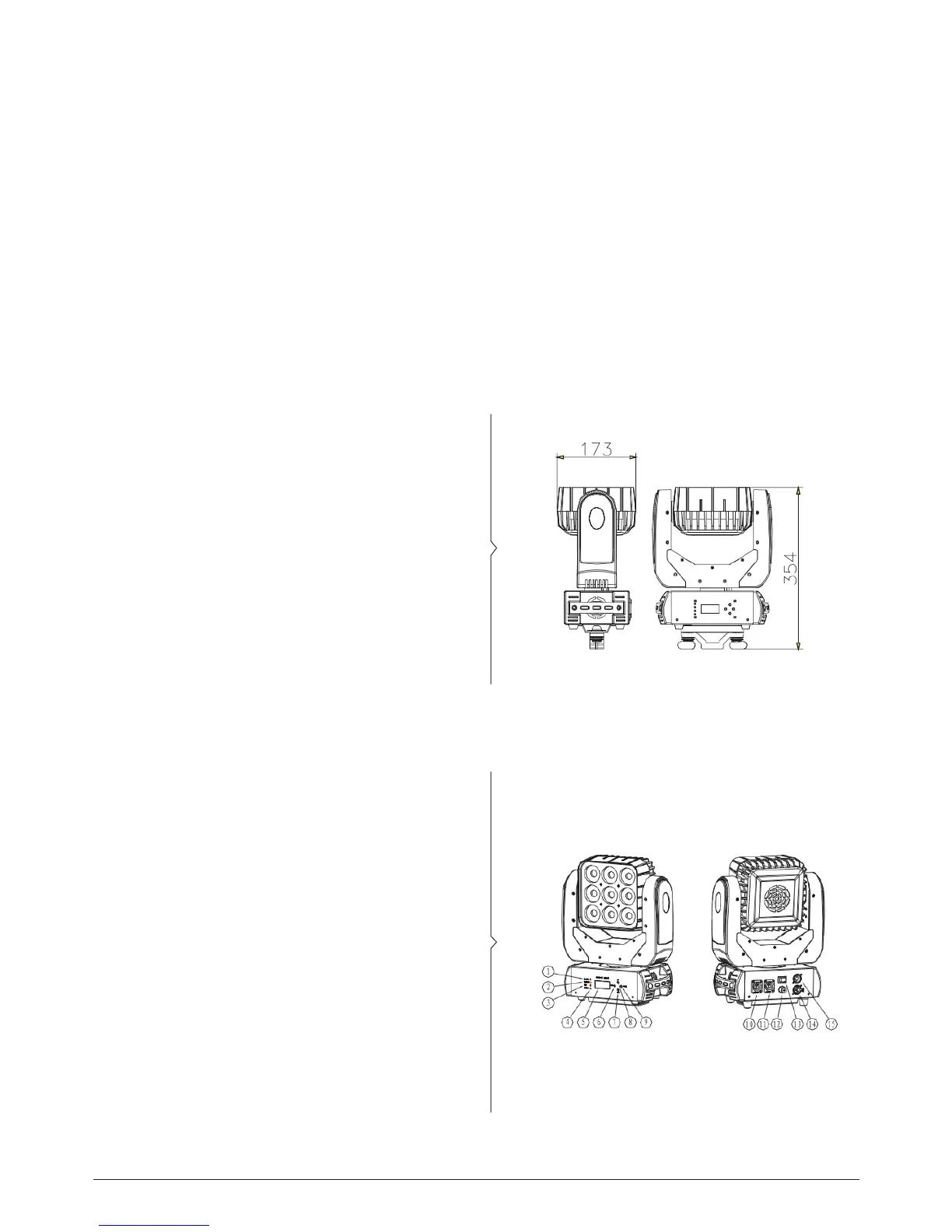
Technical Specications
• Three operational modes: DMX, Master/Slave and
Sound Active
• DMX Channel mode: 1/16/48 CH
• Three built-in programs. Control Master/Slave mode by
voice
• 0-100% smooth dimming function
• Suitable for disco, bar mobile Dj, etc.
• LEDs: 9 x 10W (RGBW)
• Net weight: 6.2 Kg.
• Dimensions: 26.5x14.9x38.9 Cm.
How to Set the Fixture
1. The light from the machine
2. The power indicator light
3. DMX signal lamp
4. The voice control lamp
5. LCD display
6. Menu button
7. Down button
8. Up button
9. Enter button
10. Power input socket
11. Power output socket
12. Safety rope
13. Power switch
14. DMX signal input
15.DMX signal output
RAZOR CUBE - LED MOVING HEAD MATRIX LIGHT
ENGLISH VERSION
p. 4



 To Next Page