Page 30
© Copyright 2008-2012 Energy, Inc. All rights reserved
For best results, it is best to turn off as many appliances
as possible prior to setting up Load Proles; be certain
that the electrical load of your home is stable, and not
uctuating.
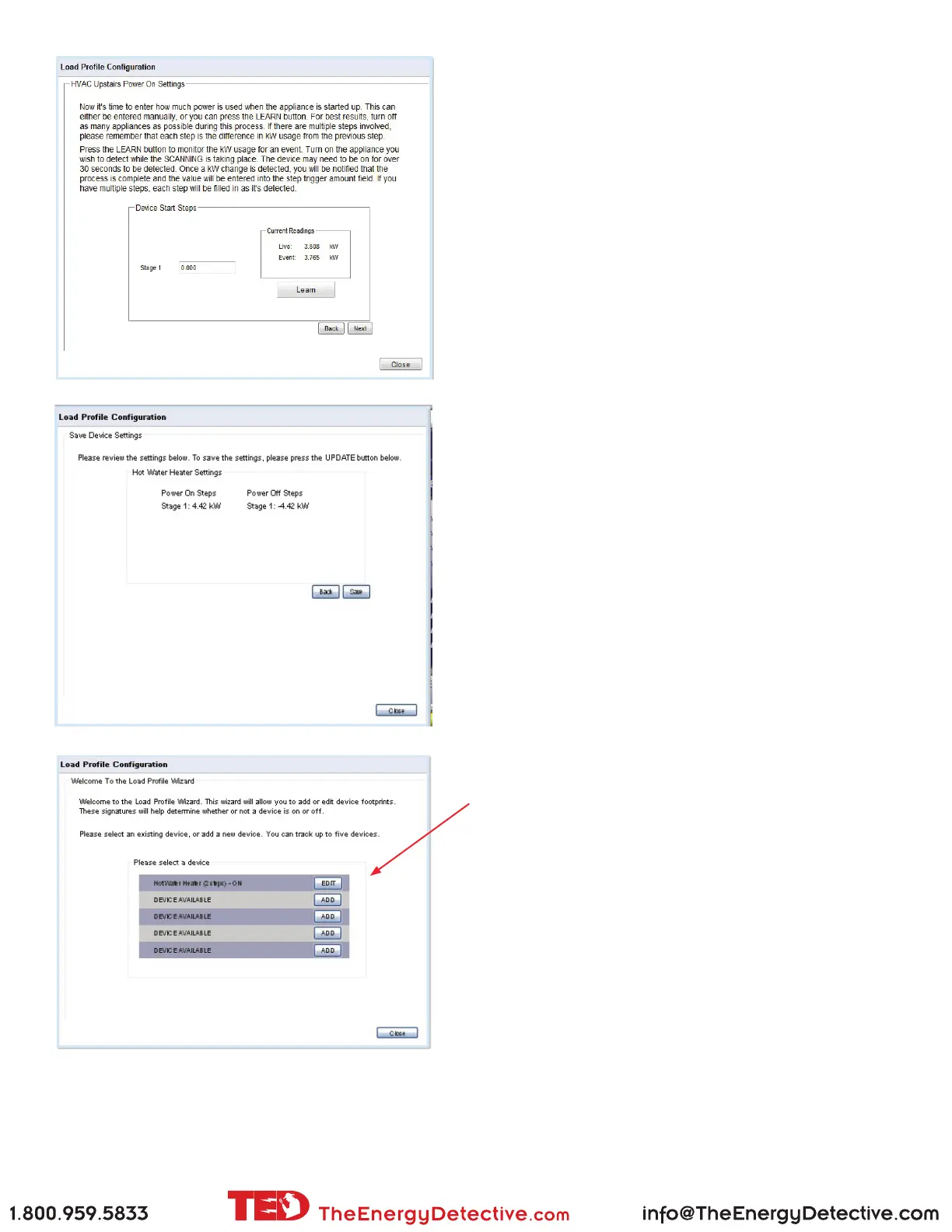
When the Learn button is pressed, Footprints will monitor
for the next kW increase. The device being proled may
need to be on for over 30 seconds to be detected. Once
a kW change is detected, the value will be automatically
entered into Stage 1 eld.
Alternatively, you may manually input the value if
preferred.
Current Readings:
Live - is the actual usage of your home at the moment.
Event - is the last change TED noted in the power.
You may press the BACK button at any time to go back
to a prior screen.
When Load Prole is complete, press the SAVE button
to complete the process.
To EDIT or DELETE your Load Prole settings, select
the Load Prole Wizard under the EDIT, and select the
device you wish to modify.
Modications to a Load Prole are performed as stated
in the ‘ADD’ section detailed above.



 To Next Page