Page 17
www.theenergydetective.com
Page 17
v.3.3.1
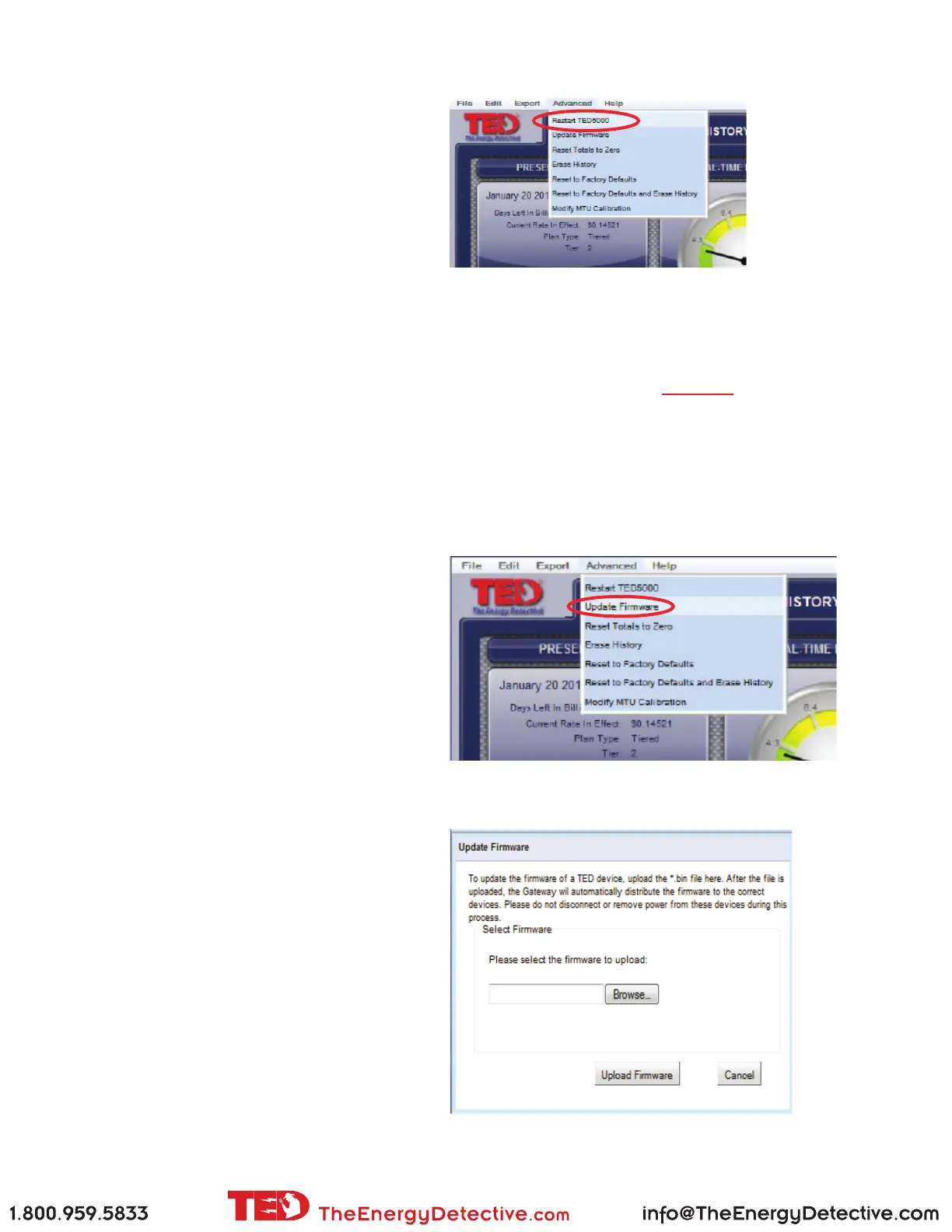
Restart TED5000
Selecting “Restart TED5000” accomplishes the
same thing as unplugging your Gateway. It is not
something you will likely nd yourself needing to
do. It simply eliminates the need to physically
unplug the Gateway.
AdvAnced Functions
Firmware Update
You can update your Footprints rmware using the instructions below, but it is HIGHLY recommended
that any rmware updates are done following the exact instructions at this link:
http://www.theenergydetective.com/upgrade
Click the Browse button and locate the rmware
you are wanting to update. Once you have located
and selected the le, click UPDATE FIRMWARE.
The process is totally automatic at this point.
Depending on the size of the update, this process
could take from one to 30 minutes.
(see note above on Firmware Update) There
will be occasions when TED or your utility may
have an update for your rmware. It could be an
update for your Display, the MTU, or the Gate-
way. It may be a rate change, software modica-
tion, or a new feature. There are several ways in
which you can receive the update: by link in an
email, a direct download from the TED website,
or from your Utility’s website. It will be your op-
tion to install the update.
Once you have downloaded the update to your
computer, you will need to select the “Update
Firmware” feature on TED 5000 shown below.



 To Next Page