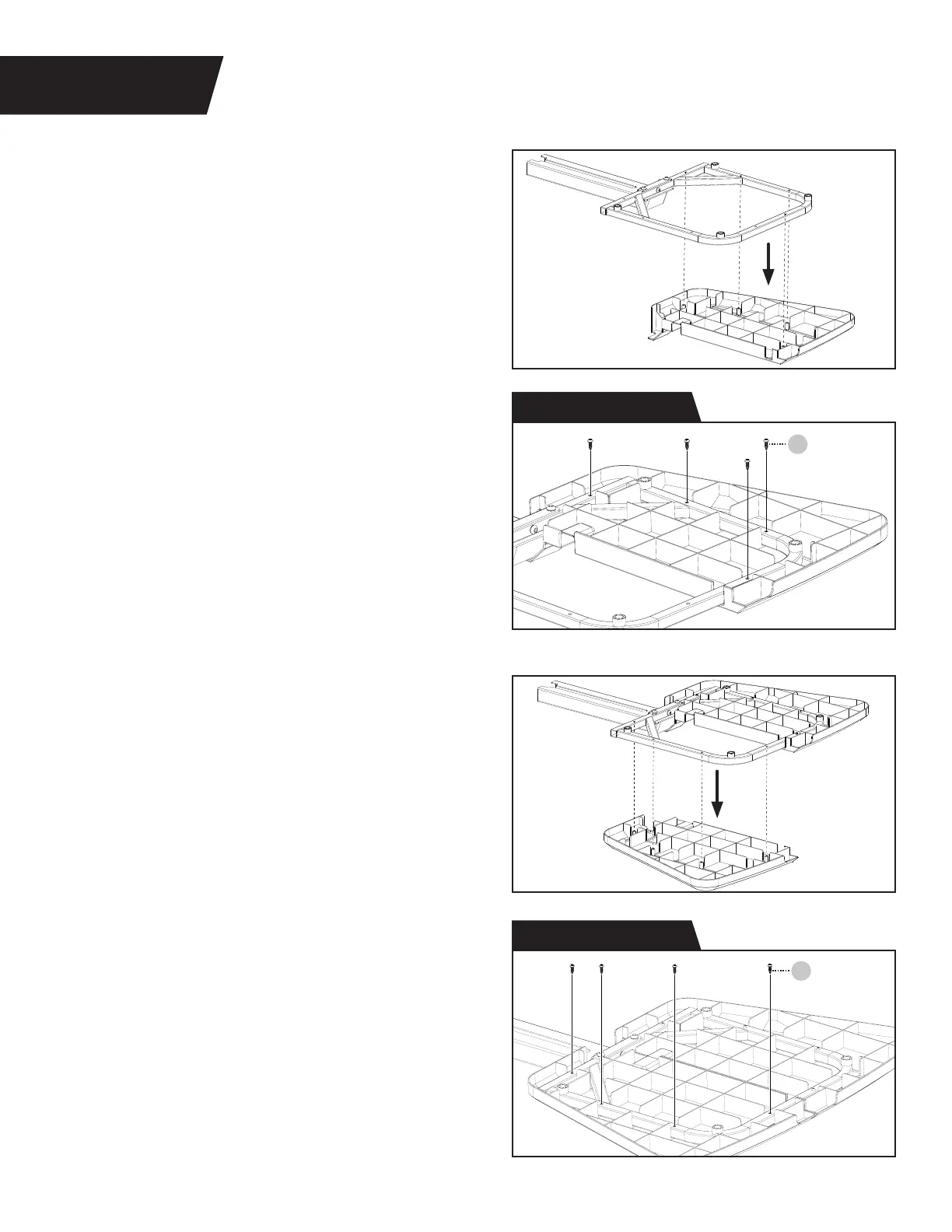
Figure 3: Locate the Right and Left Platforms.
Proceed to align one side of the Platform to the
Platform Support Frame as shown.
Figure 4: Use the Step 2 Hardware Kit to attach
one side of the Platform to the Platform Support
Frame. Hand tighten 4 × Screws through the
Platform and into the Platform Support Frame.
Figure 5: Proceed to align the other side of the
Platform to the Platform Support Frame.
Figure 6: Attach the other side of the Platform
to the Platform Support Frame by hand
tightening the remaining 4 × Screws from
the Step 2 Hardware Kit.
Proceed to fully tighten all 8 × Screws with the
screwdriver provided.
83
83
Screw
Screw
PLATFORM ASSEMBLY
STEP 2
Figure 3
Figure 4
Figure 5
Figure 6
Step 2 Hardware Kit
Step 2 Hardware Kit
6


 To Next Page