234 234
DRAWN
UNLESS OTHERWISE NOTED
SURFACE ROUGHNESS PER ANSI B46.1
DIMENSIONING PER ASME Y14.5-2009
WELD SYMBOLS PER AWS A2.4
THE INFORMATION CONTAINED HEREIN
IS PROPRIETARY TO EXPECTATIONS AND
SHALL NOT BE REPRODUCED IN WHOLE
OR IN PART OR USED FOR ANY PURPOSE
EXCEPT WHEN SUCH USER POSSESSES
DIRECT WRITTEN AUTHORIZATION
FROM EXPECTATIONS LLC
NICK SOLLER
234 234
DRAWN
UNLESS OTHERWISE NOTED
SURFACE ROUGHNESS PER ANSI B46.1
DIMENSIONING PER ASME Y14.5-2009
WELD SYMBOLS PER AWS A2.4
THE INFORMATION CONTAINED HEREIN
IS PROPRIETARY TO EXPECTATIONS AND
SHALL NOT BE REPRODUCED IN WHOLE
OR IN PART OR USED FOR ANY PURPOSE
EXCEPT WHEN SUCH USER POSSESSES
DIRECT WRITTEN AUTHORIZATION
FROM EXPECTATIONS LLC
NICK SOLLER
FIGURE 4
ACCESSORIES
USER GUIDE
ATTACHMENT
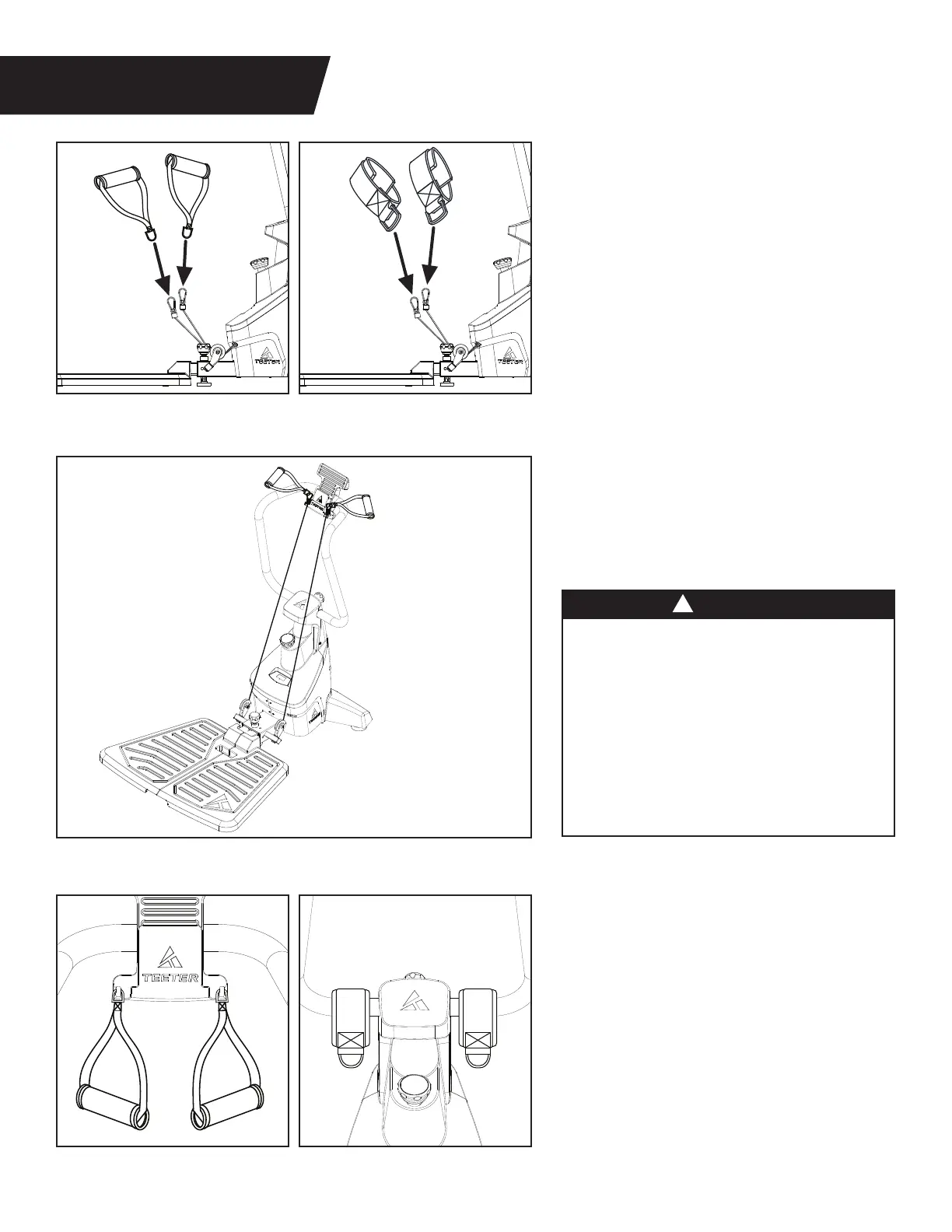
Figure 14a and 14b: Depending on the
exercise, connect either the Handle or
Ankle Attachments to the Cable Clips.
The Ankle Attachments easily wrap and
secure around the ankles with hook
and loop straps.
STORAGE
Figure 16a: When not in use, hang the
metal clips of the Handle Attachments
onto the hooks of the Media Rack.
Figure 16b: When not in use, loop the
Ankle Attachments around the lower
base of the Support Handle.
Figure 15: Rest the Cables in the
Handle Holder Slots in the Media Rack
in ‘Ready Position.’ Ensure the Cables are
fully engaged in the Handle Holder Slots
before releasing the Handles.
Ready Position
Figure 14b
Figure 16b
Figure 14a
Figure 16a
Figure 15
• DO NOT leave the Handles in the
Ready Position while not in use to avoid
unintentional cable retraction which can
cause damage to the machine or injury
to the user or bystanders.
• ALWAYS use caution when placing and
removing the Handles from the Ready
Position while using a device on the Media
Rack to avoid damage to the device.
• ALWAYS keep children, bystanders,
and pets away from machine.
WARNING
!
9


 To Next Page