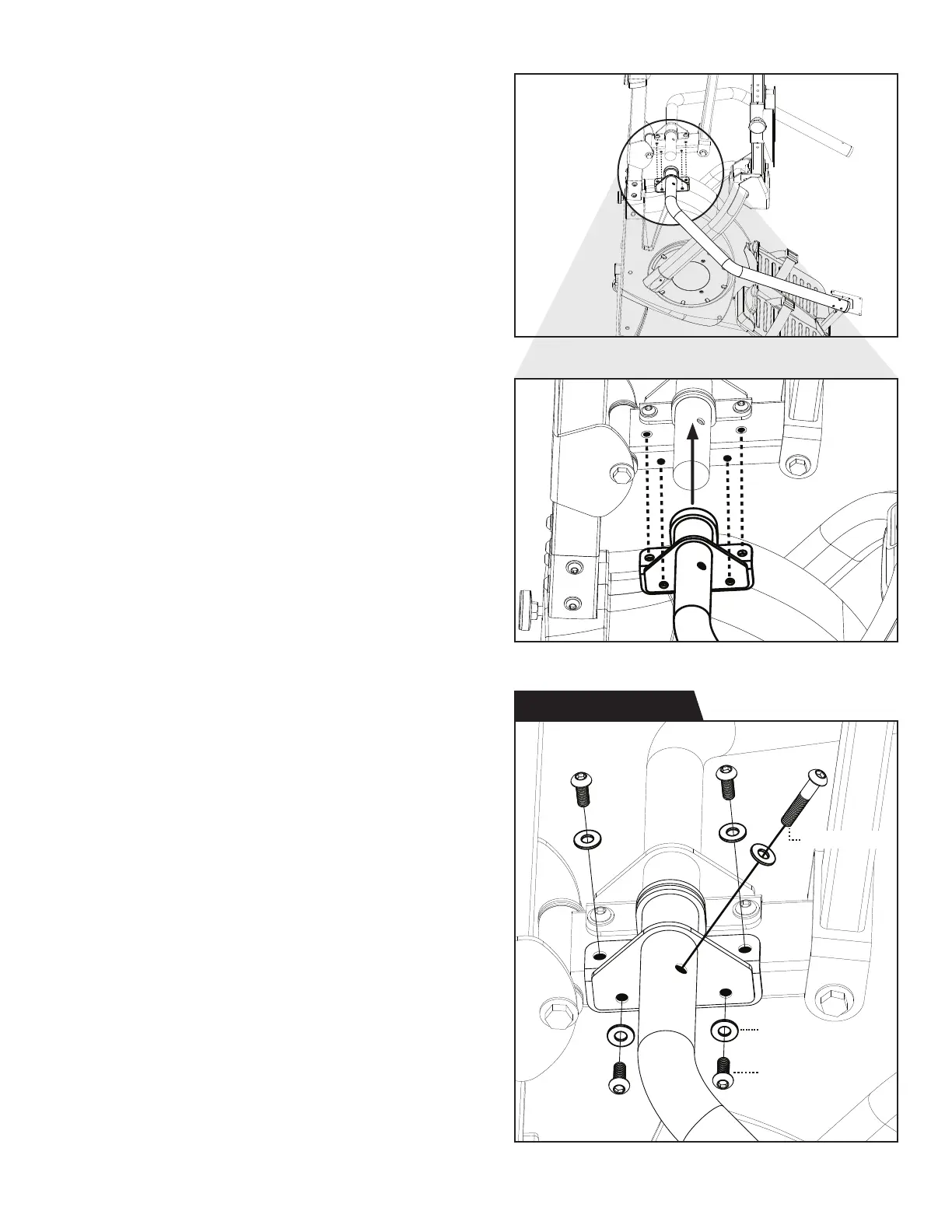
Figure 17a & 17b: Slide the base of the Lower Right
Handle over the base of the Lower Left Handle until it
aligns with the Handle Support Bar.
Figure 18: Use the Step 8 Hardware Kit to attach
the Lower Right Handle to the Handle Support Bar
and Lower Left Handle.
Hand tighten 5 × Bolts with 5 × Washers through the
Lower Right Handle and into the Handle Support Bar
and Lower Left Handle.
Proceed to fully tighten all 9 × Bolts that attach the
Lower Handles to the Handle Support Bar with the
6mm Allen Wrench.
11
Figure 17b
Figure 17a
Figure 18
Step 8 Hardware Kit
Washer (M8)
Bolt (M8 x 20)
Bolt (M8 x 45)


 To Next Page