FIGURE 4
UPPER HANDLE ASSEMBLY
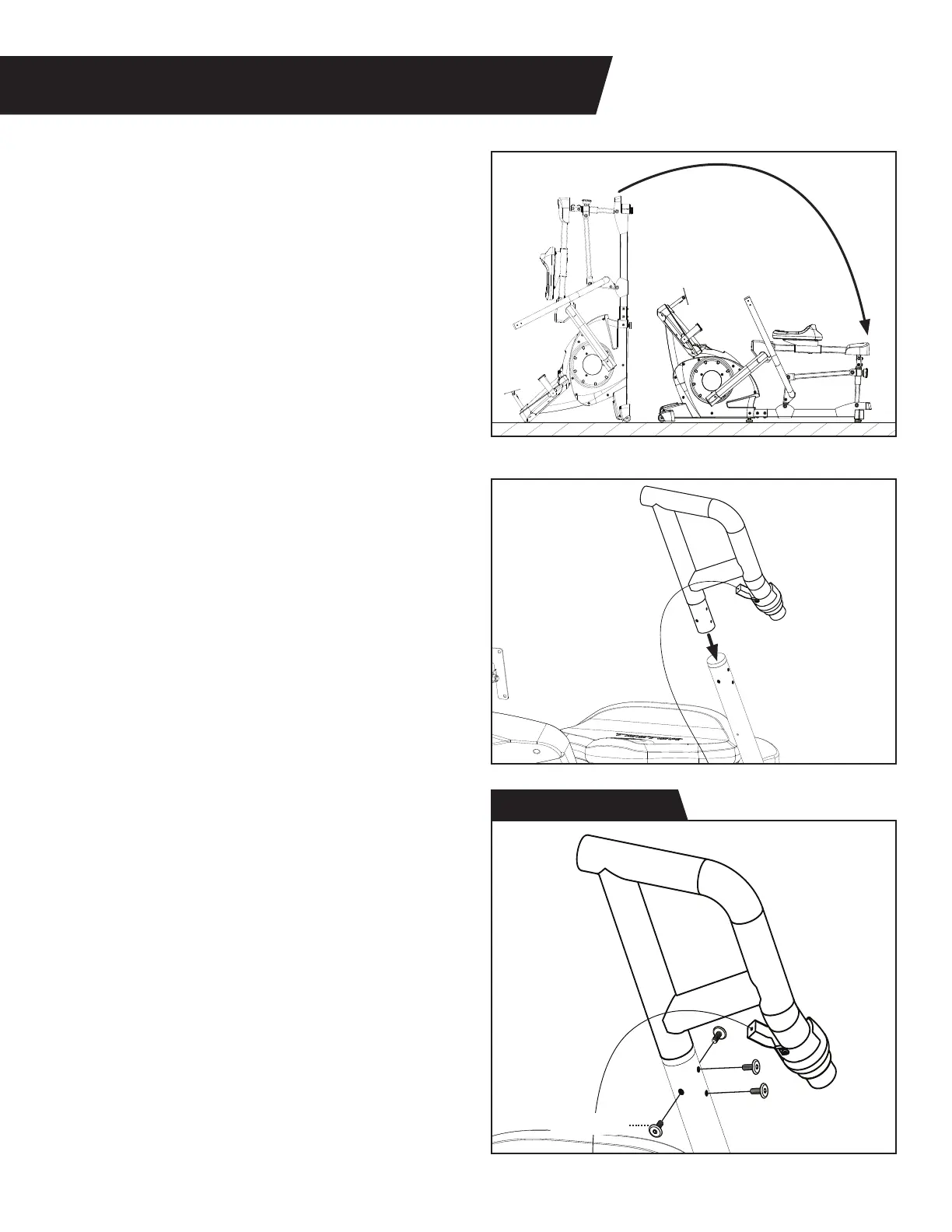
Figure 21: Return the Power10 to the in-use
position by pulling down on the Rear Handle
and rotating on the Transport Wheels until
the Rear Linkage is resting on the ground.
IMPORTANT: Use caution to ensure the
Cable that attaches the Upper Left
Handle to the Base does not get pinched or
pulled during assembly.
Figure 22: Slide the Upper Left Handle into
the top of the Lower Left Handle and align
the screw holes.
Figure 23: Use the Step 10 Hardware Kit
to attach the Upper Left Handle.
Hand tighten 4 × Bolts through the Upper
Left Handle and into the Lower Left Handle.
Proceed to fully tighten all 4 × Bolts with
the 4mm Allen Wrench.
13
Figure 21
Figure 22
Figure 23
Bolt (M6 x 15)
Step 10 Hardware Kit



 To Next Page