12
13
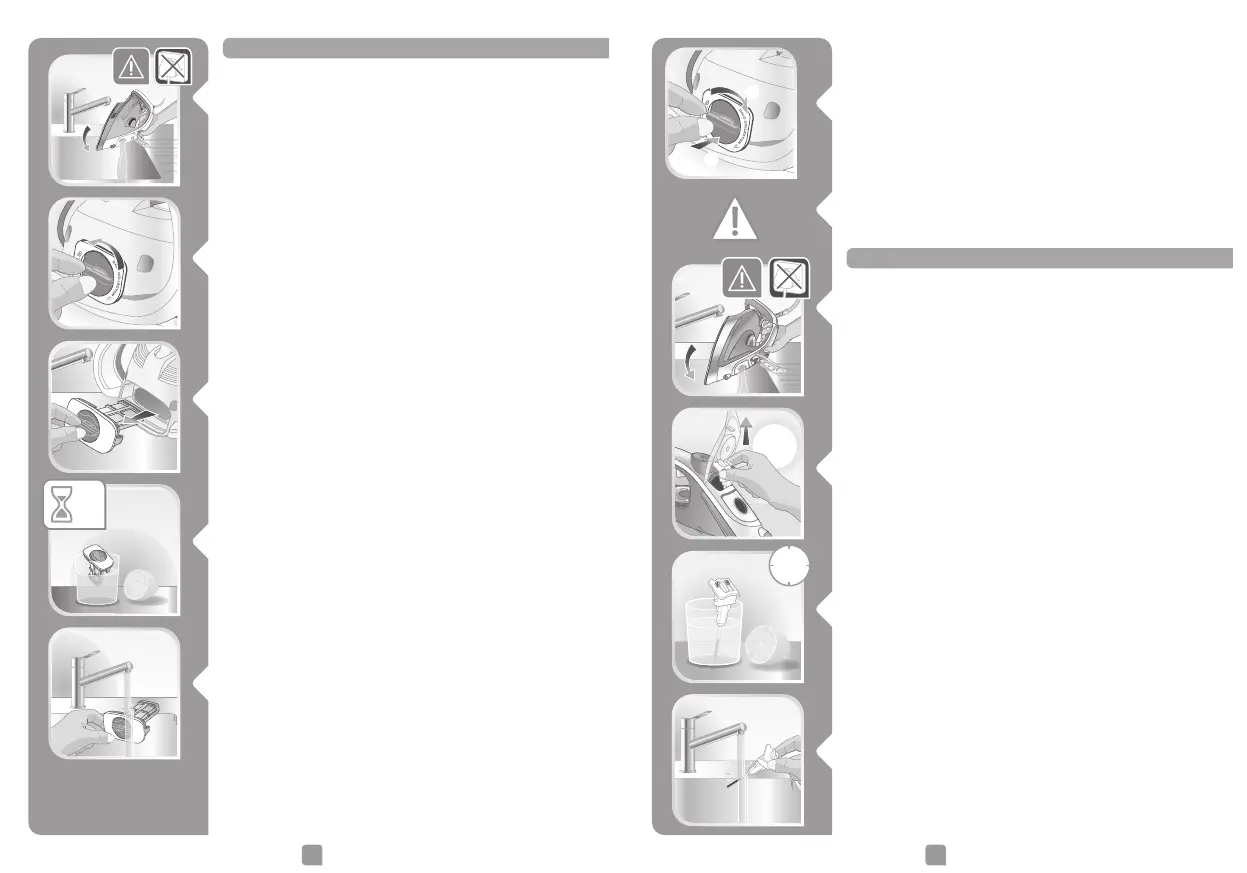
Cleaning the micro calc filter*
• Unplug your iron and empty the water tank.
• To remove the anti-calc valve, open the water tank
cover and pull on the valve near the steam control.
• Soak the valve for 4 hours in a glass of water with
lemon juice or citric acid.
• Rinse the valve under the tap.
4
h
Cleaning the anti-scale valve (once per month)
*Depending on model
• Unplug the iron, empty the water tank and wait for
the soleplate to cool down (approx. 1 hour).
• Once the steam iron has completely cooled down, raise
and turn the tab of the micro calc filter to unlock it.
• Remove the micro calc filter from the iron, it contains
the limescale collected in the iron.
• Soak the micro calc filter for 4 hours in a glass of water
with lemon juice or citric acid.
• To clean the micro calc filter thoroughly rinse in water
to remove the limescale inside.
• Reposition the micro calc filter in its housing and turn
the tab a quarter turn to the right in order to lock the
micro calc filter and ensure it is watertight.
Warning ! The iron does not work without the micro
calc filter.
2h




 To Next Page