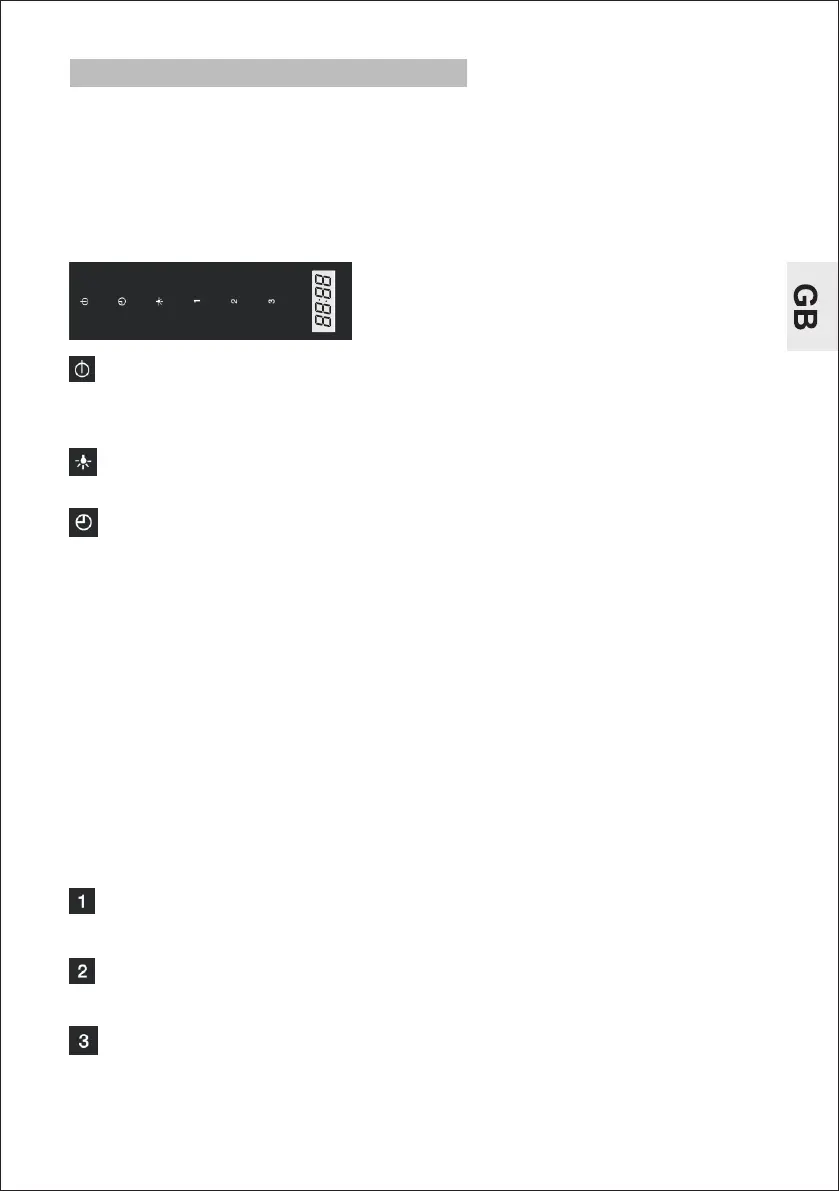
1.Clock: In stand-by mode press the key for 3 seconds to set the clock.
Press the speed key to set hours, press the high speed key for increase
the hours, press the low speed key for decrease the hours. Then press
again timer key to set the minutes. Press high speed key for increase the
minutes, press the low speed key to decrease the minutes. Press timer
key for the third time to confirm the clock setting or it will be automatically
saved within 5 seconds if no operation has been performed.
2. Timer (working time): When the appliance is operating or the light is
on press timer key to set working time – the indicator will start to blink.
Each press increases the value by 1 minute (maximum setting is 60
minutes). If no operation has been performed within 10 seconds – the
appliance will start operating with the default set working time, i.e.1
minute. Note: In standby mode, you cannot set working time.
Touch to select on/off
During operation mode,touch 1(one) time to select OFF and the fan turns
off automatically after 1(one) minute. Touch 2(two) times, and the fan
turns off instantaneously.
Light key
Touch to select on/off
Switch on the extractor fan a few minutes (between 3 to 5 minutes) before
you start to cook in order to ensure that a steady air flow has been
established before fumes appear.
Allow the extractor fan to run for several minutes after you have finished
cooking (between 3 to 5 minutes) in order to expel all the grease from the
outlet duct. This prevents the return of grease, smoke and smells.
Timer
Touch to select on/off
5
DVC560B/DVC560W
INSTRUCTIONS FOR USE
Press to select the high speed
High speed key
Mid speed key
Low speed key
Press to select the mid speed
Press to select the low speed



 To Next Page