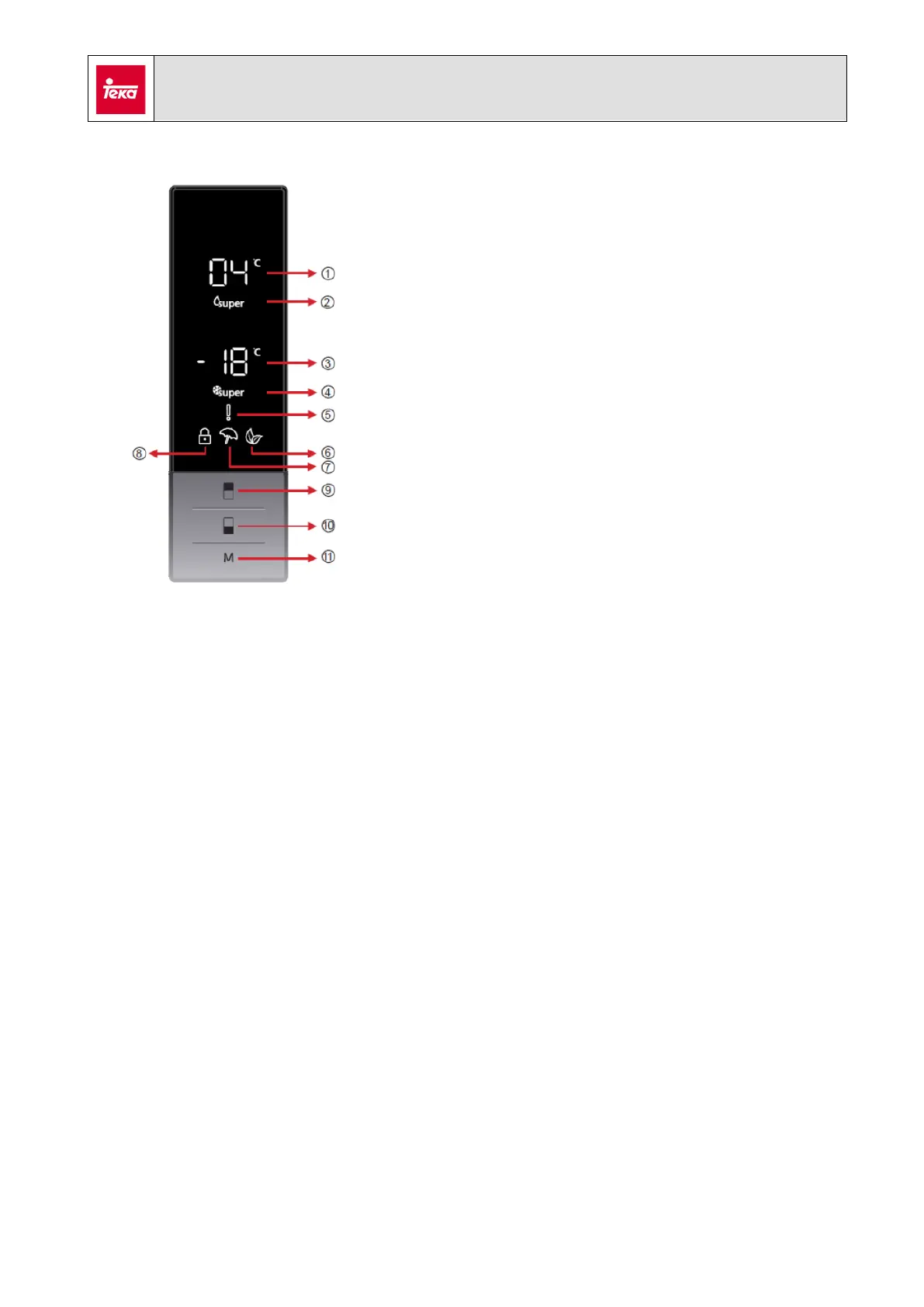
1. Refrigerator setting
2. Quick cooling mode indicator
3. Freezer setting
4. Quick freezing mode indicator
5. Alarm indicator
6. ECO mode indicator
7. Holiday mode indicator
8. Child lock indicator
9. Refrigerator Tª sensor
10. Freezer Tª sensor
11. “Mode” sensor
In order to set the temperature of a compartment, first, the sensor of that
compartment must be pressed to select it, and then, press it repeatedly until the
desired temperature is shown in the display. After a few seconds, the value is set in
memory.
4. General operation
The range of values that can be set for each compartment are:
- Refrigerator: 2ºC a 8ºC
- Freezer: -16ºC a - 24ºC
The compressor will be on until both compartments reach the target temperature. For
example, if the target temperature in the refrigerator is reached, but the temperature
in the freezer isn’t, the compressor goes on working and a heater element in the
refrigerator is turned on to prevent too low temperatures.
Operating modes
Super cooling mode: when selected, target temperature in refrigerator is set to 2ºC.
Super freezing mode: when selected, target temperature in refrigerator is set to -24ºC.



 To Next Page