29 of 44 © 2012 274_D - 11/12
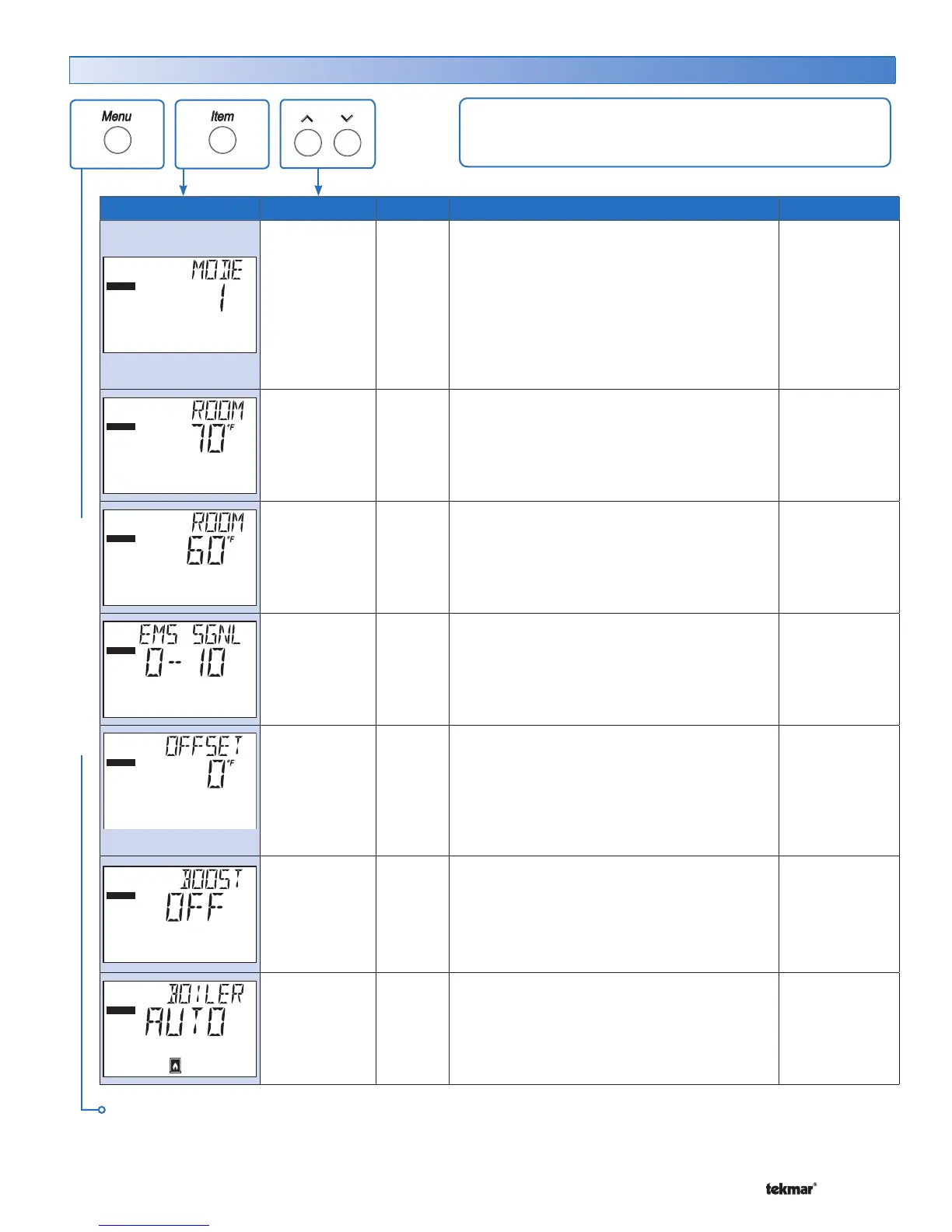
Item Field Range Access Description Actual Setting
ADJUST
1 (4 On/Off)
2 (2 On/Off &
Pumps)
3 (2 Lo/Hi)
4 (Lo/Hi & Pump)
5 (Three Stage &
Pump)
6 (Four Stage)
ADV
MODE SECTION C
Selects the control mode of operation.
ADJUST
Occ
35 to 100°F
(2.0 to 38.0°C)
Default = 70°F
(21.0°C)
INST
ADV
ROOM OCCUPIED SECTION B
The desired room air temperature during the
occupied period. Note: This item is only available
when DIP is set to Demands AND OUT DSGN
is set between -60 to 45°F.
ADJUST
UnOcc
35 to 100°F
(2.0 to 38.0°C)
Default = 70°F
(21.0°C)
INST
ADV
ROOM UNOCCUPIED SECTION B
The desired room air temperature during the
unoccupied period. Note: This item is only
available when DIP is set to Demands AND OUT
DSGN is set between -60 to 45°F.
ADJUST
0-10, 2-10
Default = 0-10
ADV
EMS SIGNAL SECTION G
Selects the range of the Energy Management
System input signal. Note: This item is only
available when DIP set to EMS.
ADJUST
-10 to 10°F
(-5.6 to 5.6°C)
Default = 0°F
(°C)
ADV
OFFSET SECTION G
Selects the range of the Energy Management
System input signal. Note: This item is only
available when DIP set to EMS.
ADJUST
OFF, 0:20 to
8:00 hr
(5 minute incre-
ments)
Default = OFF)
ADV
BOOST
SECTION L
The maximum amount of morning boost when
changing from the unoccupied to the occupied
period. Note: This item is only available when
DIP is set to Demands AND DIP is set to
Setback.
ADJUST
1
Au (Auto), OFF
Default = Au
INST
ADV
BOILER 1 SECTION C
Selects Whether Boiler 1 is operational or not.
Continued on next page.
Adjust Menu (1 of 6)
ADJUST MENU
The Adjust Menu items are the programmable settings used
to operate the mechanical equipment.


 To Next Page