3) To program a 24-hour schedule for every day of the week
• Press “Prog.” once and release. Press once and release.
• Set the time for the start of the Day mode pressing “hour” and “min.” buttons only.
• Press “Prog.” once and release. Press once and release.
• Set the time for the end of the Day mode pressing “hour” and “min.” buttons only.
• If 2nd and 3rd cycles are desired, repeat procedure 3. When finished, press .
If this program needs to be changed
, reset the clock and do procedures 2 & 3.
4) To program a 7-day schedule for every day of the week
• Press “Prog.” once and release.
• Set the day to be programmed by pressing “day” only (1= Sunday).
• Set the time for start of the Day mode by pressing “hour” and “min.” buttons.
• Press “Prog.” once and release.
• Set the time for end of the Day mode by pressing “hour” and “min.” buttons.
• If 2nd and 3rd cycles within the same day are desired, press and release “Prog.”
and repeat the preceeding 3 steps.
• Continue repeating procedure 4 until all the days of the week are programmed.
• When finished, press . The programming is now complete.
If this program needs to be changed
, review the program and press “hour” or “min.” to
change the times.
• To delete any programmed time, review the program to the day and cycle requiring
deletion and press together “hour” and “min.” buttons.
5) Program review
• To review the program, repeatedly press and release “Prog.”
6) Manual Override
• For temporary (single event) override, press . To disable temporary
override, press again.
• For permanent (holiday) override, press and hold and then repeatedly
press and release “min.” until the desired state of permanent override is obtained
as shown in the adjacent table. Release . To disable permanent override
press and hold and press and release “min.” until the dot disappears.
7) Quick change to daylight savings or standard time
• To subtract 1 hour from the clock (in the fall), press “day” and “min.” together.
• To add 1 hour to the clock (in the spring), press “day” and “hour” together.
Limited Warranty: tekmar warrants to the original purchaser each tekmar
product against defects in workmanship and materials when the product is
installed and used in compliance with tekmar's instructions. This limited
warranty covers the cost of parts and labour provided by tekmar to correct
defects in materials and/or workmanship. Returned products that are fully
operational are not considered a warranty case. tekmar also does not cover
parts or labour to remove, transport or reinstall a defective product. tekmar
will not be liable for any damage other than repair or replacement of the
defective part or parts and such repair or replacement shall be deemed to
be the sole remedy from tekmar. This warranty shall not apply to any
defects caused or repairs required as a result of unreasonable or negligent
use, neglect, accident, improper installation, or unauthorized repair or
alterations. In case of defect, malfunction or failure to conform to warranty,
tekmar will, for a warranty period of 24 months from the date of invoice to
the original purchaser or 12 months from the date of installation of the
product, whichever occurs first, repair, exchange or give credit for the
defective product. Any express or implied warranty which the purchaser
may have, including merchantability and fitness for a particular purpose,
shall not extend beyond 24 months from the date of invoice or 12 months
from the date of installation of the product, whichever occurs first.
Replacements: tekmar can send replacement products if requested. All
replacements are invoiced. Any possible credit for the replacement will only
be issued once the replaced product has been returned to tekmar.
Product Return Procedure: Products that are believed to have failed
must be returned to tekmar Control Systems Ltd. 4611-23rd Street, Vernon
B.C. Canada V1T 4K7 when agreed to by tekmar. The installer or other
qualified service person must, at the owner's expense, determine which
component has failed. The product must be returned complete with
all of its components (sensors, base, etc.). Products must be returned
together with the proof of purchase to the original purchaser who then
returns the product to tekmar after receiving a Return Goods Authorization
(RGA) number from tekmar.
Please include the following information with the product. The full address
of the original purchaser, the RGA number and a description of the problem.
From the U.S.A., in order to avoid customs charges, products must be
returned via US Post with the package clearly marked with the RGA
number, product type and the statement "Canadian Product returned for
repair". For shipping purposes the product can be valued at one half list price.
1) If returned during the warranty period and the product is defective,
tekmar will issue full credit for the returned product less cost of missing
parts.
2) If returned during the warranty period and the product is fully opera-
tional, tekmar will return the product to the original purchaser for a
testing cost of $30.00 plus postage.
3) If returned during the warranty period and the product is not damaged
and is fully operational, tekmar can take back the product for a return
charge of 40% of the product's net value. This request has to be
specified otherwise the product will be returned with a testing cost of
$30.00 plus postage.
4) If returned after the warranty period and the product needs repair,
tekmar will repair and return the product. Repair and postage costs will
be invoiced. tekmar's repair costs are calculated at $30.00 / hour plus
the cost of parts. If the repair costs will be more than $60.00 a repair
estimate will be sent to the original purchaser.
In North America: tekmar Control Systems Ltd., Canada
tekmar Control Systems, Inc., U.S.A.
Head Office: 4611 - 23rd Street
Vernon, B.C. Canada V1T 4K7
Tel. (604) 545-7749 Fax. (604) 545-0650
All specifications are subject to change without notice.
Printed in Canada on recycled paper.
Product design and literature are Copyright © 1991 by:
tekmar Control Systems Ltd. and tekmar Control Systems, Inc.
2
Limited Warranty and Product Return Procedure
PM
ON
OFF
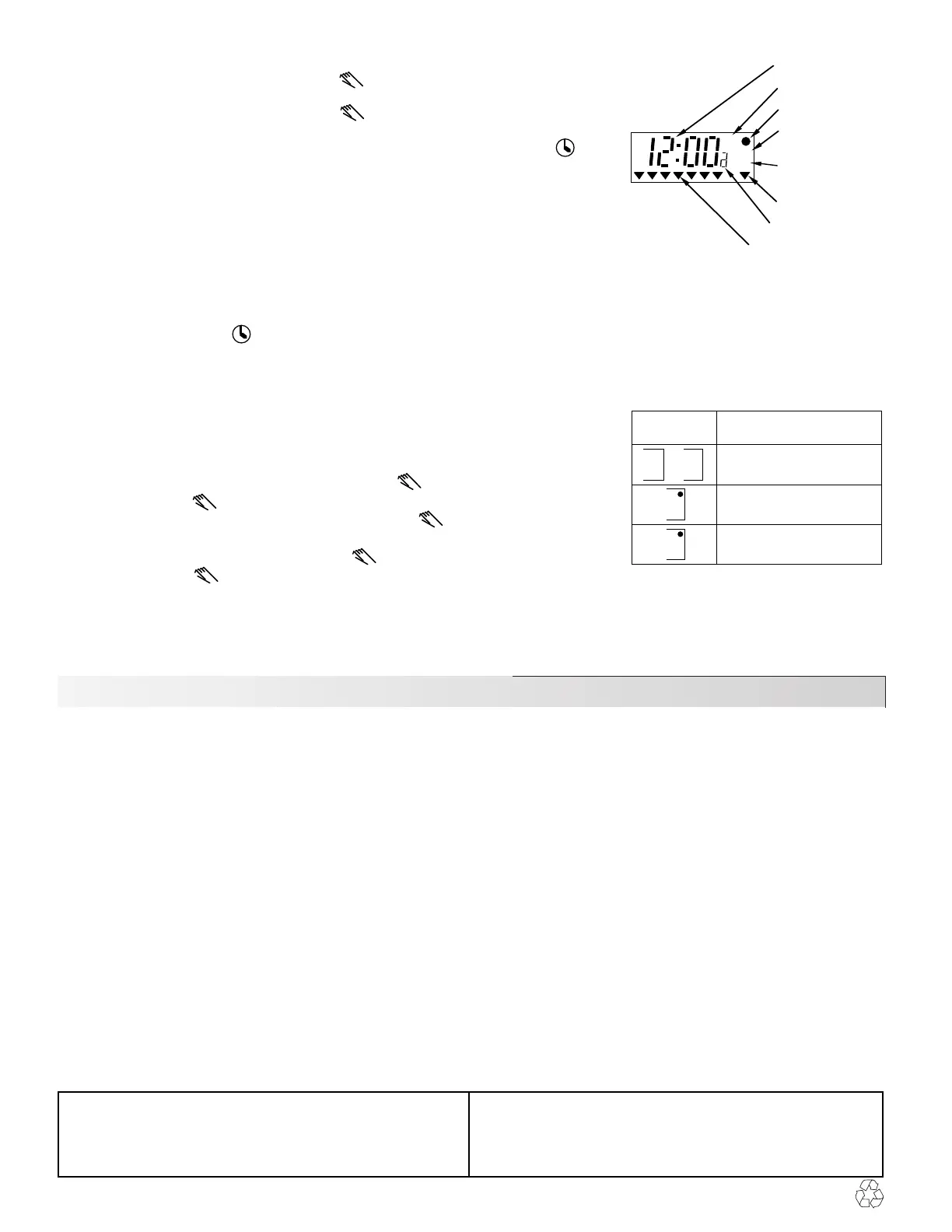
AM, PM Indicator
Permanent override
Day mode ON
(setback off)
Day mode OFF
(setback on)
24 hour indicator
Cycle number
Day indicators
12 hour LCD clock
LCD clock description
ON
OFF
ON
OFF
Displayed
state
Type of permanent
override achieved
No override
Day mode ON override
Day mode OFF override
Permanent override types possible



 To Previous Page
 Loading...