EasyManua.ls Logo

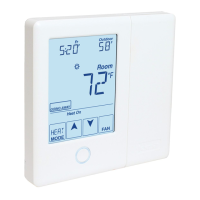
Tekmar tekmarNet 552 - User Manual

Tekmar tekmarNet 552
44 pages
Print Icon
To Next Page IconTo Next Page
Loading...
tekmarNet
®
Thermostat 552
Installation & Operation Manual
552_D
09/14
Zoning
Replaces: 08/11
© 2014
552_D - 09/14
1 of 44
A Watts Water Technologies Company
The tekmarNet
®
Thermostat 552
provides operation for:
One Stage Heat
Introduction
Features
Touchscreen
Bright Backlight
tekmarNet
®
Communication
Outdoor Temperature Display
Floor Temperature Display
7-Day, 4 Event Programmable
Schedule
Optimum Start
Scenes
Away Key
Air Group Member
Freeze Protection
Exercise Pump or Valves
Zone Synchronization
Two Auxiliary Sensor Inputs
Benefi ts
Simple to Use
Increased Comfort Through
Precise Temperature Control
Conserves Energy
Convenience Through Internet
Connectivity
Warm Radiant Floors
Protects Radiant Floors From
Over Heating

Other manuals for Tekmar tekmarNet 552

Question and Answer IconNeed help?

Do you have a question about the Tekmar tekmarNet 552 and is the answer not in the manual?

Summary

Introduction

Features

Lists the key features and capabilities of the tekmarNet® Thermostat 552.

Benefits

Highlights the advantages and positive outcomes of using the tekmarNet® Thermostat 552.

Important Safety Information

Installation

Preparation

Details the tools and materials required and considerations for thermostat placement.

Removing The Thermostat Base

Instructions on how to detach the thermostat front from its base.

Mounting The Thermostat Base

Guidance on securely attaching the thermostat base to a wall or gang box.

Thermostat Wiring

Explains the different methods and diagrams for wiring the thermostat.

Compatible Sensors

Lists the types of sensors that are compatible with the thermostat.

Testing the Thermostat Wiring

Procedures for verifying the correct electrical connections of the thermostat.

Mounting the Thermostat

Final step for attaching the thermostat front cover to the base.

Cleaning the Thermostat

Instructions for safely cleaning the exterior of the thermostat.

Switch Settings

User Interface

Home Screen

Description of the main display screen and its interactive elements.

Symbols Description

Explanation of the various symbols displayed on the thermostat screen.

Programmable Settings

Programming Menus

Guide on navigating and accessing the thermostat's programming menus.

Set Temp Menu

Configuration options for setting various temperature parameters for different events.

Time Menu

Settings for configuring the thermostat's internal clock and date.

Schedule Menu

Options for creating and managing programmable daily and weekly temperature schedules.

Display Menu

Scenes Menu

Settings for managing pre-defined heating and cooling scenarios.

Monitor Menu

Displays current and historical sensor readings and system status.

Toolbox Menu

Access to advanced settings, tests, and system information.

Setup Menu

Configuration options for sensors, terminal units, and system behavior.

Sequence of Operation

Heating Operation

Describes how the thermostat controls heating based on sensors and settings.

Freeze Protection

Ensures the system operates to prevent freezing even when in 'off' mode.

Hydronic System Supply Pump

Configuration for managing the hydronic system's primary or mix pump operation.

Air Group Operation

Time Clock

Temperature Adjustment

Programmable Schedules

Scenes (System Override)

Secondary Temperature Display

Allows toggling the display of outdoor or floor temperature on the main screen.

Access Levels

tekmarNet Address

Screen Clean Menu

Troubleshooting

Error Messages

Details various error codes and their descriptions and corrective actions.

Frequently Asked Questions

Technical Data

Limited Warranty and Product Return Procedure

Summary

Introduction

Features

Lists the key features and capabilities of the tekmarNet® Thermostat 552.

Benefits

Highlights the advantages and positive outcomes of using the tekmarNet® Thermostat 552.

Important Safety Information

Installation

Preparation

Details the tools and materials required and considerations for thermostat placement.

Removing The Thermostat Base

Instructions on how to detach the thermostat front from its base.

Mounting The Thermostat Base

Guidance on securely attaching the thermostat base to a wall or gang box.

Thermostat Wiring

Explains the different methods and diagrams for wiring the thermostat.

Compatible Sensors

Lists the types of sensors that are compatible with the thermostat.

Testing the Thermostat Wiring

Procedures for verifying the correct electrical connections of the thermostat.

Mounting the Thermostat

Final step for attaching the thermostat front cover to the base.

Cleaning the Thermostat

Instructions for safely cleaning the exterior of the thermostat.

Switch Settings

User Interface

Home Screen

Description of the main display screen and its interactive elements.

Symbols Description

Explanation of the various symbols displayed on the thermostat screen.

Programmable Settings

Programming Menus

Guide on navigating and accessing the thermostat's programming menus.

Set Temp Menu

Configuration options for setting various temperature parameters for different events.

Time Menu

Settings for configuring the thermostat's internal clock and date.

Schedule Menu

Options for creating and managing programmable daily and weekly temperature schedules.

Display Menu

Scenes Menu

Settings for managing pre-defined heating and cooling scenarios.

Monitor Menu

Displays current and historical sensor readings and system status.

Toolbox Menu

Access to advanced settings, tests, and system information.

Setup Menu

Configuration options for sensors, terminal units, and system behavior.

Sequence of Operation

Heating Operation

Describes how the thermostat controls heating based on sensors and settings.

Freeze Protection

Ensures the system operates to prevent freezing even when in 'off' mode.

Hydronic System Supply Pump

Configuration for managing the hydronic system's primary or mix pump operation.

Air Group Operation

Time Clock

Temperature Adjustment

Programmable Schedules

Scenes (System Override)

Secondary Temperature Display

Allows toggling the display of outdoor or floor temperature on the main screen.

Access Levels

tekmarNet Address

Screen Clean Menu

Troubleshooting

Error Messages

Details various error codes and their descriptions and corrective actions.

Frequently Asked Questions

Technical Data

Limited Warranty and Product Return Procedure

Tekmar tekmarNet 552 Specifications

General IconGeneral
CategoryThermostat
Power Supply24V AC
DisplayLCD
Control TypeDigital
Humidity ControlNo
Network CompatibilitytekmarNet
Communication ProtocoltekmarNet
Number of Zones1
BacklightYes
Temperature Range5 to 30 °C
FeaturesProgrammable
Operating Temperature0°C to 50°C (32°F to 122°F)

Related product manuals