© 2014 552_D - 09/14
12 of 44
A Watts Water Technologies Company
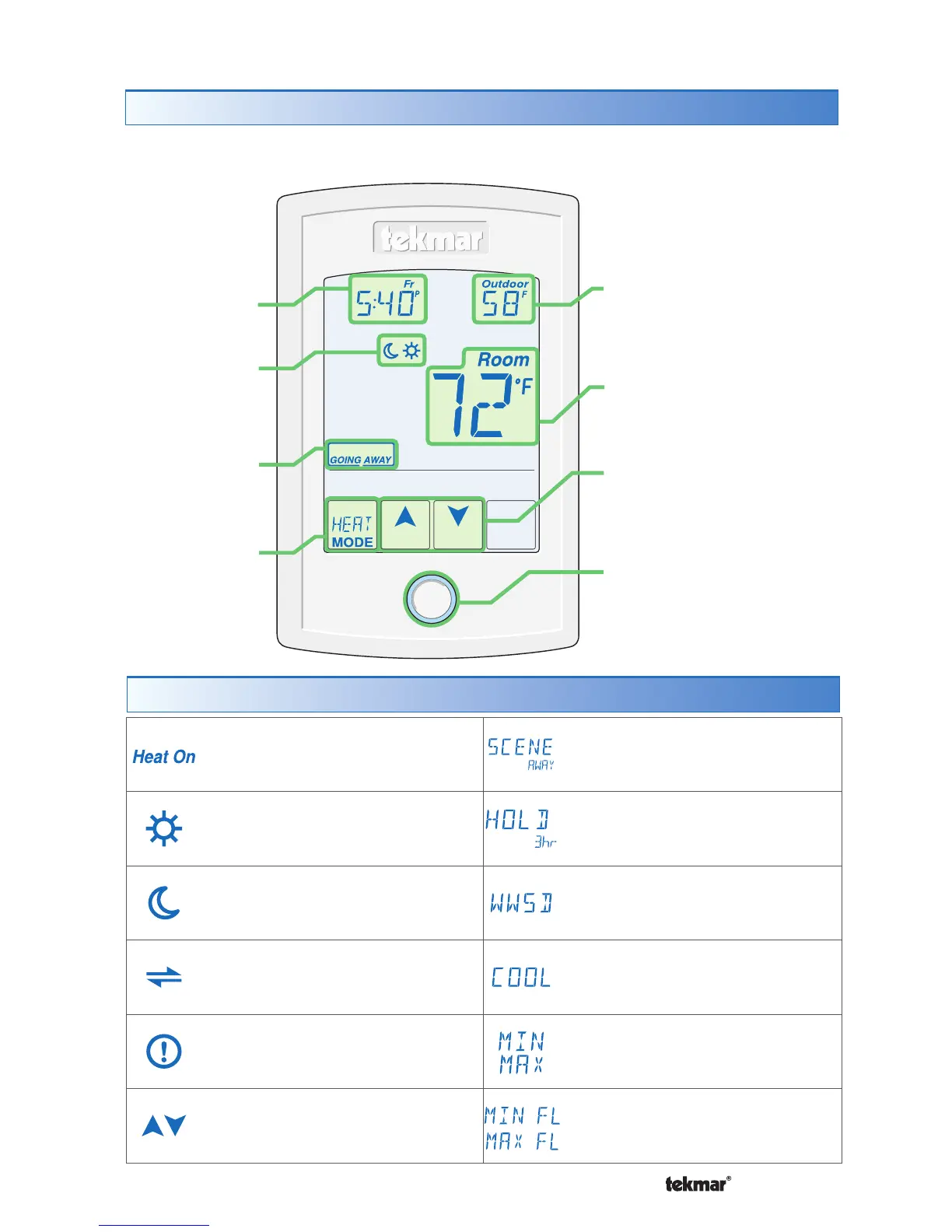
HEAT ON
Heat is turned on.
SUN
Operating at the occupied (day)
temperature.
MOON
Operating at the unoccupied
(night) temperature.
tekmarNet
®
Communication is present.
WARNING SYMBOL
Indicates an error is present.
ARROWS
Adjust the displayed setting.
SCENE AWAY
Operating at Away temperature.
TEMPORARY HOLD
Hold for 3, 6, 9 or 12 hours.
WWSD
Warm Weather Shut Down.
COOL
Cooling system is on.
MIN or MAX
Reached the room min or max.
MIN FL or MAX FL
Reached the floor min or max.
Home Screen
Symbols Description
User Interface
Adjust
the Time.
Adjust the
Schedule.
Display the
Floor or Outdoor
temperature.
Away Key.
Turn the
Heat on
or Off.
Home Button.
Return to the ‘Home’
Screen from any menu.
Press and hold for 3
seconds to access the
programming menus.
Adjust the Temperature.
Room
Temperature.
The touchscreen of the 552 provides one touch access to these settings.
Home
Button



 To Next Page