© 2014 552_D - 09/14
17 of 44
A Watts Water Technologies Company
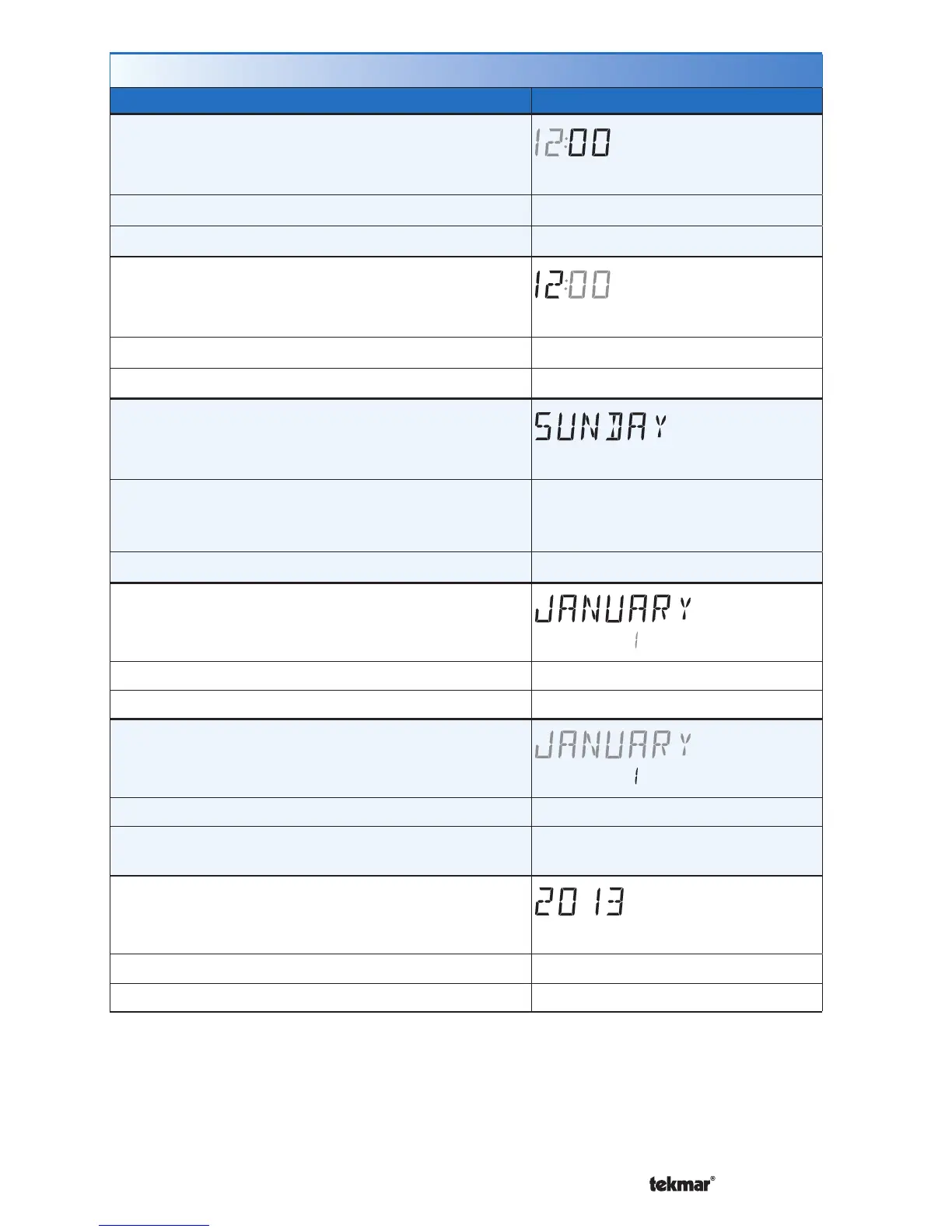
Time Menu (1 of 2)
Setting Display
MINUTE
Select the current time minutes.
Access Level: Installer, User Range: 00 to 59
Conditions: Schedule is used or Clock is set to ON. Default: 00
HOURS
Select the current time hours.
Access Level: Installer, User Range: 12 AM to 11 PM or 00 to 23
Conditions: Schedule is used or Clock is set to ON. Default: 12 AM
DAY OF WEEK
Select the current day of the week.
Access Level: Installer, User
Range: Sunday, Monday, Tuesday,
Wednesday, Thursday, Friday,
Saturday
Conditions: Schedule is used or Clock is set to ON. Default: Sunday
MONTH
Select the current month.
Access Level: Installer, User Range: JANUARY to DECEMBER
Conditions: Schedule is used or Clock is set to ON. Default: JANUARY
DAY OF MONTH
Select the day of the current month.
Access Level: Installer, User Range: 1 to 31
Conditions: Schedule is used or Clock is set to
ON.
Default: 1
YEAR
Select the current year.
Access Level: Installer, User Range: 2014 to 2255
Conditions: Schedule is used or Clock is set to ON. Default: 2014



 To Next Page