1 of 12 © 2007 U 546 - 08/07
U 546
08/07
tekmarNet
®
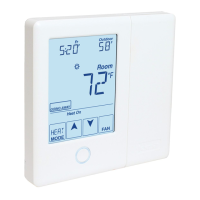
4 Thermostat 546
- User Brochure
Table of Contents
Display .................................................................... 2
Symbols Description ............................................... 2
User Interface ......................................................... 3
Viewing Current Temperatures ............................... 4
Viewing the Room Set Temperature ....................... 4
Adjusting the Room Set Temp (No Schedule) ........ 5
Adjusting the Room Set Temp (Schedule) .............. 5
Temporary Room Set Adjustment (Schedule) ........ 5
Adjusting the Temporary Zone Hold ....................... 6
Choosing the Mode of Operation ............................ 6
Setting the Floor Warming Temperatures ............... 6
Setting the Fan On Time ......................................... 6
Resetting the Filter Timer ....................................... 7
Viewing the Current Time ....................................... 7
Setting the Time ..................................................... 7
Selecting a Scene ................................................... 8
Extended Absences ................................................ 9
Viewing the Recorded High & Low Temperatures .. 9
Selecting a Schedule .............................................10
Units of Temperature .............................................11
Backlight ................................................................ 11
Cleaning the Thermostat ......................................11
Error Messages .....................................................11
Warranty ................................................................12
Congratulations
on the purchase of
your tekmar programmable
thermostat with communication.
This thermostat combines
easy-to-use programming with
advanced features to increase
both comfort and energy
efficiency.
Your tekmar thermostat allows
you to :
• Set a single schedule for your
heating and cooling system that
all of your tekmar thermostats
can follow.
• Adjust the time and date on all
your tekmar thermostats from a
single thermostat
• Automatically adjust for
Daylight Saving Time
• View the outdoor temperature on
all of your tekmar thermostats.
• Easily set up custom “Scenes” to
match your home and lifestyle.
• Easily override your tekmar
thermostats if you are planning an
extended absence.

 Need help?
 General

 To Next Page