31 of 36 © 2009 D 263 - 03/09
Schedule Menu (1 of 1)
SETTING THE SCHEDULE
A schedule allows the timer to automatically change between two preset events based on the time of day. The schedule divides the
day into Occupied and UnOccupied periods. To set the time of day at which each period is to begin, use the following procedure.
Step One
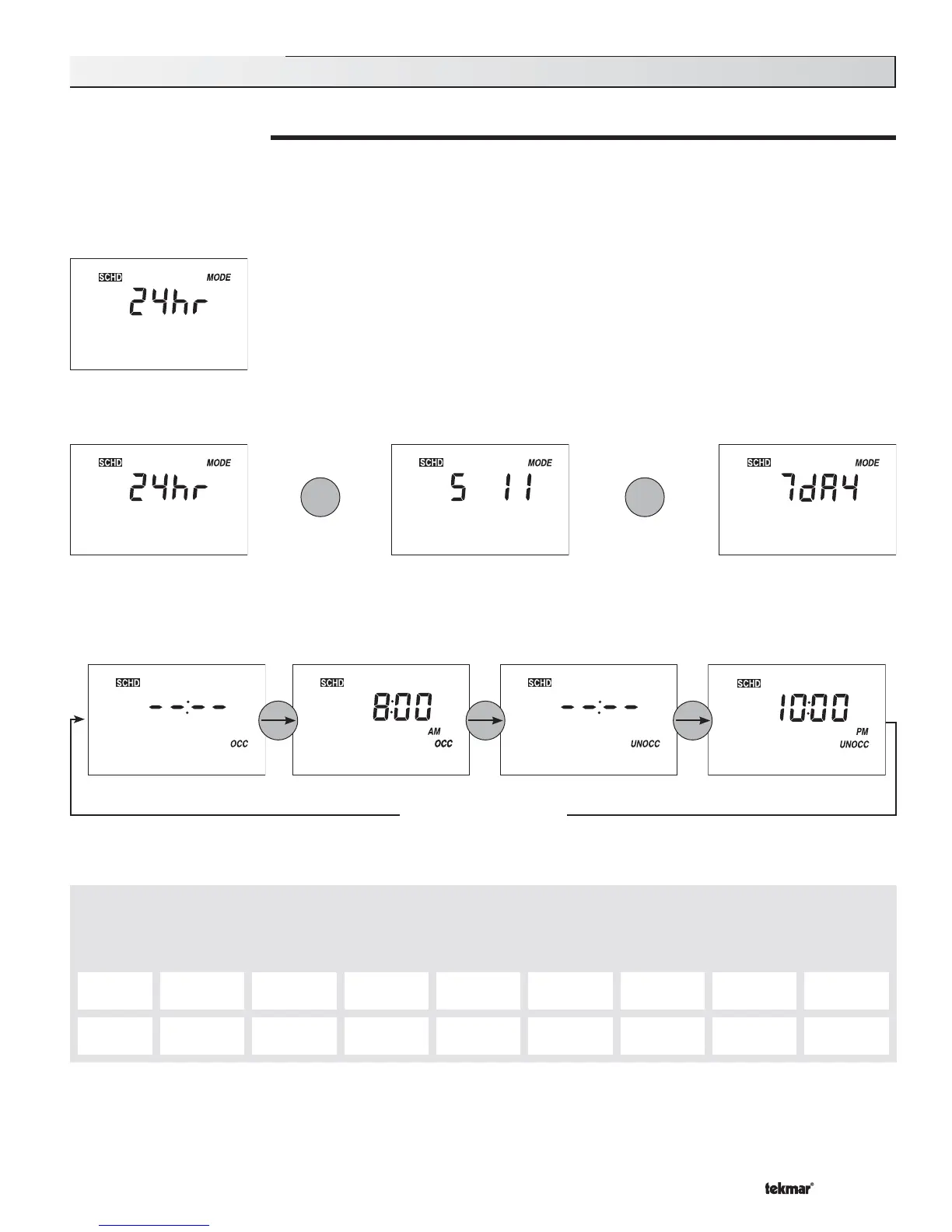
Press and release the Menu button until the SCHD (Schedule) menu is displayed
Step Two (Only available in advanced access level.)
Use the ▲ or ▼ button to select a 24 hour, 5-1-1 day, or a 7 day schedule.
or or
Step Three
Press and release the Item button. Use the ▲ or ▼ button to set the event’s beginning time. If the event is not required, select the
“– – : – –” time. This time is found between 11:50 PM and 12:00 AM. Record the event time in the schedule table found at the bottom
of this page for future reference. Press the Item button to advance to the next setting.
Repeat for all events
TWO EVENT SCHEDULE
Event 24 hr
Schedule
Sat Sun Mon Tue Wed Thu Fri
Occ
UnOcc
Note: The Setback / Off DIP switch must be in the setback position in order to have access to the SCHEDULE menu.



 To Next Page