18 Original user manual
19 | Operating the pillar drill
Switching on
Insert the plug into the socket and turn on the pillar drill by switching the rocker switch to “I”.
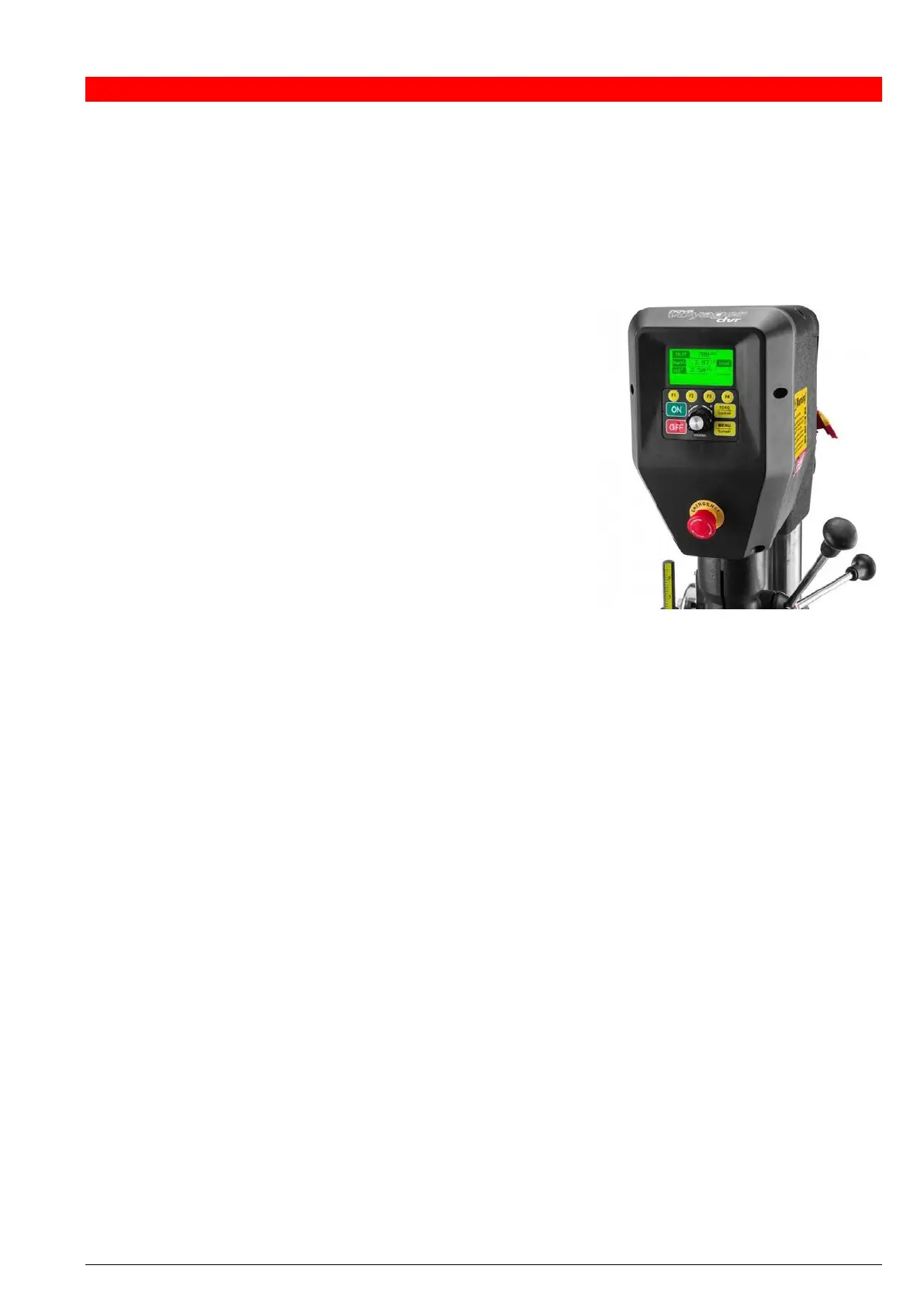
As soon as the NOVA Voyager DVR pillar drill has been switched on, the product name and logo will be displayed
on the LCD screen followed by any warning messages.
Setting the language of your pillar drill
Your newly acquired NOVA Voyager DVR pillar drill is set to
English by default. In just a few steps you can change the language
(to German or French):
1. Press the <MENU / Cancel> button.
2. Turn the dial until you reach menu item <Configuration>
and open this submenu by pressing the dial.
3. Turn the dial until you reach menu item
<Interface Settings> and open this submenu by pressing
the dial.
4. Turn the dial until you reach menu item <Language:
English> and press the dial to select another language.
This then changes the menu to <Language: German>.
The language of your pillar drill interface has now successfully been changed.
5. Press the <OFF> button to return to the main menu.
Calibrating the height sensor
The first time the pillar drill is turned on, it will prompt the user to calibrate the height sensor. To do this, follow the
instructions on the screen.
Make sure to carefully position the quill height at a consistent spot during the calibration. In the event of
inaccuracies, the calibration will have to be redone.


 To Next Page