EasyManua.ls Logo

Teknatool Nova Voyager DVR - Display elements on home screen; Controls; Start;Stop and Navigation Buttons; Function (F1-F4) Buttons

Teknatool Nova Voyager DVR
37 pages
Print Icon
To Next Page IconTo Next Page
To Previous Page IconTo Previous Page
Loading...
Version 2024 19
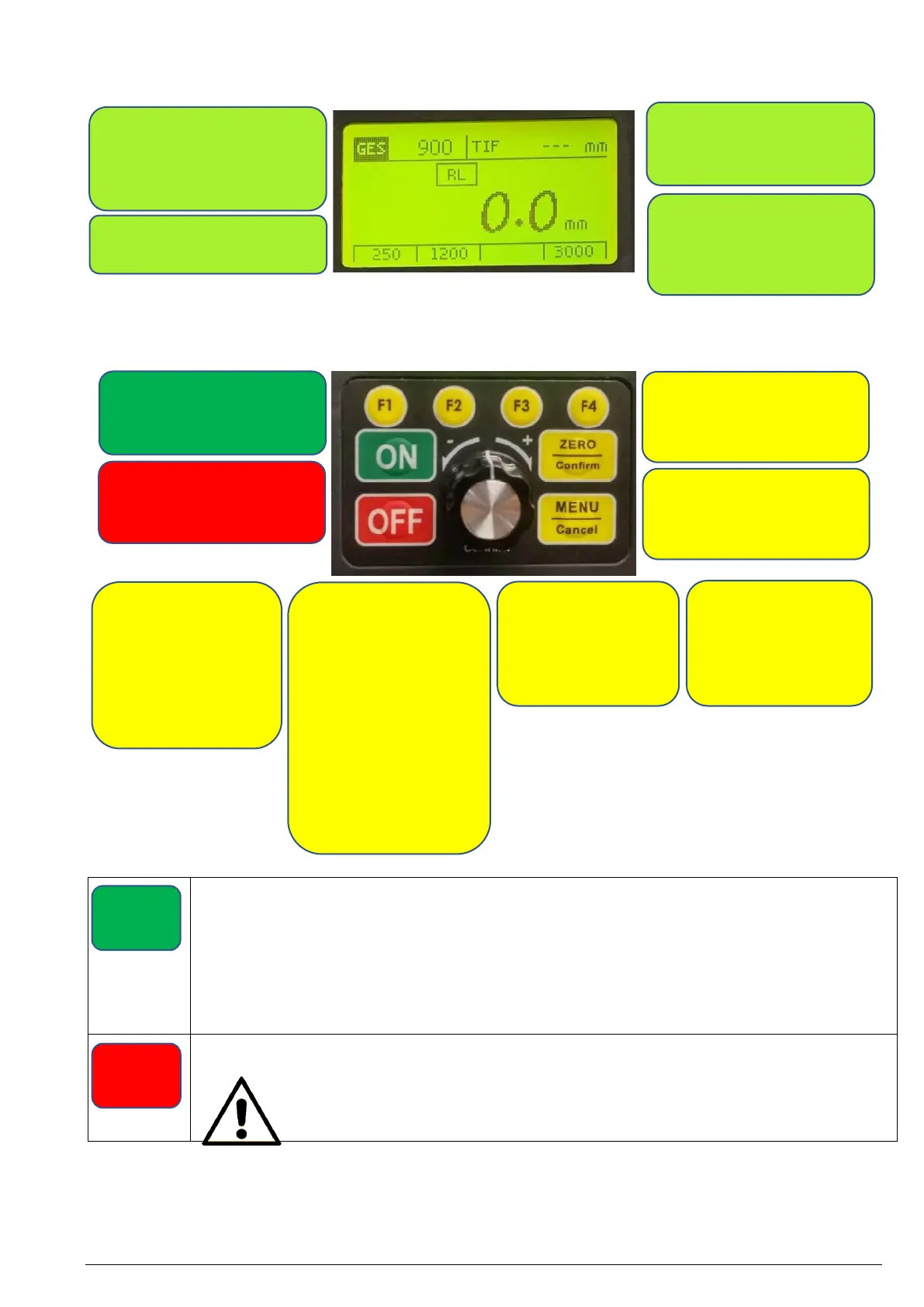
Display elements on home screen
Controls
Press the green <ON> button to start the pillar drill at the speed currently set. Always check that the
correct speed is set and make sure that the workpiece is securely mounted.
When the machine is first switched on, it is set at the factory-set default speed #2D (900 rpm).
Whenever the machine is disconnected from the power supply, the machine will start at the default
speed. The spindle can only be restarted once <ON> button is pressed.
When the <ON> button is pressed, the screen will display the set speed and direction of rotation for
two seconds before displaying the current speed.
Press the red <OFF> button to stop the spindle and reset the user interface.
Note:
The <ON> and <OFF> buttons only switch the motor on and off. The pre-set speed
will remain until it is adjusted or until the computer is switched off.

GES:
Predefined speed
(default #2D)
TIF:
User set depth
RL:
Appears in the top centre
when the reverse mode is
activated.
F1:
Favourite speed #1 /
Scroll up in menu /
Custom function
F2:
Favourite speed #2 /
Scroll down in menu /
Custom function
Note:The favourite
speed #2D is the
standard starting
speed
- - - mm:
Current vertical position of
quill
ON:
OFF
ON:
Start / Reset
OFF:
Stop / return to the main
screen
ZERO / Confirm:
Set zero point / Confirm
adjustment
MENU / Cancel:
Open menu / One level
back / Cancel
F3:
Favourite speed #3 /
Custom function
F4:
Favourite speed #4 /
Custom function

Other manuals for Teknatool Nova Voyager DVR

Related product manuals