Need help?
Do you have a question about the Teknetics Omega 8500 and is the answer not in the manual?
Reference to a metal being "eliminated" means the detector will not emit a tone, nor light up an indicator, when a specified object passes through the coil's detection field.
When the detector emits different tones for different types of metals, and when the detector "eliminates" certain metals, we refer to this as the detector "discriminating" among different types of metals.
A relic is an object of interest by reason of its age or its association with the past. Many relics are made of iron, but can also be made of bronze or precious metals.
Iron is a common, low-grade metal that is an undesirable target in certain metal detecting applications. Examples of undesirable iron objects are old cans, pipes, bolts, and nails.
Metals which are made of, or contain, iron.
Pinpointing is the process of finding the exact location of a buried object. Long-buried metals can appear exactly like the surrounding soil, and can therefore be very hard to isolate from the soil.
Discarded pull-tabs from beverage containers are the most bothersome trash items for treasure hunters. They come in many different shapes and sizes.
Ground Balancing is the ability of the detector to ignore, or "see through," the earth's naturally occurring minerals, and only sound a tone when a metal object is detected.
The armrest may be moved forward or backward by removing the single screw and nut and then repositioning the 2-piece armrest.
The strap is available for purchase as a separate accessory. Some users prefer to use the strap when swinging the detector vigorously.
Expect 20 to 25 hours of life from a 9-volt alkaline battery, longer if using headphones. Rechargeable batteries provide about 8 hours of usage per charge.
You may notice the speaker volume drop while one battery segment is illuminated. With one segment flashing, low speaker volume will be very apparent.
The remaining battery life is proportional to the percentage of the battery icon illuminated.
Alkaline batteries may be disposed of in a normal waste receptacle or recycled. Non-Alkaline batteries should be recycled.
List of items required for the demonstration: Nail, Nickel, Zinc Penny, and Quarter.
Instructions on placing the detector for the demonstration, keeping it away from interference sources.
Procedure to turn on the detector and set the GAIN knob to the 12:00 position.
Instruction to turn the THRESH knob counterclockwise until it clicks.
Demonstrates different tones for Nail, Nickel/Zinc Penny, and Quarter.
Activates DISC LVL mode, showing 'IRON' and 'FOIL' indicators.
Demonstrates that the nail will not be detected as it has been discriminated out.
Activates DISC LVL, disappearing IRON, FOIL, NICKEL, P-TAB, S-CAP, and ZINC.
Demonstrates that the nickel will not be detected.
Activates NOTCH, making 'NICKEL' start flashing.
Demonstrates that the nickel is now detected again, having been 'notched in'.
Places the detector in All Metal Mode and explains interaction with target pitch/volume.
Explains motion is not required and audio tone, depth display.
Procedure to reset the detector to original factory default settings.
Signals from ground minerals can interfere with metal object signals. Detector needs calibration to specific ground conditions.
How to ignore undesirable items like foil, nails, and pull-tabs using tone sounds or discrimination.
Different objects induce different tones and are classified on display. Requires motion to detect.
Relative depth displayed in motion mode. More accurate depth in Pinpoint mode.
Electromagnetic energy from other devices can interfere with the detector. Reduce sensitivity via GAIN and THRESHOLD controls.
Details the 1/4-inch headphone jack and its function.
Using headphones facilitates detection of weakest signals, extends battery life, and improves audio clarity.
Detailed explanation of the LCD display elements and control buttons/knobs.
How to turn the detector on/off and adjust the Gain setting for sensitivity.
Press-and-hold key pad to Ground Balance automatically.
Press-and-hold to pinpoint target and view depth. Alternate function for advanced options.
Click to enter Disc/AM mode. Turn knob to increase THRESHOLD.
Press to activate menu and change items. Press-and-hold to momentarily change modes.
Press keypads to modify active menu item or press-and-hold for continuous adjustment.
Detailed explanation of the ON/OFF/GAIN and DISC/AM/THRESH control knobs.
Explanation of touchpad controls including GND GRAB, PINPOINT, and their functions.
Steps to pinpoint a target's exact location by moving the searchcoil slowly across it.
Allows elimination of metal objects from detection, adjustable from 0 to 80.
Changes detection status of target categories in Discrimination Mode.
Audio response limited by volume setting, affects all modes. Adjustable range is 0 to 10.
Adjusts volume of each target category independently. Functions only in DISCRIMINATION Mode.
Allows 4 settings with varying filters to increase depth under certain conditions.
DEEP Mode settings can affect detector gain, especially in All Metal Mode. May require threshold adjustment.
Allows manual change of ground balance setting. Active only in All Metal Mode.
Program an automatic Ground Grab offset, positive or negative. Visible indicator on LCD.
Offers 5 pre-set tone variations to choose from in Discrimination Mode.
Provide varied audio tones. d5 eliminates proportional audio for enhanced detection of deep targets.
In All Metal Mode, varies pitch of VCO base tone by selecting one of four pre-set frequencies.
Shifts frequency to eliminate chatter or noise. May require re-ground balancing.
Adjustable backlight option, levels 0 to 5. Drains battery faster.
Saves settings when detector is off, except backlight and ground balance.
Restores all original factory default settings. Requires turning off and on while holding a button.
Process of cancelling unwanted signals from ground minerals while detecting metal objects.
Step-by-step guide to performing automatic ground balancing using the GND GRAB button.
Indicates amount of ground mineralization, expressed as magnetite volume concentration.
Graphic indicating if ground balance setting needs adjustment. Compares ground phase value with internal setting.
Chart showing how to adjust ground setting based on bars appearing and sounds heard.
LCD shows probable identification and depth of target. Consistent identification indicates repeatable signals.
Gold objects register toward middle or left-of-center. Gold flakes under iron, small gold under foil or 5¢.
Silver objects register to the right, under DIME or QTR.
All sizes of iron objects register on the far-left. Indicates items like nails or historic iron relics.
Aluminum foil registers as foil. Small broken pull tabs may also register here.
Newer pull-tabs and many gold rings register here.
Older pull tabs and medium size gold rings register here.
Older screw caps and large gold rings register here. Some non-U.S. coins also register here.
Medium conductivity objects and many non-U.S. coins are classified here.
Three-digit indicator in Discrimination Mode, two-digit in All Metal Mode.
Calculates four independent numerical Target-IDs per target: one primary and three secondary.
Table listing common target values and their possible objects, for recognition.
Steps to verify a target's identification by circling it and observing tone/Target-ID consistency.
Steps to pinpoint a target location by sweeping in side-to-side and then cross patterns.
Steps to identify target's exact location by moving searchcoil slowly and listening for loudest sound.
Procedure to further narrow the response pattern by releasing and re-pressing the Pinpoint button.
Explains drift in Pinpoint Mode sensitivity and the need for periodic retuning.
Details the terms and conditions of the 5-year limited warranty for the metal detector.
Requirement for making a warranty claim. Liability is limited to replacing or repairing the detector.
Instructions on contacting First Texas Products for a Return Authorization (RA) Number.
Rugged double-stitched nylon bag with zip-pocket for accessories.
Camo pouch with two inside pockets and belt.
Utilizes 1/4-inch stereo & 1/8-inch plug. Compatible with all Teknetics® models.
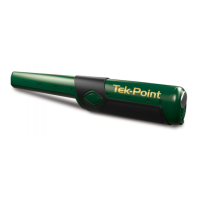
Pinpoints exact location of buried metal objects with audio signal and vibrator.
Tempered steel head, 10" long, with a super magnet to discriminate iron targets.
List of available replacement and accessory searchcoils.
Specially made to protect your coil from abrasion and damage.
High quality heat-treated tempered steel digging tool with a durable sheath.
100% cotton with Teknetics® Logo. Available in multiple sizes.
One size fits all baseball cap with Teknetics® logo.
Specially made to protect the detector from weather.
Details of Gold, Deluxe, and Hardrock Kits and included items.
 General
| Operating Frequency | 7.8 kHz |
|---|---|
| Display | LCD |
| Discrimination | Adjustable |
| Pinpoint Mode | Yes |
| Headphone Jack | 1/4" |
| Type | VLF |
| Audio Output | Speaker and Headphones |
| Battery Type | 9V Alkaline |
| Target ID | Yes |
| Waterproof | Search coil is waterproof |
| Ground Balance | Automatic and Manual |
| Search Coil | 11" DD |

 To Next Page