a. Open the Sash to the normal operating height and adjust the face velocity to the
normal operating value using a calibrated instrument to check the value.
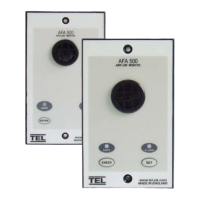
b. Press and hold the Enter button for 5 secs to go into the Calibration mode. This is
indicated by both Red and Green LEDS flashing on/off together with the audible
alarm sounding ( ‘Beep’ on/off 4 times every 1 sec ).
c. To initiate the normal airflow (100%) calibration press and hold the ENTER and the
SET button at the same time. The unit will then sample the normal airflow for a
5 sec period during which time the Green LED goes off and the Red LED flashes
on/off. The audible alarm continues to sound during this period and if the sampling
is successful will give a two tone beep at the end of the period and the unit will
then go automatically into the higher airflow calibration mode.
If the buttons are released during the sampling period or if the airflow is fluctuating
more than the pre-set value the audible alarm will give a lower frequency buzzing
sound for a short period and then go back into the calibration mode. If this occurs
re-press the ENTER and SET buttons to repeat the airflow sampling.
d. The higher airflow calibration mode is indicated by both Red and Green LEDS
flashing on/off together with the audible alarm sounding ( ‘Beep’ on/off for 2 secs
every 10 secs ).
Close the Sash down until the face velocity rises to one and a half times the
normal operating value used in a. above using a calibrated instrument to check
the value
To initiate the higher airflow (150%) calibration press and hold the ENTER and the
SET button at the same time. The unit will then sample the higher airflow for a
5 sec period during which time the Green LED goes off and the Red LED flashes
on/off. The audible alarm continues to sound during this period and if the sampling
is successful will give a two tone beep at the end of the period and the unit will
then go automatically into the Run mode.
If the buttons are released during the sampling period or if the airflow is fluctuating
more than the pre-set value the audible alarm will give a lower frequency buzzing
sound for a short period and then go back into the calibration mode. If this occurs
re-press the ENTER and SET buttons to repeat the airflow sampling.
The unit will now function and go into the ALARM condition if the Fume
Hood face velocity falls below 80% of the normal operating value.
2.2 Calibration Notes :-


 To Next Page