GB
Function
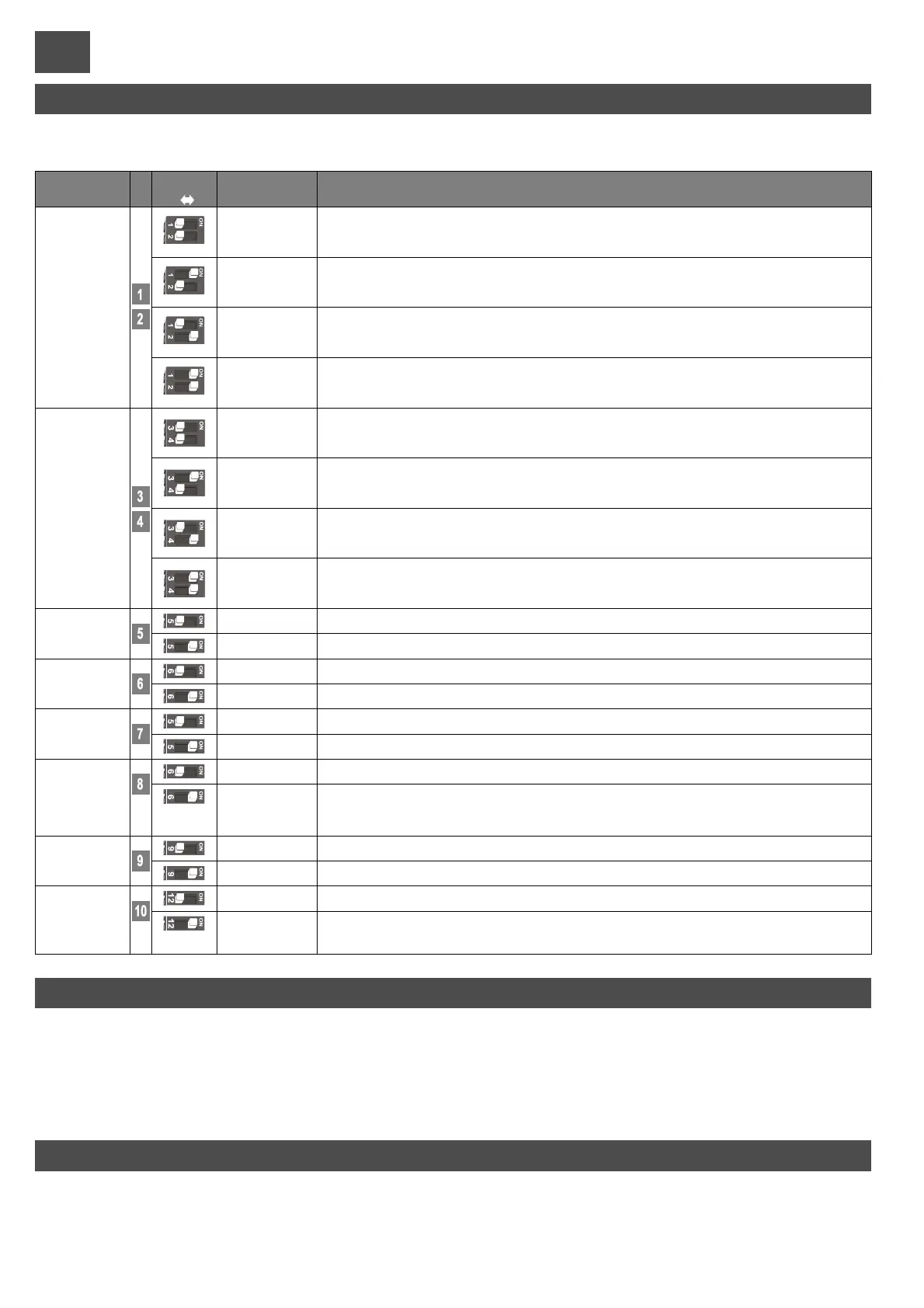
n. Off On
Descrption
Notes
During opening, upon pressing the P/P button the gate stops, pressing it again the gate closes.
During closing, upon pressing the P/P button the gate stops, pressing it again the gate opens.
During opening, upon pressing the P/P button the gate stops for a few seconds and then closes.
During closing, upon pressing the P/P button the gate stops for a few seconds and then opens.
During opening, pressing the P/Pbutton has no effect. During the pause, pressing the P/Pbutton has no
effect.
During closing, upon pressing the P/P button the gate stops for a few seconds and then opens.
During opening, pressing the P/Pbutton has no effect. During the pause, upon pressing the P/Pbutton the
gate closes.
During closing, upon pressing the P/P button the gate stops for a few seconds and then opens.
Photocell
Always opens
“Condominium”
Pedestrian
access
OFF
OFF
OFF
OFF
OFF
ON
ON
ON
ON
ON
Opens-Closes
with no reversal
during opening
Clock
Open - Close
Safety edge
Open - Stop -
Close
The flashing light operates together with the motor.
After one complete opening, the control unit only closes again with a manual control.
The flashing light operates 5 seconds before any operation.
See text at page 42.
After one complete opening, the control unit closes automatically after the programmed pause time.
The m. brake serves to overcome the inertia of heavy aut. systems. When the brake is enabled it activates
at the end of every m
The activation of photoelectric cell reduces the pause time for whatever is value previously was to 2
seconds.
Preflash
Photo test
Jolly
input mode
Step-by-step
input
and
radio channel
mode (CH1)
Re-closure
Timer
Brake
Reclosing after
the
photoelectric
cells
CONFIGURATION DIP-SWITCHES
Safety edge activation reverses the direction for a few seconds. After safety edge activation the control
unit locks; re-closing is cancelled. Use a N.C. contact
Closes the gate when the contact is opened and opens when the contact is closed.
During both opening and closing, activation of this photocell stops the gate until it is reset.
The next movement is always in the opening direction. Use a N.C. contact
The gate open spartially for a programmable time (see“pedestrianopeningprogramming”).
Use a N.O.contact.
OFF
ON
There is no slowdown in the last part of travel.
With the slowdown function connected, the motor halves its speed towards the end of every gate movement.
Slowdown
Select the options required and perform a reset (part. 15, fig. 1) to render the changes operational.
35
EN12445requiresthateveryautomationsystem must pass impact tests measured with a specialinstrument.
Carryouttheimpact tests andchange the encoder sensitivity through the trimmer (part 8 fig.1).
If adjustments are insufficient to make values fall within the graph indicated by the above standard, we recommend installing a soft
rubberprofileon theleadingedge of the gatein order to soften impact.
Ifthe requirements ofthestandard can stillnot be met after having adjusted the sensitivity andmountedthe rubber profile, alternative
devicesmustbemounted,such as a safety edge ontheleadingedge of the gate.
FORCE ADJUSTMENT
The soft-start function determines a gradual start of movement without jolts on the gate. This function may in any case be bypassed
byinsertingthe jumperJp1 (part9 of Fig. 1).
Attention:byactivating jumperJp1themotorforcewill always be at the maximum.
SOFT START


 To Next Page