28 en | Installation TA74 User Manual
© TeleAlarm SA TA74_UM_EN_V2.5_2019.09_Final
5.3.6 Internal input/output
(TA74 IO and TA74 GSM IO only)
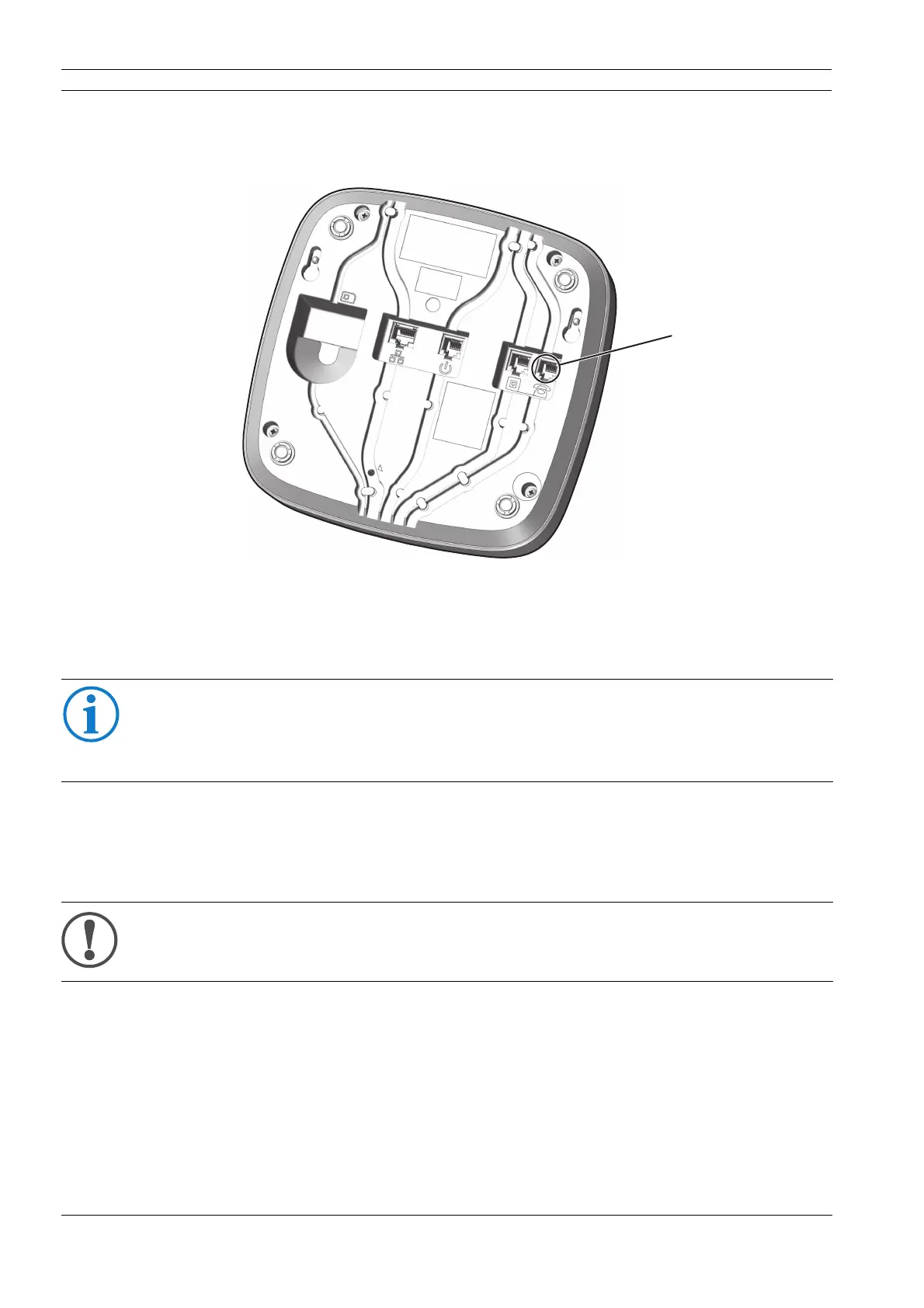
Use the socket of the external telephone (2) for the internal input/output.
1. Remove the power plug from the socket (6); see figure in section 5.3.7 "Power
connection".
2. Connect the external device to the I/O cable.
3. Insert the plug of the I/O cable into the corresponding socket (2) on the TA74. Feed the
cable through the cable channel and through the opening on the back of the device.
INFO
You cannot connect an external telephone to socket (2).
However, it is possible to connect an external telephone to the PSTN connector together
with the phone line, using a special splitter. The splitter can be ordered from TeleAlarm.
NOTE
The internal date and time are erased and must be set again after reconnection.


 To Next Page