EasyManua.ls Logo

Teleco WFT400 - User Manual

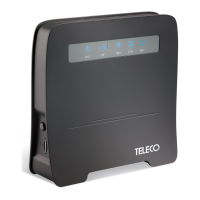
Teleco WFT400
68 pages
Go to English
Print Icon
To Next Page IconTo Next Page
Loading...
WFT400
Rev. 001 - 09/2019

Table of Contents

Question and Answer IconNeed help?

Do you have a question about the Teleco WFT400 and is the answer not in the manual?

Summary

GENERAL INFORMATION

Safety precautions

Covers health and safety advice, including electromagnetic interference and device proximity.

Intended use

Explains the router's purpose for internal network connectivity and connecting multiple devices.

Unintended uses

Lists activities considered misuse of the router, such as bypassing safety devices.

GLOSSARY

SPECIFICATIONS

Technical Specifications

Provides detailed hardware, software, and environmental specifications of the WFT400.

DESCRIPTION OF WFT400

Connectors and Controls

Details physical ports, buttons, and status indicators on the router.

OPERATING MODES

SWITCHING ON THE WFT400

Configuration

Instructions for accessing and using the router's web-based graphical user interface.

Connecting to the WiFi network

Provides default WiFi network name (SSID) and password for connection.

Internet access via the WAN port

Steps for setting up internet connection via an Ethernet WAN port.

TROUBLESHOOTING

Restoring the default factory configuration

Guide to reset the router to its original factory state using the reset button.

How to connect via the WPS function (WiFi Protected Mode)

Explains the WPS method for establishing a secure WiFi connection.

The router does not work after configuration

Troubleshooting steps for issues encountered after the initial setup.

The internet connection indicator is ON but the WiFi LED is OFF

Addresses a specific problem with WiFi connectivity indicators and signal quality.

I cannot access the graphical interface

Solutions for problems preventing access to the router's administration page.

Care and maintenance

CERTIFICATIONS

Summary

GENERAL INFORMATION

Safety precautions

Covers health and safety advice, including electromagnetic interference and device proximity.

Intended use

Explains the router's purpose for internal network connectivity and connecting multiple devices.

Unintended uses

Lists activities considered misuse of the router, such as bypassing safety devices.

GLOSSARY

SPECIFICATIONS

Technical Specifications

Provides detailed hardware, software, and environmental specifications of the WFT400.

DESCRIPTION OF WFT400

Connectors and Controls

Details physical ports, buttons, and status indicators on the router.

OPERATING MODES

SWITCHING ON THE WFT400

Configuration

Instructions for accessing and using the router's web-based graphical user interface.

Connecting to the WiFi network

Provides default WiFi network name (SSID) and password for connection.

Internet access via the WAN port

Steps for setting up internet connection via an Ethernet WAN port.

TROUBLESHOOTING

Restoring the default factory configuration

Guide to reset the router to its original factory state using the reset button.

How to connect via the WPS function (WiFi Protected Mode)

Explains the WPS method for establishing a secure WiFi connection.

The router does not work after configuration

Troubleshooting steps for issues encountered after the initial setup.

The internet connection indicator is ON but the WiFi LED is OFF

Addresses a specific problem with WiFi connectivity indicators and signal quality.

I cannot access the graphical interface

Solutions for problems preventing access to the router's administration page.

Care and maintenance

CERTIFICATIONS

Teleco WFT400 Specifications

General IconGeneral
BrandTeleco
ModelWFT400
CategoryWireless Router
LanguageEnglish