6. SWITCHING ON THE WFT400
1. Press and hold the ON/OFF button for 3 sec-
onds to switch o the router.
2. Insert the SIM CARD, as shown in Fig. 2
3. Connect the power cable.
4. Press the ON/OFF button and wait for the
router to connect to the mobile phone net-
work of the operator associated with the SIM
CARD.
Insert or remove the SIM CARD with the
router switched o. If the router is on,
the SIM CARD may be damaged and
become unusable.
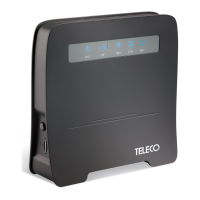
The LEDs on the front panel provide indications
on the operational status of the router.
LED Status
SYS
Power supply
On: Power supply present
O: Power supply not present
RF Indication of the RF signal reception strength
WiFi
On: WiFi enabled
O: WiFi not enabled
Flashing: attempting WPS connection
ETH
On: Concrete LAN or PC connection
O: Not connected with LAN or PC network
Flashing: Data transfer
NET
Wireless connection status indicator
On: Connected to the network
O: Not connected to the network
Flashing: data transfer
Tab. 1 - WFT400 LED status indicators
6.1 Conguration
Congure the router using the Graphical User In-
terface (GUI) accessible via web browser by typ-
ing the address http://192.168.1.1.
Use the following login credentials to access the
conguration panel:
Username: admin
Password: admin
All the information for the GUI connection, the
user address, password and IP router is displayed
on a label on the back of the router.
Once you have entered, change the pass-
word to prevent unauthorized access.
6.2 Connecting to the WiFi network
The login credentials for the router WiFi network
are:
SSID: WFT400-xxxx;
Password: 12345678.
Change the SSID and WiFi network ac-
cess password using the GUI, in order to
prevent unauthorized access.
6.3 Internet access via the WAN port
1. Connect the WAN port on the back of the rout-
er to the Ethernet socket via an Ethernet ca-
ble with an RJ45 connector.
2. Congure the access parameters for the PP-
PoE/Static/DHCP internet network.
- 8 - Rev.001
EN
WFT400
Translation of the original instructions


 To Next Page