TSA-200 / TSA-200XT / TSA-240 / TSA-240XT
© 2010 – 2014 Telefire Fire & Gas Detectors Ltd Revision 1.06 July 2014
Page 62 of 79
17 Support Functions Programming
17.1 Menu Structure – Access Level 2
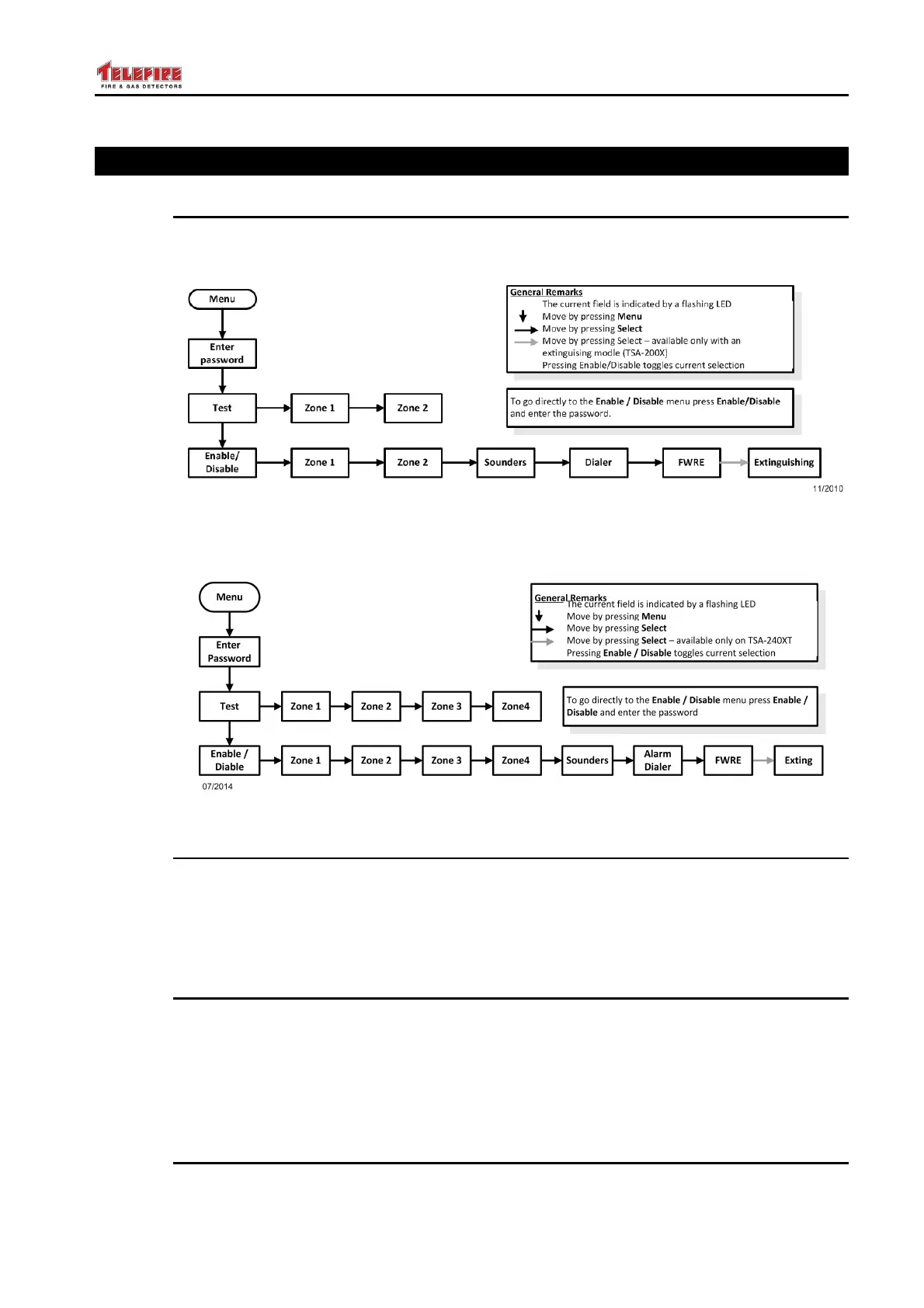
17.1.1 TSA-200 / TSA-200XT
Figure 26 TSA-200 / TSA-200XT Programming Menu Structure – Access Level 2
17.1.2 TSA-240 / TSA-240XT
Figure 27 TSA-240 / TSA-240XT Programming Menu Structure – Access Level 2
17.2 Enabling or Disabling an Input or Output
Press Menu to enter programming mode and enter the password (default 1111).
Press Menu twice to go to the Enable/Disable menu.
Press Select until the Fault LED for the appropriate zone or output will flash.
Press Enable/Disable to disable or enable the zone or output.
17.3 Field Test
Press Menu to enter programming mode and enter the password (default 1111).
Press Menu to go to the Test menu.
Press Select until the Fault LED for the appropriate zone will flash.
Press Enable/Disable to disable or put the zone in test mode.
Repeat the process to exit the zones from test mode and return to normal operation
17.4 Changing the Password
The password can be changed via a PC program.



 To Next Page