26 Telepass SAT| Operating instruction v. 1.11 OCT 2020|© 2016-2020 Telepass
EN
Main messages
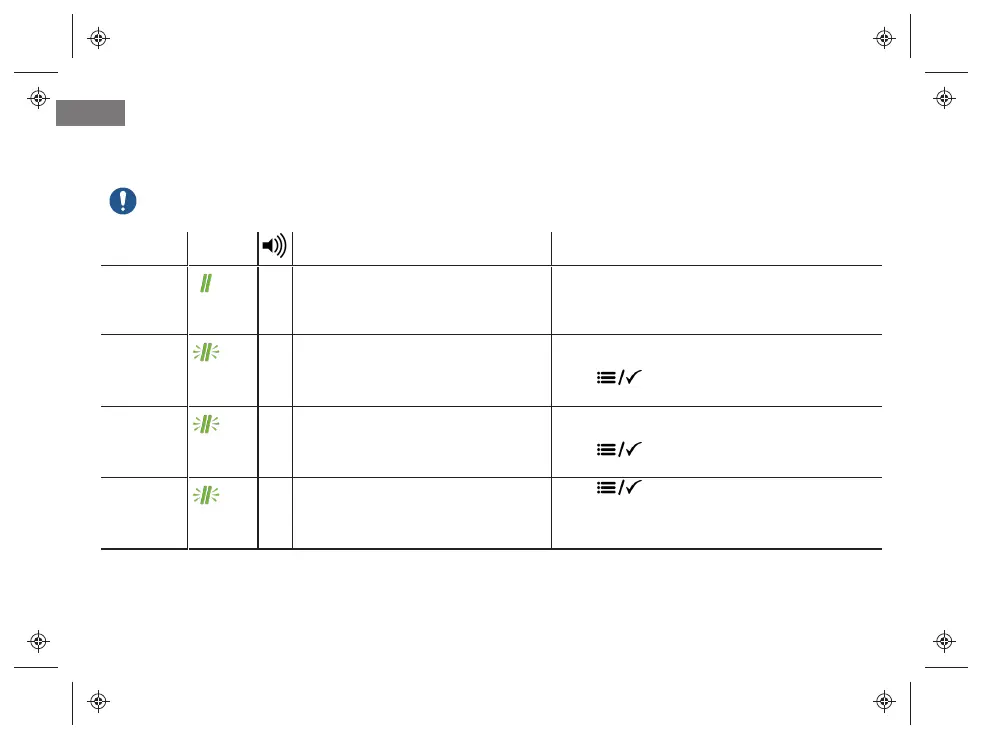
The device may display the following messages accompanied by sound signals.
Any error code displayed shall be noted and reported to the service provider.
Message LED Description Required action
Outside of
toll
coverage
area
(green)
- Road segment not covered by Telepass
service.
Pay the transit with another means of payment.
<service
name>
Activated
(flashing
green)
2 E-toll payment service activated by the
service provider.
Toll roads may be used for the indicated
service.
Press to clear the message.
<service
name>
Deactivated (flashing
green)
2 E-toll payment service disabled by the
service provider.
Toll roads may not be used for the indicated
service.
Press to clear the message.
Info
vehicle
modified
(flashing
green)
2 Vehicle data altered by the service
provider.
Press to clear the message.


 To Next Page