EasyManua.ls Logo

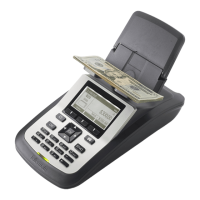
Tellermate TY - User Manual

Default Icon
5 pages
Print Icon
To Next Page IconTo Next Page
Loading...
TY Instructions 1 3/20/12
TY Counting Guidelines for New $50CAD Bills
The Bank of Canada introduced the new $50CAD bill on March 26, 2012 and you will begin to see increasing
numbers of these bills in circulation. Before you can accurately count these bills on your Tellermate TY
machine, you must calibrate your machine and enable the $50N denomination option. Instructions to do so
are on the following page.
Your Tellermate cash counting process will remain the same with the addition of the following steps:
The new $50 bills MUST be counted separately from the older bills on the Tellermate
equipment.
Count old bills on $50 denomination.
Count new bills on $50N denomination.
NOTE: If you only have a few NEW $50CAD bills, you may follow the count instructions below:
Separate the old $50 bills from the new $50 bills
Select $50 denomination
Count older bills first
Leave older bills on the Platform and add the new bills 2 at a time
Remove all the bills together
If you require assistance, please call the Tellermate Help Desk:
1-800-TELMATE
Question and Answer IconNeed help?

Do you have a question about the Tellermate TY and is the answer not in the manual?

Summary

TY Counting Guidelines for New $50 CAD Bills

General Counting Process for $50 CAD Bills

Outlines the process for counting new $50CAD bills, emphasizing separation from older bills and using specific denominations.

Counting Few New $50 CAD Bills

Provides alternative counting steps for situations with only a few new $50CAD bills, including manual bill handling.

TY Calibration Instructions for the new $50 CAD Bill

Calibrating the $50 N Denomination

Step-by-step guide to calibrate the Tellermate TY machine for the new $50CAD bill denomination ($50N).

TY Counting Guidelines for New $1 & $2 CAD Coins

$1 CAD Coin Counting

Instructions for counting new $1 CAD coins, including separation and adding coins to the cup.

$2 CAD Coin Counting

Instructions for counting new $2 CAD coins, detailing the process of adding coins to the cup after beeps.

TY Calibration Instructions for the new $1 & $2 CAD Coins

Calibrating for New $1 Coins

Procedure to calibrate the Tellermate TY machine for counting new $1 CAD coins, including weight saving.

Calibrating for New $2 Coins

Procedure to calibrate the Tellermate TY machine for counting new $2 CAD coins, including weight saving.

Overview

The Tellermate TY is a cash counting machine designed to accurately count Canadian currency, including new $50 bills, $1 (Loonies), and $2 (Toonies) coins. It requires calibration for new currency to ensure accurate counting.

Function Description

The primary function of the Tellermate TY is to weigh and count currency. It supports separate counting for different denominations and types of bills (old vs. new) and coins. The machine uses weight-based counting, which requires calibration to ensure the accuracy of counts for specific denominations. Once calibrated, users place currency on a "hod" (platform) or in a "TellerCup" (for coins), and the machine calculates the quantity.

Important Technical Specifications

The document does not explicitly list technical specifications such as weight capacity, dimensions, or power requirements. However, it implies the following:

  • Currency Support: Canadian $50 bills (old and new), $1 coins (Loonies, old and new), and $2 coins (Toonies, old and new).
  • Counting Method: Weight-based.
  • User Interface: Features a display screen and physical buttons including "ON-OFF," "$," "MENU," "ENTER," "CE," "WRAP," "END," "BANK," "COINS," and "BILLS."
  • Calibration Capability: Essential for new currency types to maintain accuracy.

Usage Features

For New $50 CAD Bills:

  • Separate Counting: New $50 bills must be counted separately from older $50 bills.
  • Denomination Selection: Users must select "$50" for old bills and "$50N" for new bills on the Tellermate equipment.
  • Calibration Process:
    1. Access the "Menu" screen by pressing the "MENU" key.
    2. Navigate to "Options" and press "ENTER."
    3. Select "Supervisor" using the "BILLS" key and press "ENTER."
    4. Enter a PIN (ON-OFF, ENTER, $, ENTER) to access the "Supervisor" screen.
    5. Select "Setup/Calibrate" and press "ENTER."
    6. Select "BILLS" and press "ENTER" to reach the "Press WRAP for Setup" screen.
    7. Scroll to and highlight "$50N" using the "BILLS" key.
    8. Press the "MENU" key to change the 'X' to a '✓' for "$50N."
    9. With "$50N" highlighted, press the "WRAP" key to enter the "Calibrate Bills" screen.
    10. Press "ENTER" to go to the "Calibrate $50N" screen.
    11. The display will prompt "Put 10 loose Bills on hod and press ENTER." Place 10 new $50 bills on the hod and press "ENTER."
    12. The screen will then display "Add another 5 to 10." Users should remove the bills from the hod at this point.
    13. Scroll to "Save new weight" using the "BILLS" key and press "ENTER."
    14. Press "END" repeatedly to return to the Count screen. The machine is now set up for $50N.
  • Counting Few New $50 Bills (Alternative Method):
    1. Separate old and new $50 bills.
    2. Select "$50" denomination.
    3. Count older bills first.
    4. Leave older bills on the platform and add new bills two at a time.
    5. Remove all bills together.

For New $1 & $2 CAD Coins:

  • Calibration Requirement: Calibration is necessary for new $1 and $2 coins to prevent miscounts.
  • Counting Mixed Coins:
    • $1 CAD Coin:
      1. Select the "$1" denomination.
      2. Empty the coin cup into another shallow container.
      3. Place 5-7 mixed coins (new and old) in the coin cup and place it on the Tellermate.
      4. After a beep, add another 5-7 coins.
      5. Continue adding 5-7 coins after each beep until all coins are in the cup.
      6. Remove the coin cup and count the next denomination.
    • $2 CAD Coin:
      1. Select the "$2" denomination.
      2. Empty the coin cup into another shallow container.
      3. Place up to 14 mixed coins (new and old) in the coin cup and place it on the Tellermate.
      4. After a beep, add up to another 14 coins.
      5. Continue adding up to 14 coins at a time after each beep until all coins are in the cup.
      6. Remove the coin cup and count the next denomination.
  • Calibration Process for $1 Coins:
    1. Requires 5 new $1 coins, 5 old $1 coins, and 1 TellerCup.
    2. Access the "Menu" screen by pressing the "MENU" key.
    3. Navigate to "Options" and press "ENTER."
    4. Select "Supervisor" using the "BILLS" key and press "ENTER."
    5. Enter a PIN (ON-OFF, ENTER, $, ENTER) to access the "Supervisor" screen.
    6. Select "Setup/Calibrate" and press "ENTER."
    7. Select "COINS" using the "BILLS" key and press "ENTER" to reach the "Press WRAP for Setup" screen.
    8. Scroll to and highlight "$1" using the "BILLS" key.
    9. With "$1" highlighted, press the "WRAP" key to enter the "Calibrate Coins" screen.
    10. Press "ENTER."
    11. The display will prompt "Put container on hod." Place an empty TellerCup on the hod.
    12. The display will then prompt "Put 10 Coins on hod and press ENTER." Place the 5 new $1 and 5 old $1 coins into the TellerCup on the hod, and then press "ENTER."
    13. The screen will display "Add another 5 to 10." Users should remove the TellerCup from the hod.
    14. Scroll to "Save new weight" using the "BILLS" key and press "ENTER."
    15. Press "END" repeatedly to return to the Count screen. The machine is now set up for $1.
  • Calibration Process for $2 Coins:
    1. Requires 5 new $2 coins, 5 old $2 coins, and 1 TellerCup.
    2. Access the "Menu" screen by pressing the "MENU" key.
    3. Navigate to "Options" and press "ENTER."
    4. Select "Supervisor" using the "BILLS" key and press "ENTER."
    5. Enter a PIN (ON-OFF, ENTER, $, ENTER) to access the "Supervisor" screen.
    6. Select "Setup/Calibrate" and press "ENTER."
    7. Select "COINS" using the "BILLS" key and press "ENTER" to reach the "Press WRAP for Setup" screen.
    8. Scroll to and highlight "$2" using the "BILLS" key.
    9. With "$2" highlighted, press the "WRAP" key to enter the "Calibrate Coins" screen.
    10. Press "ENTER."
    11. The display will prompt "Put container on hod." Place an empty TellerCup on the hod.
    12. The display will then prompt "Put 10 Coins on hod and press ENTER." Place the 5 new $2 and 5 old $2 coins into the TellerCup on the hod, and then press "ENTER."
    13. The screen will display "Add another 5 to 10." Users should remove the TellerCup from the hod.
    14. Scroll to "Save new weight" using the "BILLS" key and press "ENTER."
    15. Press "END" repeatedly to return to the Count screen. The machine is now set up for $2.
  • Limitations for Coins:
    • For $1 coins, it is no longer possible to check full rolls after calibration; coins must be counted loose by adding approximately 6 coins at a time to the TellerCup.
    • For $2 coins, it is no longer possible to check full rolls after calibration; coins must be counted loose by adding approximately 14 coins at a time to the TellerCup.
    • Full rolls of coins can be manually entered in the Roll Review option.

Maintenance Features

The document does not detail specific maintenance features like cleaning instructions or routine checks. However, it emphasizes the importance of calibration as a crucial step to maintain accuracy, especially when new currency types are introduced. This suggests that calibration is a key aspect of keeping the device functioning correctly.

For any assistance, users are directed to call the Tellermate Help Desk at 1-800-TELMATE. This indicates that technical support is available for troubleshooting and guidance, which can be considered a support-related maintenance feature.

Tellermate TY Specifications

General IconGeneral
BrandTellermate
ModelTY
CategoryCash Counter
LanguageEnglish

Related product manuals