What's
in
the
box
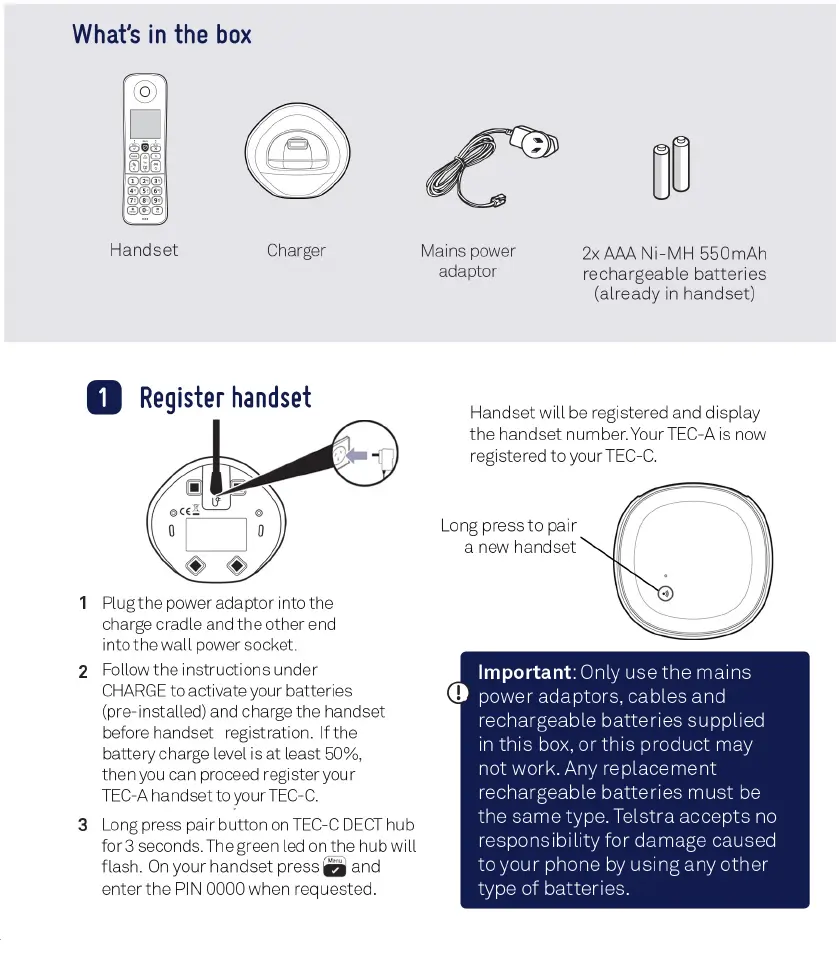
Handset
Charger
Mains
power
adaptor
2xAAANi-MH
550mAh
rechargeable
batteries
(already
in
handset)
1
Register
handset
1
Plug
the
power
adaptor
into
the
charge
cradle
and
the
other
end
into
the
wall
power
socket.
2
Follow
the
instructions
under
CHARGE
to
activate
your
batteries
(pre-installed)
and
charge
the
handset
before
handset
registration.
If
the
battery
charge
level
is
at
least
50%,
then
you
can
proceed
register
your
TEC-A
handset
to
your
TEC-C.
3
Long press
pair
button
on
TEC-C
DECT
hub
for
3
seconds.
The
green
led
on
the
hub
will
flash.
On
your
handset
press
S
and
enterthe
PIN
0000
when
requested.
Handset
will
be
registered
and
display
the
handset
number.
YourTEC-A
is
now
registered
to
your
TEC-C.
Important:
Only
use
the
mains
power
adaptors,
cables
and
rechargeable
batteries
supplied
in
this
box,
or
this
product
may
not
work.
Any
replacement
rechargeable
batteries
must
be
the
same
type. Telstra
accepts
no
responsibility
for
damage
caused
to
your
phone
by
using
any
other
type
of
batteries.
Long
press
to
pair
a
new
handset
What's
in
the
box
Handset
Charger
1
Register
handset
,,.
._
•
1 Plug
the
power adaptor into the
charge cradle and
the
other end
into
the
wa
ll
po
wer socket.
2 Follow
the
instructions under
CHARGE
to activate your batteries
(pre-installed) and charge the handset
before handset registration. If the
battery charge level is
at
least 50%,
then
you
can proceed register your
TEC
-A handset to your
TEC-C
.
3 Long press pair
button
on
TEC-C
DECT
hub
for 3 seconds. The green led
on
the
hub will
flash.
On
your
handset
press a and
enter
the
PIN 0000 when requested .
Mains power
2xAM
Ni-MH
550mAh
adaptor
rechargeable
batteries
(already
in
handset)
Handset will be registered and display
the
handset
number
. Your TEC-A
is
now
registered
to
yourTEC-C.
Long press
to
pair
a new handset



 To Next Page