Need help?
Do you have a question about the Telstra Easy Control TEC-A and is the answer not in the manual?
Details consumer rights for product failures and compensation for losses.
Guidance on proper disposal of the product at its end of life.
Essential precautions to prevent fire, electric shock, and injury during phone operation.
Equipment not designed for emergency calls during power failure; alternative arrangements needed.
Instructions for cleaning the handset and base with a damp cloth, avoiding harsh chemicals.
Explains Ringer Equivalence Number (REN) and its impact on line capacity.
Step-by-step process to pair the TEC-A handset with the TEC-C DECT hub.
Guide on how to initiate, answer, and end phone calls, including mute function.
Instructions for adjusting incoming speech volume and handset ringer volume/ringtone.
Accessing and dialing numbers from the list of the last 50 incoming calls.
Options to block calls by prefix, blacklist, or specific numbers from the call list.
Explanation of icons shown on the handset display, such as Alarm, Handsfree, and signal strength.
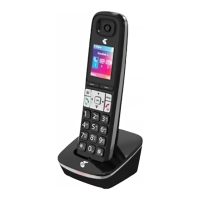
Description of key buttons like Menu, Redial, Calls, Vol, Mute, R, and number keys.
How to activate or deactivate the Do Not Disturb setting on the handset.
Instructions for dialing stored numbers using the speed dial buttons.
Steps to store new entries, add VIP contacts, and dial from the phonebook.
Guide on navigating the phone's menu system using the buttons.
Tips for entering letters, numbers, spaces, and switching case on the keypad.
Addresses issues like no dial tone, handset not charging, or no ring, with corresponding fixes.
Contact information for customer support and online help resources.
 General
| Network Technology | GSM / HSPA |
|---|---|
| 2G bands | GSM 900 / 1800 |
| 3G bands | HSDPA 850 / 2100 |
| Speed | HSPA |
| GPRS | Yes |
| EDGE | Yes |
| SIM | Mini-SIM |
| Card slot | microSD, up to 32 GB |
| Phonebook | Yes |
| Call records | Yes |
| Primary Camera | 2 MP |
| Video | Yes |
| Loudspeaker | Yes |
| 3.5mm jack | Yes |
| WLAN | No |
| GPS | Yes, with A-GPS |
| Radio | FM radio |
| USB | microUSB 2.0 |
| Browser | WAP 2.0/xHTML |
| Games | Yes |
| Colors | Black |
| Type | TFT |
| Internal | 512 MB RAM |
| Alert types | Vibration, MP3, WAV ringtones |
| Bluetooth | v2.1, A2DP |
| Messaging | SMS, MMS |
| Java | Yes |
| Battery | Removable Li-Ion battery |
| Stand-by | Up to 300 h |
| Talk time | Up to 5 h |
| Announced | 2013, August |


 To Next Page