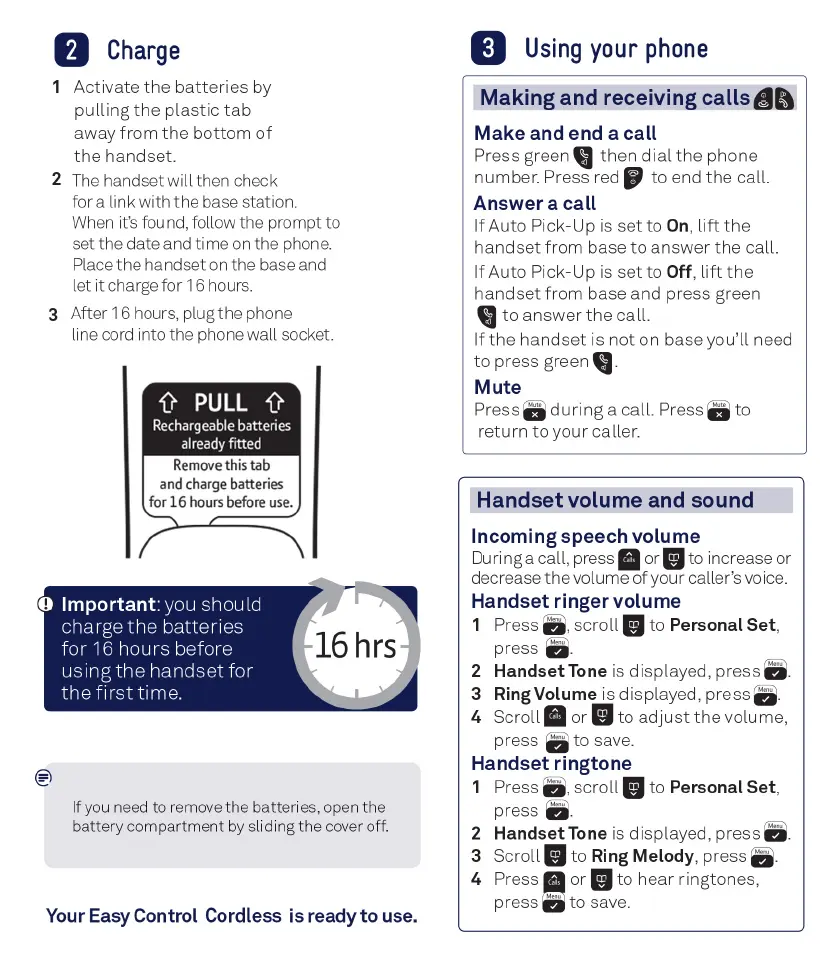
PULL
Rechargeable
batteries
already
fitted
Remove
this
tab
and
charge
batteries
for
16
hour
s
before
use.
2
Charge
1 Activate
the
batteries
by
pulling
the
plastic
tab
away
from
the
bottom
of
the
handset.
2
The
handset will then check
for a link with the base station.
When
it's
found, follow the prompt to
set the date and time
on
the phone.
Place the handset
on
the base and
let
it
charge for
16
hours.
3 After 16 hours, plug the phone
line
cord
into the phone wall socket.
D Important: you should
charge
the
batteries
for
16
hours before
using
the
handset for
the
first
time
.
•
If
yo
u need to remove
the
batteries, open
the
battery
co
mp
a
rtm
e
nt
by sliding
the
cover off.
Your
Easy
Control Cordless
is
ready to
use
.
3
Using
your
phone
Making and receiving calls
Make
and end a call
Press green
then
dial
the
phone
number. Press red
to
end
the
call
.
Answer a call
If
Auto Pick-Up
is
set
to
On
,
lift
the
handset
from
base
to
answer
the
call
.
If
Auto Pick-Up
is
set
to Off,
lift
the
handset
from
base and press green
to
answer
the
call
.
If
the
handset
is
not
on base you'll need
to
press green
Mute
Press
during
a call. Press
to
return
to
your
caller.
Handset volume and sound
Incoming speech volume
During a call, press
II
or
II
to increase or
decrease
the
volume
of
your caller's voice.
Handset ringer volume
1 Press D,
scroll
II
to Personal
Set
,
press
D-
2
Handset
Tone
is
displayed, press
a.
3 Ring Volume is displayed, press
a.
4
Scroll
II
or
II
to
adjust
the
volume,
press
a
to
save.
Handset ringtone
1 Press D,
scroll
II
to Personal
Set
,
press
D-
2
Handset
Tone
is
displayed, press
a.
3
Scroll
II
to
Ring
Melody
, press
D·
4 Press I or
II
to
hear
ringtones,
press
"'""
to
save.



 To Next Page