Open
redial
list.
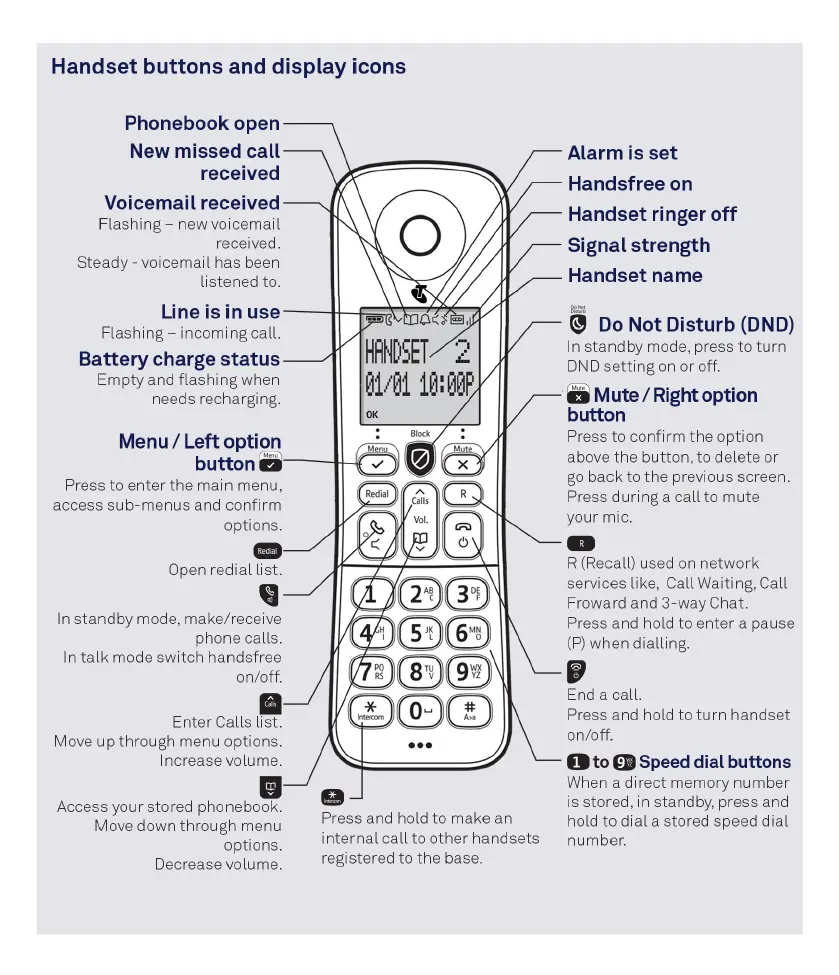
Handset buttons and display icons
Phonebook open
New missed call
received
Voicemail received
Flashing - new voicemail
recei
ved
.
Steady-
voicemail has been
listened to.
Line is in use
Flashing - incoming call.
Battery charge status
Empty and flashing when
needs recharging.
Menu/
Left option
button
Press to enter the main menu,
access sub- menus and confirm
options.
In
standby mode, make/receive
phone calls.
In
talk
mode switch handsfree
on/off.
II
Enter Calls list.
Move
up
through menu
opt
ions.
Increase volume.
ll
Access
yo
ur
stored phonebook.
Move down through menu
options.
Decrease volume.
a
Press a
nd
hold to make an
internal
ca
ll
to other handsets
registered to the base.
Alarm is set
Handsfree
on
Handset ringer
off
Signal strength
Handset name
=
~
Do
Not Disturb (DND)
In standby mode, press
to
turn
DND
setting
on
or off.
a
Mute/
Right
option
button
Press to
co
nfirm
the
option
above the button, to delete or
go
back to the previous screen.
Pre
ss
during a call to mute
yo
ur mic.
R (Reca
ll
) u
se
d on
net
wo
rk
-
se
rvices lik
e,
Call
Wa
iting, Call
Froward and 3-way Chat.
Press and hold to enter a pau
se
(P) when dialling.
IP
End
a
ca
ll.
Pre
ss
a
nd
hold to
turn
handset
on/off.
1
to
9
Speed dial buttons
When a direct memory number
is stored, in standb
y,
press and
hold
to
dial
a stored speed
dial
number
.



 To Next Page