EasyManua.ls Logo

Telstra Easy Control TEC-A - Phonebook and Keypad Usage; Phonebook Operations; Using the menu; Using the keypad

Telstra Easy Control TEC-A
8 pages
Print Icon
To Next Page IconTo Next Page
To Previous Page IconTo Previous Page
Loading...
Phonebo
ok
El
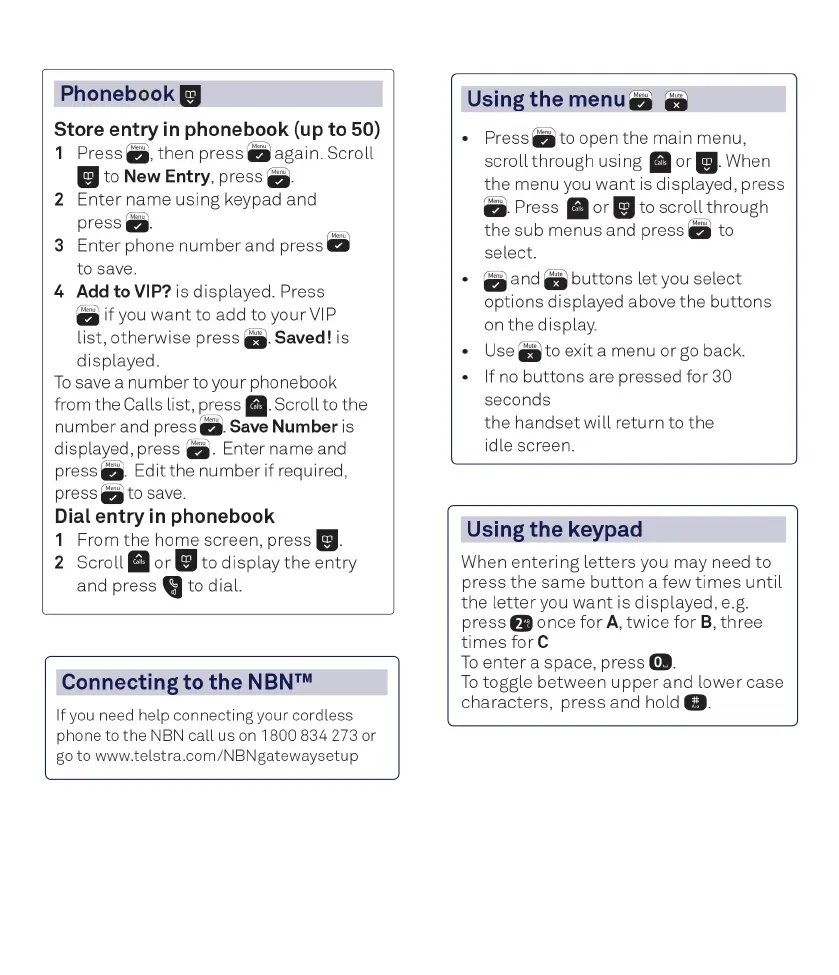
Store entry
in
phonebook
(up
to 50)
1 Press
fj
,
then
press a again.
Scroll
El
to
New
Entry, press
a-
2
Enter
name
using
keypad and
press
3 Enter phone
number
and press a
to save.
4 Add to VIP? is displayed. Press
if you
wantto
add to your
VIP
list,
otherwise
press
a-
Saved! is
displayed.
To
save a
number
to your phone book
from
the
Calls list,
press
■-
Scroll to
the
number
and press
a.
Save Number is
displayed, press
a-
Enter name and
press
a-
Edi
t the
number
if
required,
press
ato save.
Dial entry
in
phonebook
1 From
the
home screen, press
El-
2
Scroll■ or
or
El
to
display
the
entry
and
press
to dial.
\)
Connecting
to
the
NBN™
If
you
need
help connecting your cordless
phone
to
the
NBN
call
us
on
1800
834
273
or
go
to
www
.telstra.com/NBNgatewaysetup
Using
the
menu
a a
Press ato open
the
main menu,
scroll
through
using
or
El-
When
the
menu you
want
is displayed, press
a-
Press
■ or
or
El
to
scroll
through
the
sub menus and press a to
select.
a and a
buttons
let you select
options displayed above
the
buttons
on
the
display.
Use
g to exit a menu
or
go
back.
If
no
buttons
are pressed
for
30
seconds
the
handset
will
return to
the
idle screen.
Using
the
keypad
When
entering
letters
you may need
to
press
the
same
button
a
few
times
until
the
letter
you
want
is displayed, e.g.
press
2 once
for
A,
twice
for
B,
three
times
for e
To
enter
a space, press
0.
To
toggle between
upper
and
lower
case
characters, press and hold
II.

Related product manuals