4
|
TELUS SmartHome Security
How to use your alarm panel
Arming
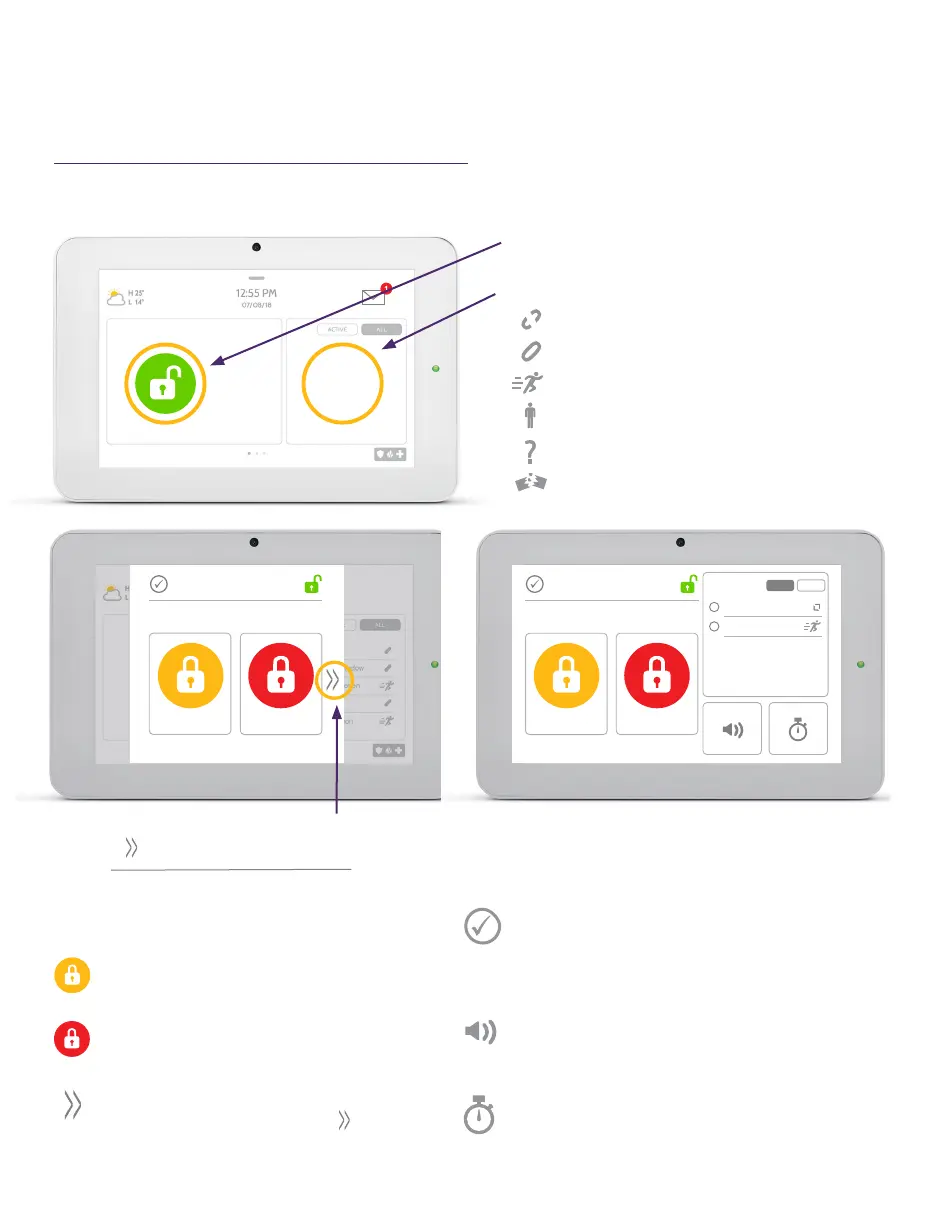
SYSTEM
DISARMED
Touch to access arming options.
Sensor status:
Open
Closed
Motion Active
Idle
Unreachable
Tampered
SMITH HOME
DISARMED
ARM STAY ARM AWAY
SMITH HOME
DISARMED
ARM STAY ARM AWAY
BYPASS
Front Door
Living Room Motion
EXIT SOUNDS
ON
ENTRY DELAY
ON
ALLACTIVE
See more options by touching the
“ “
icon on the right.
AR M STAY
AR M AWAY
Arming Options:
Quickly choose from “Stay” or “Away”.
Arming Stay - Arms doors and
windows only.
Arming Away - Arms doors, windows
and motions.
Additional Options - View additional
arming options by touching “ ” icon
on the right side.
Additional Arming Options:
Select these options before choosing your
arming type.
Bypass - Touch the circle next to a sensor to
bypass it during the arming sequence. All open
sensors will automatically bypass when arming.
Exit Sounds - The panel beeps as the timer
counts down. Silence these beeps before you
choose the arming type.
Entry Delay - The panel will give you time to
disarm once a “delay door” has been opened.
Turn this off with a touch.



 To Next Page