Page 9 of 12
Auto-tuning
The auto-tuning process is performed near the set point.
The process will oscillate around the set point during
the tuning process. Set the set point at a lower value if over-
shooting beyond the normal process value is likely to cause
damage.
Auto-tuning is applied in cases of:
• Initial setup for a new process
• The set point is changed substantially from the previous
auto-tuning value
• The control result is unsatisfactory
Operation:
1. The system has been installed normally.
2. Set the correct values for the setup menu of the unit, but
don’t set a zero value for PB and TI, or the auto-tuning pro-
gram will be disabled. The LOCK parameter should be set
at NONE.
3. Set the set point to a normal operating value, or a lower value
if overshooting beyond the normal process value is likely to
cause damage.
4. Press and hold until appears on the display.
5. Then press
again
for at least 5 seconds. The AT indicator
will begin to flash and the auto-tuning procedure begins.
NOTE: The ramping function, if used, will be disabled when
auto-tuning is taking place.
Auto-tuning mode is disabled as soon as either failure mode or
manual control mode is entered.
Procedures:
Auto-tuning can be applied either as the process is warming
up (cold start), or when the process has been in a steady state
(warm start). After the auto-tuning procedures are completed,
the AT indicator will cease to flash and the unit will revert to
PID control using its new PID values. The PID values ob-
tained are stored in the nonvolatile memory.
Auto-Tuning Error
If auto-tuning fails an ATER message will appear on the upper
display in the following cases:
• If PB exceeds 9000 (9000 PU, 900.0°F or 500.0°C),
• if TI exceeds 1000 seconds,
• if the set point is changed during the auto-tuning procedure.
Solutions to
1. Try auto-tuning once again.
2. Don’t change the set point value during the auto-tuning pro-
cedure.
3. Don’t set a zero value for PB and TI.
4. Use manual tuning instead of auto-tuning (see section 3-12).
5. Touch RESET key to reset message.
Manual Tuning
In certain applications auto-tuning may be inadequate for the
control requirements. You can try manual tuning for these ap-
plications.
If the control performance using auto-tuning is still unsatis-
factory, the following rules can be applied for further adjust-
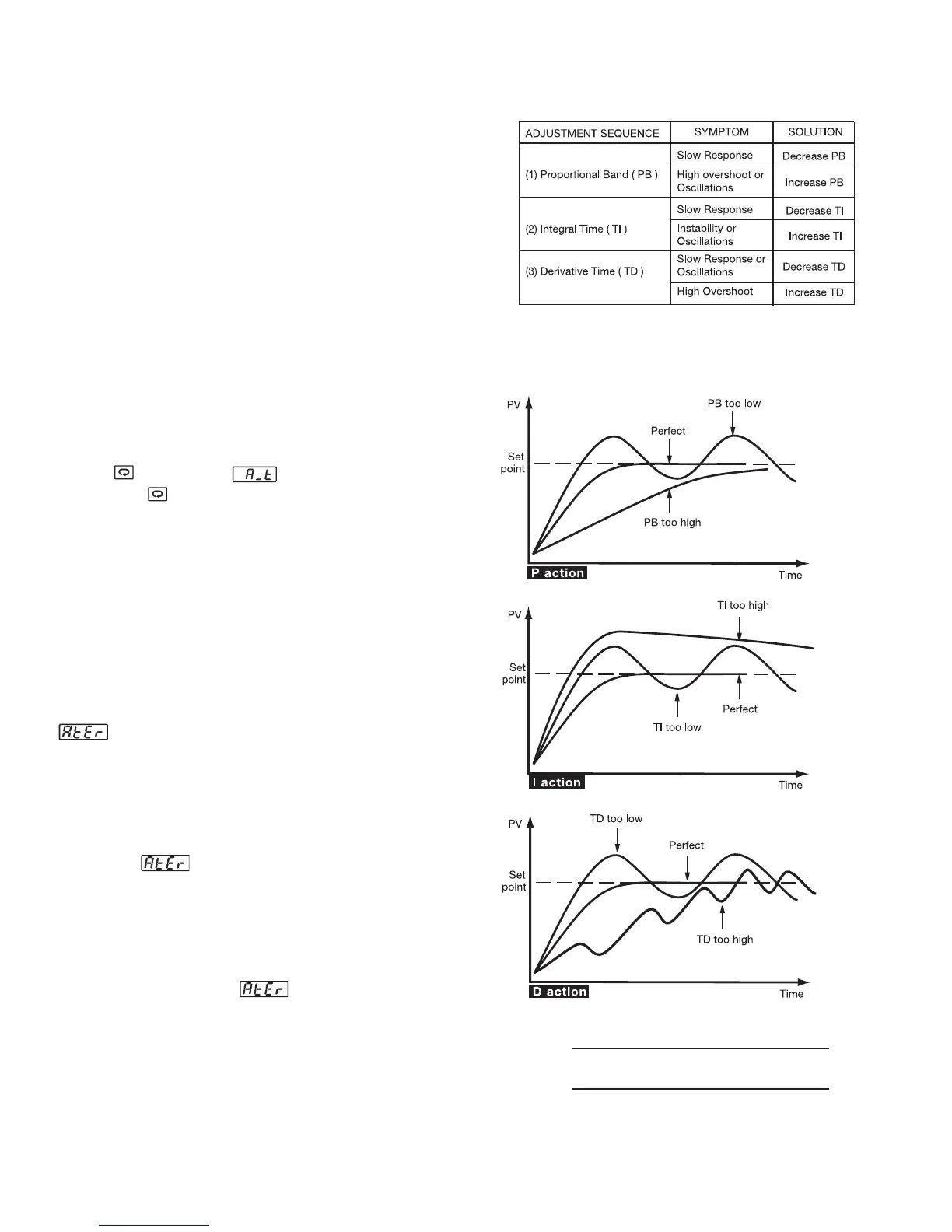
ment of PID values:
Figure 3.9 shows the effects of PID
adjustment on process response.
Figure 3.9 Effects of PID Adjustment
Table 3.2 PID Adjustment Guide


 To Next Page