Page 9
Remote Control (option)
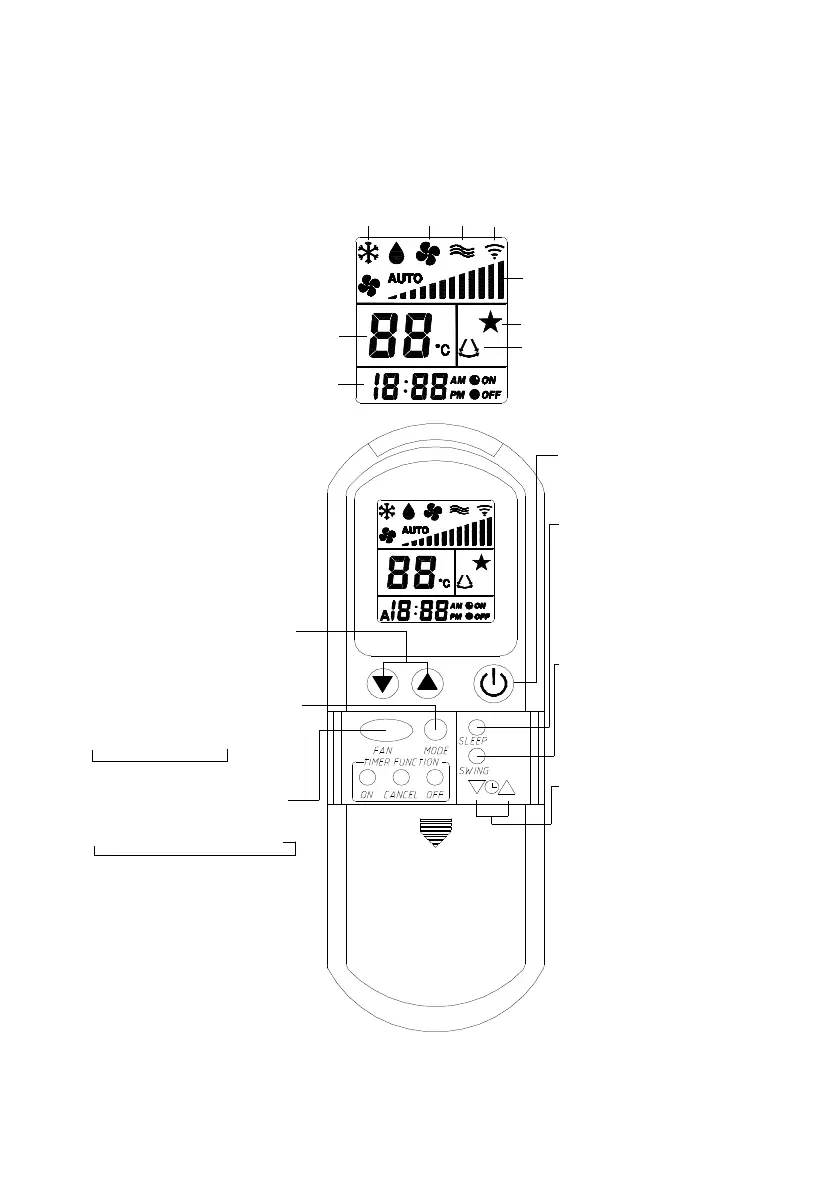
Operation
A beep will sound when the wall plaque receives a signal from the hand held infra
red remote control. The IR remote control must be pointed directly at the SAT-2 wall
thermostat plaque in order for its signal to be received.
Set Temperature
Clock
Swing
Sleep
Fan Speed
Signal
Heat
Fan
Cool
On/Off
Press to switch on or off
the air conditioner.
Sleep
Press to activate the energy
saving Sleep function which
automatically adjusts the
temperature to provide a
more confortable sleep, ie
for use in bedrooms.
Swing
Press to activate or deactivate
the air louver sweep function.
(NB This function is only
applicable to systems with
under ceiling indoor units).
Clock
Press down or up button
for
2 seconds to activate. The
current clock setting will
decrease or increase at 1
minute intervals on each
press.
The speed of interval
updating increases after 4
seconds of continuous key
press. It will update at high
speed after 6 seconds of
continuous key press.
Adjust Set Temperature
Press down or up button to
decrease or increase the desired
room temperature.
Note: A temperature can not be
set in Fan mode.
Fan
Press this button will advance
the fan speed as follows:
Auto
→
Low
→
Medium
→
High
Mode
Press this button will advance the
mode in the following sequence:
Cool
→
Fan
→
Heat
→
Auto
Under Fan mode, only low,
medium and high are available.



 To Next Page