EasyManua.ls Logo

Ten-Tec PARAGON - Page 15

Ten-Tec PARAGON
36 pages
Print Icon
To Next Page IconTo Next Page
To Previous Page IconTo Previous Page
Loading...
3-111
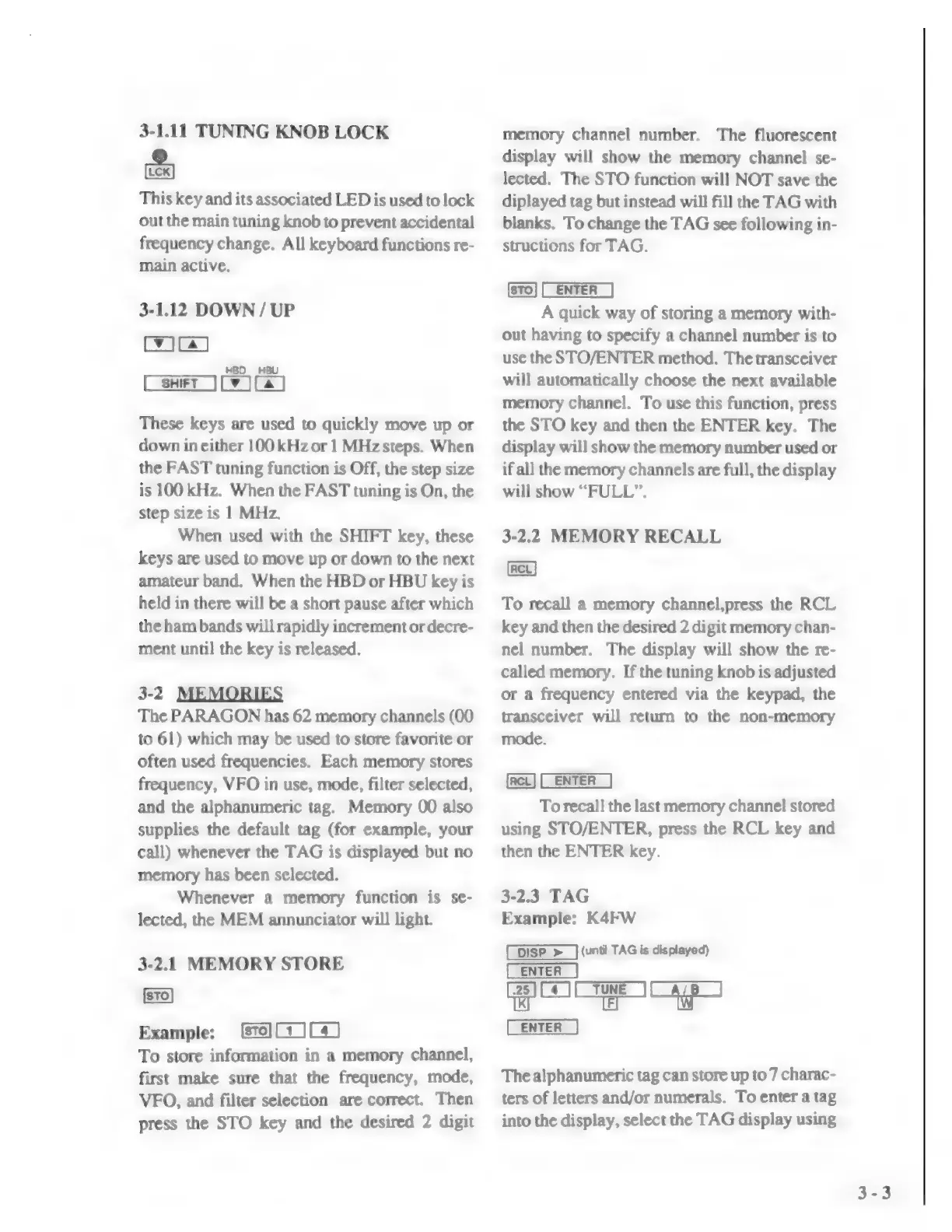
TUNING
KNOB
ОСК
This
key
and
its
associated
LED
is
used
to
lock
out
the
main
tuning
knob
to
prevent
accidental
frequency
change.
All
keyboard
functions
re-
main
active.
3-1.12
DOWN
/
UP
mo
Car
Cy
fa)
These
keys
are
used
to
quickly
move
up
or
down
in
either
100
kHz
or
1
MHz
steps.
When
the
FAST
tuning
function
is
Off,
the
step
size
is
100
kHz.
When
the
FAST
tuning
is
On,
the
step
size
is
1
MHz.
When
used
with
the
SHIFT
key,
these
keys
are
used
to
move
up
or
down
to
the
next
amateur
band.
When
the
HBD
or
HBU
key
is
held
in
there
will
be
a
short
pause
after
which
the
ham
bands
will
rapidly
increment
or
decre-
ment
until
the
key
is
released.
3-2
MEMORIES
The
PARAGON
has
62
memory
channels
(00
to
61)
which
may
be
used
to
store
favorite
or
often
used
frequencies.
Each
memory
stores
frequency,
VFO
in
use,
mode,
filter
selected,
and
the
alphanumeric
tag.
Memory
00
also
supplies
the
default
tag
(for
example,
your
call)
whenever
the
TAG
is
displayed
but
no
memory
has
been
selected.
Whenever
a
memory
function
is
se-
lected,
the
MEM
annunciator
will
light.
3-2.1
MEMORY
STORE
Example:
OIC)
To
store
information
in
a
memory
channel,
first
make
sure
that
the
frequency,
mode,
VFO,
and
filter
selection
are
correct.
Then
press
the
STO
key
and
the
desired
2
digit
memory
channel
number.
The
fluorescent
display
will
show
the
memory
channel
se-
lected.
The
STO
function
will
NOT
save
the
diplayed
tag
but
instead
will
fill
the
TAG
with
blanks.
To
change
the
TAG
see
following
in-
structions
for
TAG.
(CENTER)
A
quick
way
of
storing
a
memory
with-
out
having
to
specify
a
channel
number
is
to
use
the
STO/ENTER
method.
The
transceiver
will
automatically
choose
the
next
available
memory
channel.
To
use
this
function,
press
the
STO
key
and
then
the
ENTER
key.
The
display
will
show
the
memory
number
used
or
if
all
the
memory
channels
are
full,
the
display
will
show
“FULL”,
3-2.2
MEMORY
RECALL
(Ret)
To
recall
а
memory
channel,press
the
RCL
key
and
then
the
desired
2
digit
memory
chan-
nel
number.
The
display
will
show
the
re-
called
memory.
If
the
tuning
knob
is
adjusted
or
a
frequency
entered
via
the
keypad,
the
transceiver
will
return
to
the
non-memory
mode.
To
recall
the
last
memory
channel
stored
using
STO/ENTER,
press
the
RCL
key
and
then
the
ENTER
key.
3-2.3
TAG
Example:
KAFW
(until
TAG
is
displayed)
ша
жата
The
alphanumeric
tag
can
store
up
to
7
charac-
ters
of
letters
and/or
numerals.
To
enter
a
tag
into
the
display,
select
the
TAG
display
using

Related product manuals