Need help?
Do you have a question about the Tenda A21 and is the answer not in the manual?
Improves network signal strength and extends coverage up to 3000 sq.ft for about 30 devices.
Offers dual-band concurrent rate up to 2033 Mbps for enhanced audio-visual and gaming experiences.
Achieves a concurrent rate of 2034 Mbps, 1.2 times faster than AC1750.
Provides a 5GHz rate 1/3 higher than 3x3 MU-MIMO devices for better multi-client performance.
Connects the extender to the router by pressing WPS buttons within 2 minutes.
Helps find the best location for Wi-Fi coverage via color-coded LED indicators.
Allows connecting wired devices like smart TVs, game consoles, or PCs to the internet via Ethernet.
Converts a wired internet connection into a dual-band wireless signal using the Ethernet port.
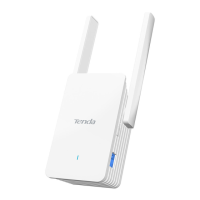
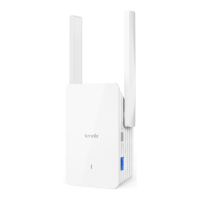
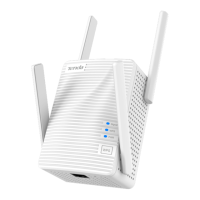
Details the RJ45 interface and four external 3dBi omni-directional antennas.
Lists WPS and Reset buttons, along with Signal, WPS, and Power LED indicators.
Specifies 12V1A power supply, 11W max consumption, and device dimensions.
Lists supported IEEE standards and operational frequencies (5GHz/2.4GHz).
Provides maximum data rates and signal strength (RSSI) values for different standards.
Details transmit power (<20dBm) and supported wireless modes (Repeater, AP).
Specifies default encryption modes (WPA/WPA2-PSK) and WPA algorithm (TKIP).
Lists product certifications (CE, FCC, RoHS) and available plug types (US, EU, UK).
Details included items and available system management tools.
Specifies operating/storage environment conditions and lists related products.
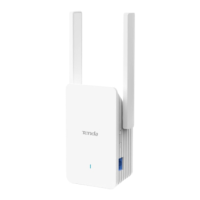
The Tenda A21 AC2100 Dual Band Wi-Fi Range Extender is a robust and versatile networking device designed to enhance wireless signal coverage and performance in large-sized homes. Its primary function is to extend an existing Wi-Fi network, eliminating dead zones and providing a stable, high-speed internet connection throughout your living space. Beyond simple signal extension, the A21 also offers an external Gigabit Ethernet port, allowing for reliable wired connections to various devices, and features a built-in Access Point mode for converting wired internet into a dual-band wireless signal.
The core function of the A21 is to act as a Wi-Fi range extender, boosting the reach and strength of your current wireless network. It operates on a dual-band system, supporting both 2.4GHz and 5GHz frequencies. The 5GHz band offers a wireless rate of up to 1734Mbps, while the 2.4GHz band provides up to 300Mbps. This dual-band capability ensures that you can utilize the faster 5GHz band for demanding activities like high-definition online video streaming, live broadcasting, and large-scale 3D gaming, while the 2.4GHz band handles general internet browsing and smart home devices.
Equipped with four external omnidirectional antennas and 4x4 MU-MIMO technology, the A21 is engineered for superior signal penetration and coverage. This advanced antenna configuration, combined with MU-MIMO (Multi-User, Multiple-Input, Multiple-Output) technology, allows the extender to communicate with multiple devices simultaneously, significantly improving efficiency and reducing latency, especially in environments with many connected clients. This makes it a more powerful solution compared to older AC1750 and AC1900 products that typically use 3x3 MU-MIMO technology.
Another key function of the A21 is its ability to serve as an entertainment adapter. With its external Gigabit Ethernet port, the extender can provide a wired network connection to devices that lack Wi-Fi capabilities or benefit from a more stable connection. This is particularly useful for devices such as set-top boxes, smart TVs, gaming consoles like PS4, and PCs, ensuring a reliable and faster network experience for your entertainment and productivity needs.
Furthermore, the A21 incorporates a built-in Access Point (AP) mode. This function allows you to convert a wired internet connection into a dual-band wireless signal. By simply plugging a networked Ethernet cable into the A21's Ethernet port, you can create a new Wi-Fi hotspot, which is ideal for situations where you have a wired internet source but need to provide wireless access to devices. This adds a layer of flexibility, making the A21 suitable for various networking scenarios beyond just extending an existing Wi-Fi signal.
The A21 is designed with user convenience in mind, offering several features that simplify setup and optimize performance.
One-Touch Connection for Easy Setup: Setting up the A21 is straightforward thanks to its WPS (Wi-Fi Protected Setup) button. Users can establish a secure connection with their router by simply pressing the WPS button on the router and then pressing the WPS button on the extender within a two-minute window. This eliminates the need for complex manual configuration, making it accessible even for users with limited technical knowledge.
Intelligent LED Indicator: To help users find the optimal placement for the extender, the A21 features an intelligent LED indicator. After the bridging process is complete, this LED provides visual feedback on the signal strength and connection quality. A blue light indicates a good connection, suggesting that the extender is in an ideal location for Wi-Fi coverage. A red light, on the other hand, signals that the extender is too far from the router, prompting the user to reposition it closer to improve signal extension quality. This intuitive feedback system ensures that users can maximize the extender's performance by placing it strategically.
Blazing-Fast Dual Band Wi-Fi Extension: Compliant with IEEE 802.11ac Wave2 standards, the A21 delivers a dual-band concurrent rate of up to 2033 Mbps (300Mbps on 2.4GHz and 1734Mbps on 5GHz). This high-speed capability ensures a smooth and uninterrupted experience for bandwidth-intensive activities, enhancing your audio-visual entertainment and gaming networking experience. The faster speed, combined with the wider coverage, means less buffering and more seamless online interactions.
Faster and Reliable Performance: The AC2100 dual-band concurrent rate of 2034 Mbps is approximately 1.2 times faster than that of AC1750 extenders. This significant speed advantage translates into a more responsive and reliable network, particularly when multiple devices are connected and actively using the internet.
4x4 MU-MIMO Technology for Faster Transmission: The integration of 4x4 MU-MIMO technology is a significant usage feature. It allows the A21 to offer a 5GHz transmission rate that is one-third higher than that of AC1750 and AC1900 devices, which typically use 3x3 MU-MIMO technology. This means that even with multiple connected clients, you can enjoy higher transmission rates, as the extender can efficiently serve several devices simultaneously without a significant drop in performance for individual connections. It's important to note that to fully leverage MU-MIMO, your existing access points (APs) should also support this technology.
Extensive Coverage: The A21 is designed to extend wireless network coverage to approximately 3000 square feet, supporting up to 30 devices. This makes it an excellent solution for large homes or offices where comprehensive Wi-Fi coverage is essential. The four high-gain external antennas play a crucial role in achieving this wide coverage and improving existing network signal strength.
While the A21 is largely a "set it and forget it" device, it does include several system tools that allow for basic maintenance and management. These features are typically accessed through a web-based interface, providing users with control over their network settings.
Firmware Upgrade: The ability to upgrade firmware is a critical maintenance feature. Firmware updates often include bug fixes, security patches, and performance enhancements, ensuring that the device operates optimally and remains secure against potential vulnerabilities. Regular firmware upgrades can extend the lifespan and improve the reliability of the extender.
Restore Factory Settings: In cases where configuration issues arise or if a user wishes to reset all settings to their default state, the "Restore factory settings" option is invaluable. This feature can help troubleshoot network problems by eliminating any custom configurations that might be causing conflicts, or it can be used when preparing the device for a new setup or transfer of ownership.
Login Password Management: For security purposes, the A21 allows users to manage the login password for its administrative interface. This ensures that only authorized individuals can access and modify the extender's settings, protecting the network from unauthorized changes.
Reboot Function: A simple reboot function is also available. Rebooting the device can often resolve minor connectivity issues or refresh network parameters without requiring a full power cycle. This is a quick and easy troubleshooting step that can be performed remotely if necessary.
Wireless Security: The A21 supports robust wireless security protocols, including a default encryption mode of Mix WPA-PSK/WPA2-PSK with TKIP algorithm. These security features are essential for protecting your wireless network from unauthorized access and ensuring the privacy of your data. While not a "maintenance" feature in the traditional sense, maintaining strong security settings is a crucial aspect of network upkeep.
In summary, the Tenda A21 AC2100 Dual Band Wi-Fi Range Extender is a powerful and user-friendly device that not only extends Wi-Fi coverage but also enhances network performance through advanced technologies like 4x4 MU-MIMO. Its ease of setup, intelligent indicators, and versatile operational modes (extender and AP) make it a flexible solution for various networking needs, while its maintenance features ensure long-term reliability and security.
 General
| Antenna type | Omni-directional |
|---|---|
| Output power | - mW |
| Bidirectional | No |
| Connector type | - |
| LED indicators | Activity, Power, WPS |
| Frequency range | 2412 - 5250 MHz |
| Networking standards | IEEE 802.11a, IEEE 802.11ac, IEEE 802.11b, IEEE 802.11g, IEEE 802.11n |
| WLAN data transfer rates supported | 300, 1734 Mbit/s |
| Power consumption (typical) | 11 W |
| Operating temperature (T-T) | 0 - 40 °C |
| Operating relative humidity (H-H) | 10 - 90 % |
| Quick installation guide | Yes |
 Weight and Dimensions
| Depth | 109 mm |
|---|---|
| Width | 78 mm |
| Height | 56.2 mm |

 To Next Page