Need help?
Do you have a question about the Tenda TEL9901G and is the answer not in the manual?
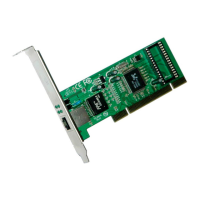
The Tenda TEL9901G is a 10/100/1000Mbps PCI LAN Adapter designed to provide high-speed network connectivity for desktop computers. This adapter is a versatile solution for upgrading or adding network capabilities to a PC, enabling it to connect to modern Gigabit Ethernet networks. Its primary function is to facilitate data transfer between a computer and a local area network (LAN) at various speeds, ensuring compatibility with different network infrastructures.
One of the key functions of the TEL9901G is its auto-negotiation capability. This feature allows the adapter to automatically detect and adjust to the optimal transfer rate (10Mbps, 100Mbps, or 1000Mbps) of the networking device it's connected to. This eliminates the need for manual configuration of speed settings, making installation and use straightforward. Furthermore, it supports both full and half-duplex modes, which means it can efficiently handle data transmission in both directions simultaneously (full-duplex) or one direction at a time (half-duplex), depending on the network's capabilities and configuration. This adaptability ensures efficient data flow and compatibility with a wide range of network equipment.
The TEL9901G is designed to be fully compliant with PCI2.2 standards, ensuring broad compatibility with most desktop computer motherboards that feature a PCI expansion slot. This compliance also includes support for ACPI (Advanced Configuration and Power Interface) power management, which allows the operating system to manage the power consumption of the adapter. This feature contributes to energy efficiency and helps in optimizing the overall power usage of the computer system.
A notable feature of this LAN adapter is its support for BootROM and RPL/PXE. BootROM functionality enables the computer to boot from the network, which is particularly useful in diskless workstations or for network-based operating system installations and diagnostics. This capability enhances the flexibility and manageability of systems equipped with the TEL9901G, especially in corporate or educational environments where centralized network booting is common.
The TEL9901G incorporates several advanced networking protocols to ensure robust and efficient performance. It supports IEEE802.3x full-duplex flow control, which helps prevent data loss during periods of high network traffic by regulating the data flow between the adapter and the network switch. This ensures reliable data transmission, even under demanding network conditions. Additionally, it supports IEEE802.1p priority tagging, which allows network administrators to prioritize certain types of network traffic, such as voice or video, to ensure a smoother and more responsive user experience for critical applications.
Another significant usage feature is the auto MDI/MDI-X support. This eliminates the need for special crossover cables when connecting the adapter directly to another network device (like another computer or a hub/switch without auto MDI/MDI-X), as the adapter can automatically detect and correct for cable type. This simplifies network setup and reduces potential connection issues. The Plug-and-Play design further enhances ease of use, allowing the operating system to automatically detect and configure the adapter upon installation, minimizing manual setup requirements.
The adapter is also compliant with IEEE802.1Q standard, which enables support for Tag VLANs (Virtual Local Area Networks). VLANs are used to segment a network into smaller, isolated broadcast domains, improving network security and performance. With Tag VLAN support, the TEL9901G can be integrated into complex network architectures that utilize VLANs, making it suitable for business and enterprise environments.
For high-performance applications, the TEL9901G supports the transmitting and receiving of Gigabit Jumbo Frames. Jumbo Frames are Ethernet frames larger than the standard 1500-byte size, typically up to 9000 bytes. Using Jumbo Frames can significantly reduce CPU utilization and increase network throughput for large data transfers, which is beneficial for tasks like file sharing, backup operations, and streaming high-definition media over a Gigabit network. This feature contributes to achieving a theoretical throughput of up to 2000Mbps in full-duplex Gigabit mode.
In terms of internal design, the TEL9901G features an integrated big capacity independent transferring/receiving FIFO (First-In, First-Out) buffering area. This buffering mechanism helps manage data flow efficiently, ensuring smooth and uninterrupted data transfer even during peak network activity. The adoption of a high-integration and high-performance single chipset solution contributes to the adapter's reliability and compact design, while also optimizing power consumption and reducing manufacturing complexity.
From a maintenance perspective, the TEL9901G is designed for broad operating system compatibility, which simplifies driver installation and ongoing support. It supports a wide array of operating systems, including various versions of Windows (Windows 98, ME, 2000, NT, XP), Linux (2.2X/2.4X/2.6X), MAC OS, and Free BSD. This extensive driver support ensures that the adapter can be used with many different computer systems, reducing potential compatibility issues and making it easier for users to find the necessary drivers. The provided CD driver and user's manual further assist in the initial setup and troubleshooting process.
The LED indicators on the adapter provide immediate visual feedback on its operational status, which is a useful maintenance feature. The "FDX" LED indicates if the adapter is working in full-duplex mode. Separate "10", "100", and "1000" LEDs indicate the current link speed (10Mbps, 100Mbps, or 1000Mbps, respectively) and also serve as Link/Act indicators. When a Link/Act LED is ON, it signifies a successful network connection at the corresponding transfer rate. When it is blinking, it indicates that the adapter is actively transmitting or receiving data. These indicators allow users to quickly assess the network connection status and diagnose basic connectivity issues without needing to access software tools.
The installation process is straightforward, involving physically inserting the card into an available PCI slot and then installing the appropriate drivers. The step-by-step instructions provided in the manual guide users through shutting down the computer, opening the chassis, seating the card firmly, securing it with a bracket screw, and finally connecting the network cable. The driver installation process is also user-friendly, typically involving running an executable from the provided CD or downloading drivers from the manufacturer's website. The software guides users through selecting the device, language, and installation directory, concluding with a confirmation of successful installation. This ease of installation and clear status indicators contribute to simplified maintenance and troubleshooting for the end-user.
 General
| Model | TEL9901G |
|---|---|
| Category | Adapter |
| Wavelength | 1310nm |
| Transmission Distance | Up to 20km |
| Operating Temperature | 0°C to 40°C |
| Storage Temperature | -40°C to 70°C |
| Operating Humidity | 10% to 90% (non-condensing) |

 To Next Page