6
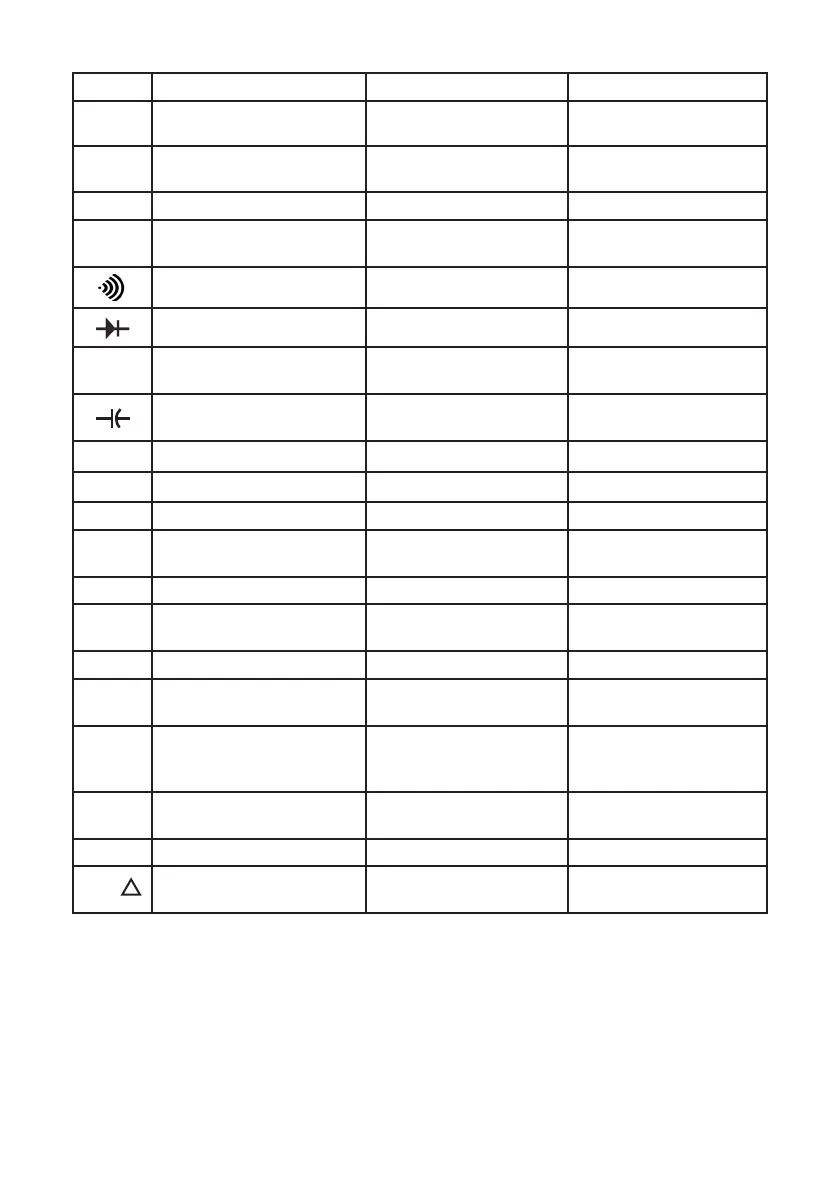
Function Primary Display Right Secondary Display Left Secondary Display
DCV The tested DC voltage value No display Full range: 4, 40, 400, 1000
ACV
The tested AC voltage value
The tested frequency value:
40.00Hz~ 250.0kHz
Full range: 4, 40, 400, 1000
DCmV
The tested DCmV value No display
Full range: 400
Ω
The tested resistance value No display
Full range: 400, 4, 40,
400, 4, 40
The tested resistance value No display
Full range value: 400
The tested resistance value No display
Full range: 4
Hz
The tested frequency value No display
Full range: 40, 400, 4, 40,
400, 4, 40, 400
The tested capacitance value No display
Full range: 40, 400, 4, 40,
400, 4, 40
o
C
The tested
o
C value
No display
1000
o
F
The tested
o
F value
No display
1832
DC
μA
The tested DC
μA No display
Full range: 400, 4000
AC
μA
The tested AC
μA
The tested frequency value:
40.00Hz~100.00kHz
Full range: 400, 4000
DCmA The tested DCmA value
No display
Full range: 40, 400
ACmA The tested ACmA value
The tested frequency value:
40.00Hz~100.00kHz
Full range: 400, 4000
DCA The tested DC current value No display Full range: 10
ACA The tested AC current value
The tested frequency value:
40.00Hz~100.00kHz
Full range: 10
STO
The current measurement
reading
The value of the
corresponding index
number
Index number increase one.
Index number:
no.0001~no.0100
RCL The recalled value
The total number of the
stored value
Index number
no.0001~no.0100
MAXMIN Send
The present measurement
value minus the stored value
The stored value
The present measurement
value
REL
Selecting the Range
• Press RANGE to select either a xed range or the auto range feature.
• Auto ranging (AUTO lit in the display) always comes on initially when you select
a new function. In auto range, the meter selects the lowest input range possible,
ensuring that the reading appears with the highest available resolution.
• If AUTO is already on, press RANGE to enter MANUAL ranging in the present
range. You can then select the next manual range each time you press RANGE.
• Return to auto ranging by press EXIT.
Note: There is no MANUAL ranging on REL feature.


 To Next Page