ACM Series Instrument www.tensitron.com pg. 7
2. Determine the correct riser for your cable by referring to the Calibration Chart
on the back of the meter. (See also Riser Usage Chart in Appendix 1)
3. Rotate the riser so the correct setting faces the front (dial side) of the meter
and clicks into place.
Example: Selecting Riser
Assuming your cable diameter is 1/8”:
If the meter is an ACM-100, rotate the riser so the number 1/8 faces front
If the meter is an ACM-200, rotate the riser so the number 2 faces front
If the meter is an ACM-300, rotate the riser so the number 2 faces front
If the meter is an ACM-400, rotate the riser so the number 2 faces front
If the meter is an ACM-600, rotate the riser so the letter A faces front
Engaging Instrument onto Cable
Warning:
Do not force the engagement lever or
exceed the maximum tension range of the instrument
or you will damage your meter!
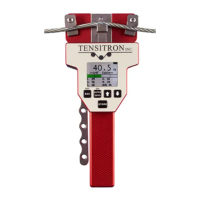
1. To engage the instrument on the cable, first rotate the engagement lever away
from the instrument, raising the outer cable contacts. Next position your cable
so it rests on top of the (center) riser and beneath the outer cable contacts.
(See Figure 4)
2. Once the cable is in place, squeeze the engagement lever shut until it locks
into position parallel with the instrument handle. (See Figure 5) Note: Do NOT
try to force the lever closed, or damage may occur. If the lever does not close


 To Next Page
 Loading...