5
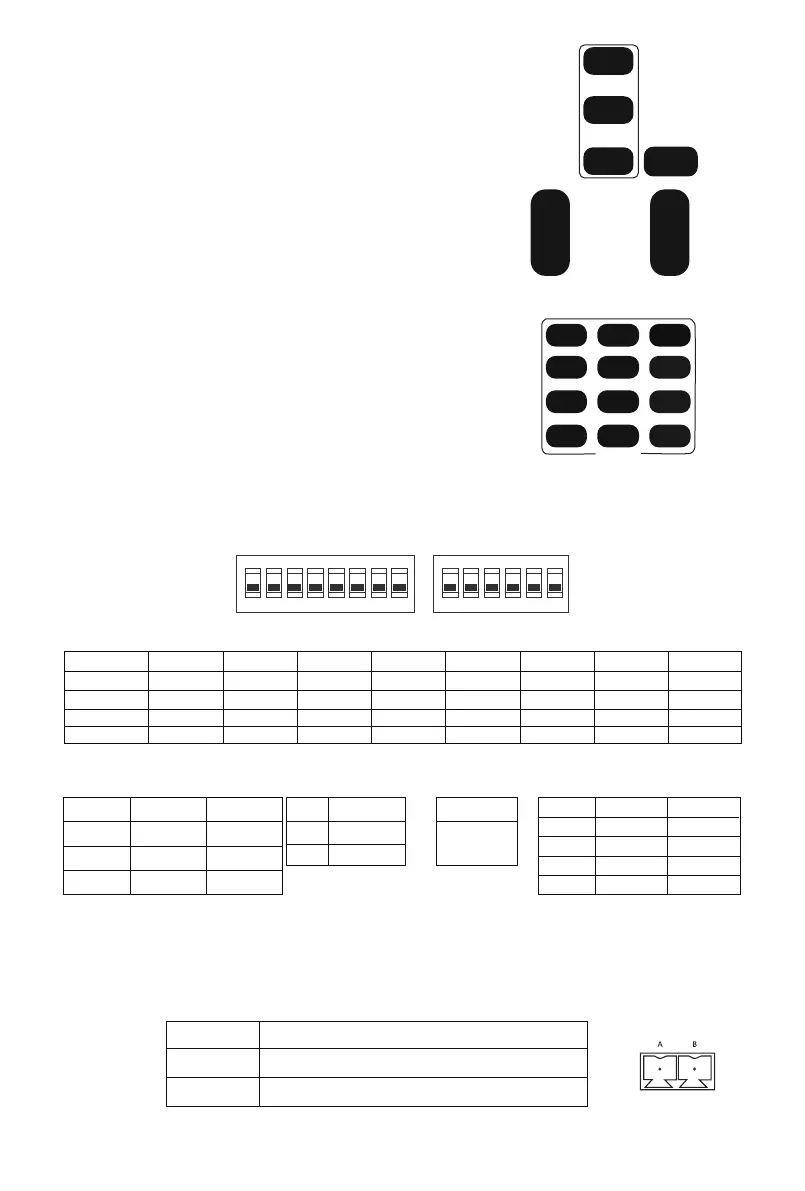
(3)Camera Focusing Mode Control
(4)Camera Zoom Control
(5)Preset Setup,Call,Cancel
【AUTO】Switch the focus mode to AUTO
【MANUAL】Switch the focus mode to MANUAL
【FAR】Far focus manually
【NEAR】Near focus manually
FAR
NEAR
MANUAL
FOCUS
AUTO
FOCUS
Press any one of the 4 【ZOOM】 to make the zoom functioning.
These 4 keys are not applicable for fixed focus camera.
(1) Reserve Preset: Press 【PRESET】then press one of the number (1-9) to
reserve a preset that correspond to the NUMBER.
★Note: you can setup 9 presets at most by the remote control.
(2) Call Preset: Press the NUMBER (1-9)directly to call the reserved preset.
★Note: It won’t work if there’s no preset reserved in the corresponded number.
(3) Remove Preset: Press 【RESET】, then press one of the
number (1-9) to remove a preset that correspond to the
NUMBER.
1 2 3
4 5 6
7 8 9
PRESET
0
RESET
STD REV
POSITION
ZOOM
SLOW
+
-
ZOOM
FAST
+
-
(1)RS-485 Interface Distribution
PS: RS-485 and RS-232 Pins distribution
2.Dial-up
3.Control Interface
(1)Dial-up ON/OFF set
(2)Address Set
Protocol set Baud rate set COM IR IR Add
★Note:not applicable for fixed focus model.
PIN NUM
A
B
FUNCTION
DTR IN+(connect to RS-485)
DSR IN-(connect to RS-485)
1 2 3 4 5
ON DIP
SW1
6 7
DIP
8 1 2 3 4 5
ON DIP
SW2
6
PTZ Add.
1 ON
ON ON ON ON ON ON ON ON
OFF
OFF OFF
OFF
OFF
OFF
OFF
OFF
OFF
OFF
OFF
OFF
OFF
OFFON
SW1 DIP-1 SW1 DIP-2 SW1 DIP-3 SW1 DIP-4 SW1 DIP-5 SW1 DIP-6 SW1 DIP-7 SW1 DIP-8
2
255
....
SW2 DIP-4
Baud
9600
SW2 DIP-3
OFF
38400 ON
Protocol
VISCA OFF
OFF ON
ON OFF
OFF
PELCO-D
PELCO-P
SW2 DIP-1 SW2 DIP-2
IR Add.
SW2 DIP-5 SW2 DIP-6
All
OFF OFF
1
OFF ON
2
ON OFF
3
ON ON
RESERVE


 To Next Page