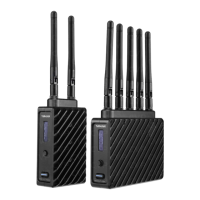
The Teradek Ace 500 is a wireless video transmission system designed for professional use, offering a reliable and convenient solution for sending high-quality video signals from a camera to a monitor without the need for cumbersome cables. This kit includes both a transmitter (TX) and a receiver (RX), allowing for a complete wireless workflow.
Function Description:
The core function of the Ace 500 is to wirelessly transmit video signals. The transmitter connects to a video source, such as a camera, via an HDMI input, while the receiver connects to a monitor or other display device via an HDMI output. This setup enables real-time monitoring of video feeds from a distance, providing flexibility on set or during productions where mobility is crucial. The system operates by scanning for and selecting the best available wireless channel, ensuring a stable and clear connection. It is designed to work within the 5GHz spectrum, and users can configure the device to comply with regional regulations for this frequency band.
Usage Features:
The Ace 500 is designed for ease of use with several features that enhance its operational capabilities.
- Connectivity: The transmitter features an HDMI input (D) for connecting to your video source and a 7-17V DC input (E) for power. It also includes a Mini USB port (G) for potential firmware updates or configuration. The receiver mirrors these connections with an HDMI output (H) for your monitor and a 7-17V DC input (E) for power.
- Powering the Devices: The transmitter can be powered from a compatible battery using the included P-Tap to barrel cable. The receiver can be powered using the included A/C adapter or, if equipped with a battery plate accessory, by a compatible battery such as Sony L-series or LP-E6.
- Quick Setup: For optimal performance, it is recommended to keep the transmitter and receiver at close range for approximately 60 seconds after powering them on. This allows the devices to scan for and automatically select the most suitable wireless channel, minimizing interference and ensuring a strong link.
- Multi-System Operation: When using multiple Ace systems in the same area, it's advisable to place the transmitters and receivers a few feet apart from each other to prevent potential interference and ensure each system operates independently and efficiently.
- Interference Management: The Ace 500 is a wireless device, and as such, its operation can be affected by other wireless equipment. To mitigate this, users should try to separate other wireless transmitters and receivers from the Ace 500 system as much as possible.
- On-Screen Display (OSD): The receiver features an intuitive OSD that provides critical information and allows for configuration. By depressing the Menu joystick button (I), users can activate the OSD and cycle through various status screens.
- Main Status Screen: Displays the wireless receiver's status, including current video resolution, frequency, and link quality (if connected).
- Temperature Status Screen: Shows the internal temperature of the unit, which can be important for monitoring performance during extended use.
- Menu Navigation: The menu can be launched by pressing right on the joystick when the OSD is active, and exited by pressing left.
- Test Pattern: Allows users to select a video output format to display a test pattern over SDI, useful for troubleshooting or setting up monitors.
- Pairing: This feature enables linking the receiver with another transmitter. To initiate pairing, activate it on the receiver, then turn on the transmitter and hold the reset button (F) with a paper clip for one second before releasing. The red warning LED and link LEDs will blink to indicate active pairing.
- OSD Settings: Users can customize when the OSD is displayed. Options include displaying it when the link is down (default), hiding it until activated by the joystick, or always showing it unless manually deactivated.
- Reset All Settings: This option allows users to revert all configurable options to their factory defaults, providing a clean slate for troubleshooting or reconfiguring the device.
- Device Info: Displays the model and serial number of the unit.
- Mounting: The Ace 500 units are equipped with a 1/4"-20 threaded hole on the bottom, allowing them to be mounted on light stand adapters or other mounting accessories. For optimal wireless performance, it is recommended to mount the transmitter vertically, ensuring its antennas are clear of obstructions and have a clear line-of-sight to the receiver.
Maintenance Features:
While the Ace 500 is designed for robust performance, certain aspects contribute to its longevity and proper functioning.
- Power Cable Polarity: When using custom or third-party power cables, it is crucial to test the power cable polarity with ONLY the power cable connected to the Ace unit. Incorrect polarity or improperly constructed power cables can cause damage to the product and will void the warranty.
- Cable Integrity: Always check power cables for shorts and proper grounding to prevent electrical issues and ensure safe operation.
- Avoid Video Cable Connection during Power Test: Do not connect video cables when testing power cables to isolate potential issues and ensure safety.
- Mounting Caution: When mounting the transmitter, avoid overtightening screws inserted into the 1/4"-20 threaded hole. Excessive force can damage the transmitter's chassis and internal components, which would void the warranty.
- Firmware Updates: Teradek regularly releases new firmware versions to improve performance, add new features, and address vulnerabilities. Users are encouraged to visit teradek.com/pages/downloads to access the latest firmware and software updates, ensuring their Ace 500 system remains up-to-date and performs optimally.
- Support Resources: For tips, information, or to submit a request for support, users can visit support.teradek.com. This resource provides valuable assistance for troubleshooting and maximizing the use of the Ace 500.
- Bolt Manager Software: The Bolt Manager software, available for Mac and Windows at teradek.com/pages/downloads, allows users to configure, pair, and upgrade their Ace system. This software provides advanced control over settings such as:
- Select Region: Configures the Ace 500 to comply with regional regulations for 5GHz spectrum use.
- Select TX Name (Transmitter Only): Allows users to modify the transmitter's name, making it easier to identify among multiple systems in use.

 Need help?
 General

 To Next Page