2
2
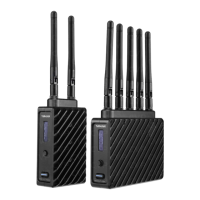
Connect the output from your video source to the HDMI input (D) on the Ace transmitter. Connect
the HDMI output (H) from the Ace receiver to the video input on your monitor.
1
POWER AND CONNECT
Connect power to the Ace transmitter from a compatible battery using the included P-Tap to barrel
cable. Power the Ace receiver with the included A/C adapter, or if Ace is equipped with a battery plate
accessory, connect a compatible battery (Sony L-series or LP-E6).
DEVICE OPERATION
• Keep the transmitter and receiver at close range for 60 seconds after powering on the devices. This
allows them to scan for and select the best wireless channel.
• For best results when using multiple Ace systems in the same area, place the transmitters and
receivers a few feet apart from each other.
• Operation of other wireless equipment may interfere with Ace. Try to separate other wireless
transmitters and receivers as much as possible.


 To Next Page