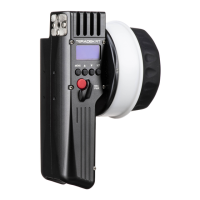
Press the REC button on the controller (C) to start/stop recording on the camera.
2
NOTE: If using a RED camera, the camera serial communication setting must be set to RCP
(Redlink Command Protocol) for the unit to operate.
Connect a camera cable from the CAM/Control port on the Latitude to the camera, then
navigate to MENU>CAMERA on the CTRL.1 to indicate which camera you have connected.
1
CAMERA RUN/STOP
4
The Lens Mapping Package can be purchased with the CTRL.1, or as a seperate upgrade. After
purchasing the Lens Mapping Package, use the following steps to activate it.
LENS MAPPING
To generate a license key, enter the controller’s UID, the upgrade code, and your email address
on activate.teradek.com.
2
3
Navigate to the LICENSES menu. Press SET to display the UID number.
Press the MENU button, then use the ▼ button to navigate to the ADV (Advanced) menu. Press
the SET button to access the menu.
1
On the same screen displaying the UID number, select YES to enter the license key.
4


 To Next Page