• OFF - Unit is powered o
• YELLOW - No wireless connection
• RED - Camera is recording
• ORANGE - PC/Bootloader mode
• WHITE - Checking RF module status
• GREEN - Wireless is synched
• BLUE - Wired-mode connection.
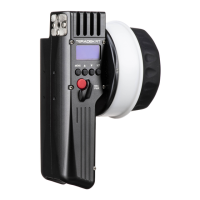
Controller Status LED
The controller status LED indicates when the system is ON and provides the system’s current status
during operation.
5
Press the MENU button, then use the ▲, ▼ and SET button to navigate through the dierent
menu options.
• POWER OFF - Power OFF the controller
• LENS - Congure lens mapping function
• MOTORS - Congure the attached motor(s)
• INPUTS - Congure the controller’s knob
• WIRELESS - Congure the wireless settings
• CAMERA - Select the make of the camera
• LIMIT - Congure the knob’s range
• SCREEN - Change display settings
• BUTTONS - Assign functions to the buttons
• RX CONFIG - Congure auxiliary controllers,
such as a thumbwheel or zoom rocker
• ADV - Contains device info menu, licenses,
and advanced functions for debugging
CONTROLLER MENU OPERATION


 To Next Page