20 21
Housing with filter where the chilled water
can pass through to cool and moisten the air
passing through. Do not open the filter hous-
ing during operation, otherwise water will
leak out onto the surface below the air cooler.
Always close the air cooler and wait 5 min-
utes before opening the hatch if you’ve used
the cooling function. It is important that the
filter is correctly mounted.
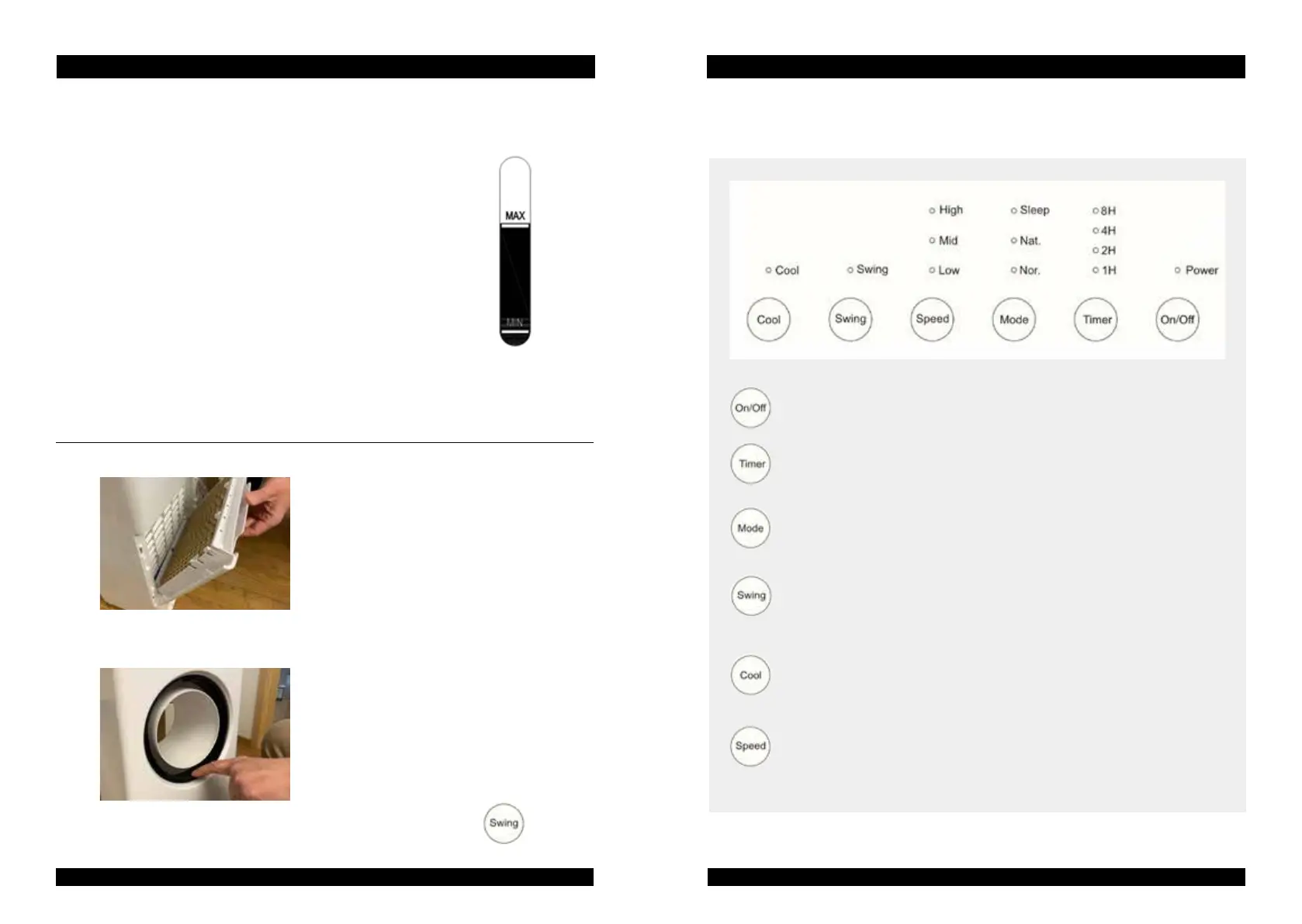
To regulate the wind flow UP/DOWN
around 30 degrees, manually push/pull on
the small lugs located on the inner ring on
both the upper and lower edges.
Left/Right regulation of wind flow by 30 de
-
grees can be done with the ‘Swing’ button
on the control panel.
REFILLING WITH WATER
Take the plug out of the socket, turn the dial so that you can pull out
the water container and pour in clean, cold tap water. The water level
is shown in the water level indicator on the front side of the device.
IMPORTANT: do not overfill with water and keep the level within the
indicators for minimum and maximum levels. Always push the con-
tainer back in after the water has been refilled so the water doesn’t
splash out and keep it in place with the dial.
Keep in mind that the water contained in an item can leak.
Therefore, place it on a surface that can withstand water.
You are responsible for not placing the product where
water can cause damage.
ON/OFF Button
Use to turn the air cooler ON and OFF.
TIMER Button
Press to st uo the countdown timer.Each press increases the countdown timer
by one hour up to 8 hours .
MODE Button
Press to choose from ordinary ,natural,or sleep mode . The indicator light will
turn on next to your selection .
SWING Button
Press to turn the oscillation function on and off.When in Swing mode ,the air will
cycle from side to side horizontally.Press again to turn off .
COOL Button
Press to turn on air humidification .Press again to turn off . Do not start the cool
air humidification function if the water level is lower than the minimum water
line as it may cause damage . NOTE! If the water tank is empty, the pump sounds.
SPEED Button
There are 3 fan speed setting (High/Middle/Low).Press to cycle though,until the
desired speed light is on .
CONTROL PANEL AND SETTINGS
GB INSTRUCTION MANUAL GB INSTRUCTION MANUAL


 To Next Page